Flutter: Impressions After One Week
For someone who loves chasing new technology, it is frankly indefensible that Flutter burned bright for more than a year and I never sampled it. My indifference to Flutter stemmed from ignorance of the Dart language it uses — I figured that if the market already had languages like TypeScript that could meet Flutter’s needs, why use Dart, a language on its last legs? But recently a friend showed me a personal project he’d built with Flutter, and it stunned me, so I started learning Flutter.
My path through Flutter differed somewhat from other languages. With Rust, for instance, I read the official docs while writing code, and the whole process was smooth. With Flutter — perhaps because I have no mobile development experience — reading the official docs always left me with that “beginner to quitter” feeling, so I went looking for video courses.
I first went through the Flutter Crash Course for Beginners 2020[1] on YouTube. Although the course runs nearly six hours, it’s aimed at people with little programming background, so most of it can be watched at 1.5x. Some of the very basic material — the Dart introduction, for instance — can be skipped entirely; reading “Learn Dart in Y minutes” yourself is enough for the course’s needs. The course introduces some very basic widgets, and following along I eventually completed a rather crude app.
Afterward I found a free course on Udacity called Build Native Mobile Apps with Flutter. This one goes deeper, taught by a Google engineer, and focuses on concepts — it tends to toss out a piece of knowledge and then immediately throw you into the deep end. It isn’t well suited to beginners, but the sheer volume of exercises makes it excellent for digesting and internalizing concepts. If you have some React experience, this course is a great way to master Flutter’s fundamentals. Because of the heavy volume of exercises, it takes roughly 8–12 hours in total.
With these two courses under my belt, plus reading part of the Flutter Gallery source and spending some time going deep on Dart, I have at least a basic understanding of Flutter. What follows are my personal reflections.
What’s Good About Flutter?
Unlike other cross-platform mobile solutions, Flutter is more like a game engine, and a Flutter app is a game wearing an ordinary app’s clothes. Pause for a moment and think about what that means. Yes — Flutter is built on top of Skia, a 2D graphics engine. Few people have heard of Skia; it’s a graphics engine company Google acquired in 2005, founded by Michael Reed. Amusingly, Google also acquired Android in 2005. Michael Reed is an extremely low-profile man — I tried to dig up more information about him and got nowhere; the guy can’t even be bothered to set up a LinkedIn page. The only news I could find about him comes from a 2017 techwire report, “Inside Google’s Chapel Hill outpost,” which mentions that he is still at Google, leading some forty-odd employees in Chapel Hill. Skia’s performance is outstanding, and under Google’s continuous polishing it gradually became the built-in graphics engine for Chrome and Android, laying a solid foundation for the success of both.
As we know, before Flutter, cross-platform mobile solutions followed two mainstream approaches:
-
Render UI through the DOM. This is the path of early PhoneGap and today’s Ionic. It lets developers write JavaScript and then package it into a mobile app. The mobile app itself is just a shell; all the logic still lives in JavaScript inside a WebView. Such apps cross platforms beautifully, and with a suitable UI library they can imitate native apps quite convincingly — but their Achilles’ heel is performance, rendering performance included.
-
Map JavaScript onto native UI and leverage native UI’s capabilities. This is the path taken by React Native / Weex. The rendering performance PhoneGap gets lambasted for prompted developers to ask: if DOM rendering is too inefficient, could we build suitable UI libraries so that JavaScript code maps one-to-one onto native UI, achieving rendering performance nearly identical to native apps? React Native tried this path, making the overall user experience almost indistinguishable from native apps and vastly surpassing DOM rendering. Its drawback, however, is that business logic and UI still communicate through a JS bridge, which still drags down performance somewhat. And if you have oddball UI requirements, you may still need to write matching native code.
Flutter Has Its Own Rendering Engine
Flutter took a completely different and highly imaginative road: rather than depending on an existing rendering engine, it controls the rendering of every pixel on the screen itself. That’s why I say Flutter is more like a game engine — every widget on the screen is actually drawn by Flutter itself, pixel by pixel, so any change means repainting the whole screen (Flutter optimizes the repainting process, of course). That’s why Flutter claims 60 fps rendering — enough to run games smoothly. With that concept in mind, the diagram below becomes much easier to understand:
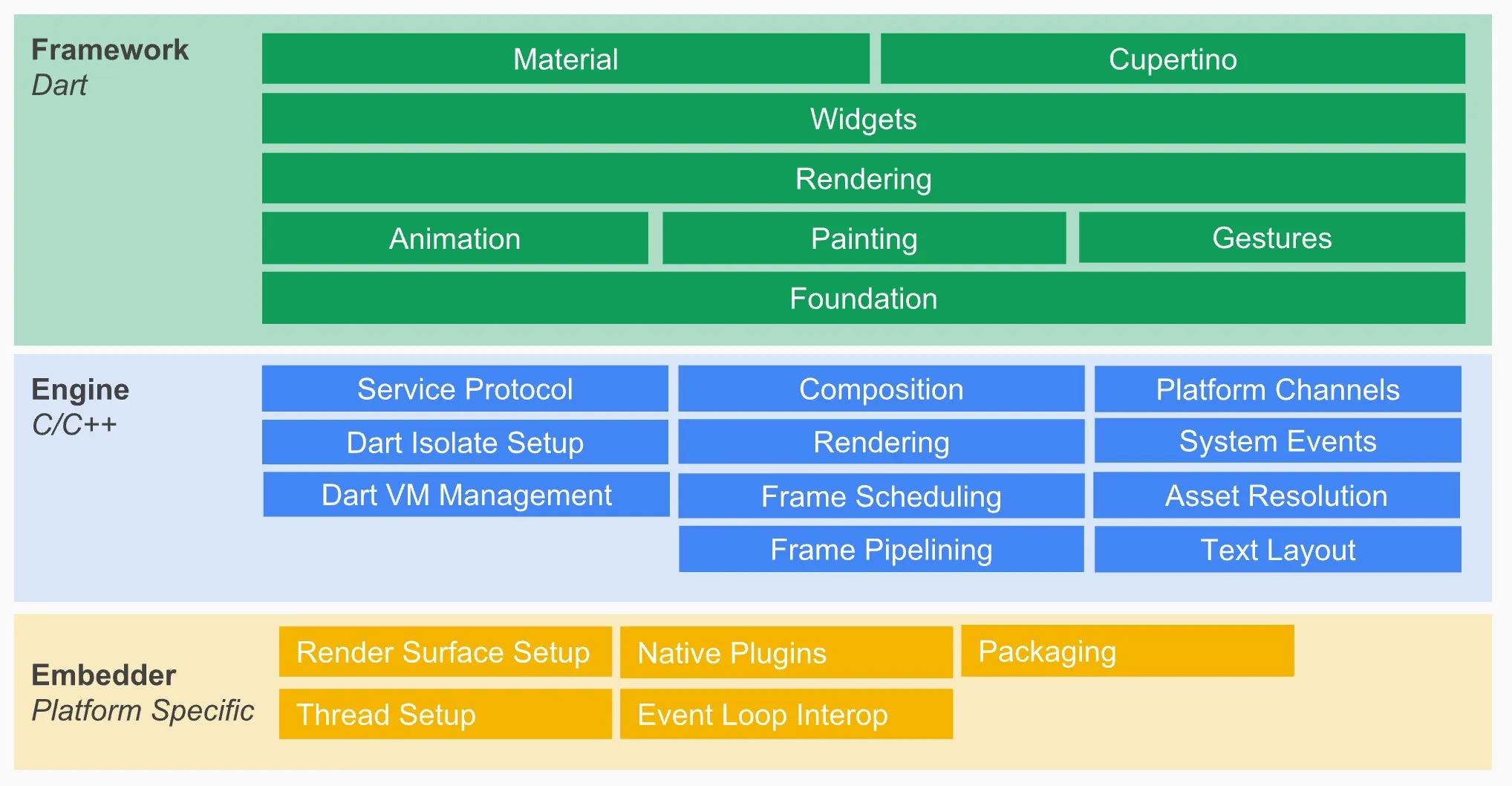
The C/C++ Engine portion in the diagram contains Skia and the Dart VM. The Flutter code a user writes, together with the Flutter framework, ultimately calls into the Skia library to efficiently render images and text through the GPU. We know that controlling rendering at such a low level is extremely efficient but makes for very low developer productivity, so Flutter ships a large amount of SDK code to keep user-written Flutter code simple and clear.
If you’ve written a bit of Flutter, it feels strikingly familiar to React. Indeed, Flutter borrowed heavily from React’s engineering practices; its lifecycle and state management are very similar to React/Redux. For instance, Flutter splits widgets into stateful and stateless; a stateful widget uses setState to drive the UI’s reactivity. In React everyone knows the Virtual DOM — at render time you diff VDOM against DOM and paint only the parts that truly changed. Flutter has a similar idea: it keeps the widget tree in memory, at render time sees which subtrees have changed, and re-renders those. The algorithm is called structural repainting using compositing; the curious can watch Flutter’s rendering pipeline [2].
In Flutter, going from user input to final rendering traverses the following pipeline:
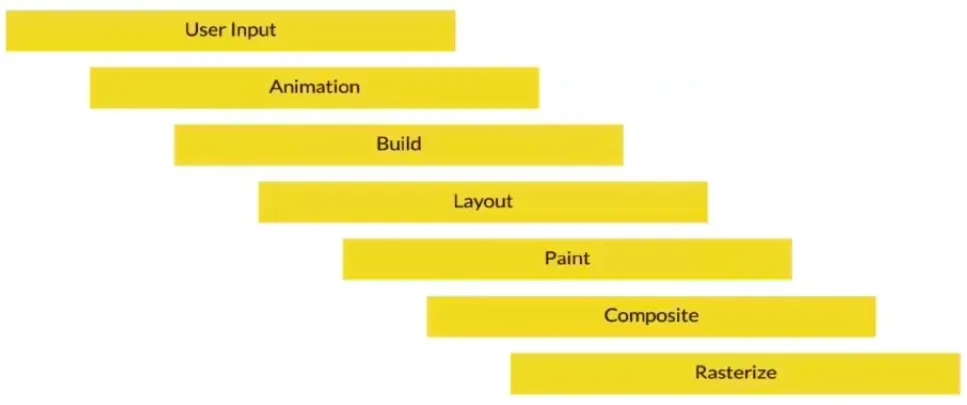
So you see, every widget in Flutter has a build method that controls that widget’s rendering. Like React’s render, you must not put any compute-intensive code in build.

Flutter’s self-controlled rendering brings it a host of revolutionary advantages — this is a crushing blow to React Native / Weex. For example: Flutter makes it easy to create dazzling animations and interfaces — anything irregular and highly customized, which in other frameworks or even native apps is painful work, is often far simpler in Flutter. For example:
Moreover, compared with React Native / Weex or even native apps, Flutter easily maintains UI consistency across different operating systems and hardware — a capability many people overlook. For example, when you develop a native app, you have to consider its compatibility with older operating systems and older hardware. Flutter handles rendering itself, so its expressive output is consistent across system versions, which greatly reduces testing work.
Flutter’s Cross-Platform Potential Is Boundless
Flutter has peerless cross-platform potential. Again, this comes from its control over screen rendering. As long as you use widgets appropriately and handle media queries properly, Flutter makes it easy to extend a mobile app to desktop and even the web. Today Flutter already supports OSX apps well (master channel), while Windows/Linux apps have limited support (technical preview). In addition, the beta channel offers web support. Flutter is currently the most promising technology for unifying the “big frontend,” and I think Flutter has enormous ambitions in that direction.
Why Does Flutter Use Dart?
The language you use shapes how you think — especially in the world of programmers. Flutter’s team reportedly tried more than a dozen languages before choosing their own Dart. That choice shuts many people out at first, myself included. I used to be utterly baffled as to why Flutter didn’t use TypeScript and instead picked Dart, a Google-owned language almost nobody uses. But as I came to understand Flutter, I realized that Dart made Flutter, and Flutter in turn repays Dart.
We said earlier that Flutter’s chief advantage as a cross-platform solution is performance. Dart is a compiled language supporting both AOT (Ahead Of Time) and JIT (Just In Time) — that is, the Flutter code we write compiles down to native ARM (mobile) / x86 (desktop) machine code, maximizing runtime efficiency. Because Dart is a garbage-collected language, its AOT compilation resembles Go’s: the memory-management runtime from the VM is baked into the compiled executable. That’s why the architecture diagram above includes a Dart runtime. Dart’s JIT capability, meanwhile, makes debugging in the development environment extremely convenient, giving mobile developers something close to web development’s “write and tweak” flow. Few existing languages offer both: an interpreted language like TypeScript has JIT but no AOT, and the Flutter team would have had to provide AOT compilation itself — considering ARM/x86 support and performance optimization, that would be a massive undertaking. A compiled language like Go/Rust has AOT but no JIT, and its expressive power isn’t well suited to writing frontend code.
Anyone who has worked on Android will recognize this: on early Android versions, if you didn’t control object allocation sensibly, you’d get intermittent jank. That’s the downside of GC-managed memory allocation — it spares you the trouble and unsafety of manual allocation and freeing, but periodic GC hurts app performance. Though this happens less and less on newer Android versions, it’s still a problem. Regarding Dart, Android engineers might well wonder: can Dart’s GC handle the complex interactions of a large number of UI widgets?
Since Flutter dares to claim 60 fps, the cost of creating objects and running GC in Dart must be low enough. I haven’t studied this specifically, but from public blog posts (e.g., Flutter: don’t fear the garbage collector), you can see that Dart requires no locks when creating objects or during GC (locks are needed at mark time). Its GC is generational, having absorbed many lessons from Java’s GC (and, I’d bet, from Go’s, also at Google). In Flutter’s scenario, a great many objects are short-lived, which fits the young generational hypothesis, so GC efficiency is high enough.
All of the above is about performance trade-offs. A language’s syntax and programming paradigm also affect user efficiency, and thus its acceptability. Dart is easy for programmers with a Java/TypeScript background to understand — especially if you’re only writing UI, you can get up to speed in minutes to hours; it’s very simple. And compared with Java, its syntax is well suited to declaring verbose UI structures.
As an object-oriented language, Dart supports higher-order features like mixins and generics. Dart adopts an async/await concurrency model, where each future object can be viewed as an independent coroutine. Dart is statically typed, but its type model resembles TypeScript’s: type annotations are recommended but not enforced. After a few days of use, I feel Dart would do fine for server-side development too — at least its expressive power beats the JavaScript behind Node.js. Of course, nearly all Dart programmers today are Flutter programmers, but it’s not impossible that someday we’ll see a frontend-to-backend takeover like JavaScript → Node.js. After all, backend engineers’ capabilities keep getting flattened by cloud providers: server-side code a backend engineer painstakingly accumulated can be overturned in minutes by a monster like Firebase.
Conclusion
Flutter is a very interesting framework that deserves a real investment of effort. If you’re working on anything related to the big frontend, you shouldn’t miss Flutter; if you’re doing backend development, you might also look into Flutter to build your own end-to-end capabilities.
References
- flutter: https://flutter.dev
- dart: https://dart.dev
- Flutter Crash Course for Beginners 2020: https://www.youtube.com/watch?v=x0uinJvhNxI
- Build Native Mobile Apps with Flutter: https://www.udacity.com/course/build-native-mobile-apps-with-flutter--ud905
- Inside Google’s Chapel Hill outpost: https://www.wraltechwire.com/2017/05/24/inside-googles-chapel-hill-outpost-a-growing-success-story
- flutter’s rendering pipeline: https://www.youtube.com/watch?v=UUfXWzp0-DU
- Implementing complex UI with flutter: https://www.youtube.com/watch?v=FCyoHclCqc8d
- SY expedition travel challenge: https://github.com/MarcinusX/sy_expedition_travel_challenge
- Flutter: Don’t Fear the Garbage Collector:https://medium.com/flutter/flutter-dont-fear-the-garbage-collector-d69b3ff1ca30