How to Make Educational Videos: My Journey of Exploration
Since September of last year, I’ve spent nearly an hour every evening teaching my daughter Xiaobao. The curriculum is a grab bag — from Monday to Sunday, in order: historical stories, math, Scratch, scientific exploration, documentaries, inspirational films, and geometry. Whenever I “showed off” after class on WeChat Moments, friends would encourage me to just turn the content into videos — joy shared is joy multiplied. I made a few attempts afterward, but directly recording my classes with Xiaobao didn’t work well: for one thing, it was too customized; for another, it was too long, with insufficient effective information density. Unless someone is forced into it, or bored out of their mind, no one wants to listen to an hour-long, unpolished “lesson” delivered by a less-than-professional teacher. I also tried compressing the math or science lessons I gave Xiaobao, cutting the chaff to keep the wheat, and presenting them in the style of “Teacher Li Yongle” or “Mamishuo” — but that isn’t my strength; deliberate imitation stripped away the soul of my own teaching.
So the video-recording project was shelved.
In early February, as the novel coronavirus raged ever more fiercely, I scrolled through the news every day, empathizing with Wuhan’s plight like everyone else in the country, and developing a mild case of PTSD — “grieving their misfortune, angry at my own inaction,” by turns a cynic and a fool, steeped in negativity. My wife had joined a charity event in the Seattle area called “Read English Books with Wuhan Kids,” letting Xiaobao contribute a little something to her peers, and she urged me: instead of cursing this and that every day and doing all those useless things, why not think about what I could actually do. After much deliberation, I decided to take another crack at the video-teaching road — sharing knowledge across different dimensions counts as making a small contribution, I suppose.
For the topic, from historical stories, math, Scratch, scientific exploration, and geometry, I chose historical stories. It’s Xiaobao’s favorite class, and the one with the strongest interaction. Over the past four months, I’ve already finished the five volumes of the Zhou Annals from the Zizhi Tongjian with her, and we’re now on the Qin Annals; with that groundwork laid, I can teach it with ease. More importantly, historical stories are very flexible to tell — a few minutes is enough for one, and each stands alone as a complete piece, so listeners aren’t burdened. So I started thinking about how to go about it.
First, the audience. Based on my earlier experience, the method for teaching kids like Xiaobao isn’t well suited to video — or at least not to short videos under ten minutes. Even for the well-known story of the Partition of Jin among the Three Families, explaining the causes and consequences to Xiaobao took me over an hour. So I set my audience as people with some historical background who want to get more out of the Zizhi Tongjian.
Next, the content. Although last year, for my own reading convenience, I sliced the 294 volumes and nearly three million characters of the Zizhi Tongjian into slides volume by volume, from a narrative standpoint it wasn’t good enough. When I teach Xiaobao, I go story by story. So I further reorganized the previously processed material from the five volumes of the Zhou Annals into more than seventy stories (see: tongjian.qiaopang.com/story-zhou). These seventy-odd stories run from “Zhi Xuanzi and Zhao Jianzi Establish the Heir” all the way to “King Nan of Zhou Builds a Tower of Debt,” each self-contained and easy to present. Woven through these stories are also citations from the Records of the Grand Historian and the Zuo Zhuan. The Tongjian’s content is too dense — sometimes a few characters pull in a whole pile of allusions, so you can’t do without drawing widely on other sources. For example, when Sima Wen Gong discusses “integrity,” he simply says, “In the past, Duke Huan of Qi did not break his covenant with Cao Mo; Duke Wen of Jin did not covet the gains of attacking Yuan; Marquis Wen of Wei did not forsake his appointment with the gamekeeper; Duke Xiao of Qin did not abolish the reward for moving the pole” — and just like that, four allusions from the Spring and Autumn and Warring States periods. All of these need explanation. Some content also needs to be woven together — for example, the Covenant at Xirang and the Battle of Yiyang. If Gan Mou hadn’t sworn an oath to King Wu of Qin at Xirang using the story of “Zengzi is murdered, and Zengzi’s mother drops her shuttle and climbs over the wall,” there would have been no victory at Yiyang later. Without weaving such content together, telling them separately would leave readers confused.
Once the audience and content were set, the question was how to make it. Like a product: you’ve defined the users, settled the strategy, and what comes next is where execution shows its mettle. Li Yongle’s and Mamishuo’s presentation styles aren’t my forte, so I turned my gaze to the Khan Academy approach. Sal Khan himself doesn’t appear in his lesson videos; he guides step by step through voice and board work — that might be a viable approach for me. So I started using Notability on the iPad for board work and the iPad’s screen recording to capture it, and began my first round of experiments.
After the first batch of videos was done, I played them for my wife. She found the result lacking. Two problems: 1. The voice was too flat, lulling listeners to sleep. 2. The pacing was slow, the information density insufficient. Both points hit the mark. For someone untrained like me, teaching Xiaobao and recording while wearing headphones are two completely different states — the me who waxes eloquent at Xiaobao becomes, when formally recording, like George VI in The King’s Speech: stammering, the screen riddled with “uhs” and “ums” and verbal tics. So I had to re-record again and again, and once I had a decent version, edit it in iMovie, and finally lay down guzheng music (“High Mountains and Flowing Water” and “Fisherman’s Song at Dusk”) to mask the insecurity in my delivery and the slight unevenness left by editing.
For the first batch of seven videos, I spent an entire weekend, trying both Notability and Paper before settling on Notability. Editing the recorded videos in iMovie was grueling, because my “uhs” and “ums” were so frequent that I had to pick them out painstakingly. Some videos ran seven minutes; after cutting the transitional silences and the filler, barely five remained.
The second weekend, I continued making the second batch of seven videos the same way. Beyond growing more familiar with the tools — especially iMovie’s keyboard shortcuts — my video-making ability hadn’t improved much. Seven videos, roughly thirty minutes of finished content, still ate up most of the weekend — aside from taking Xiaobao and Xiaobei to dance class, I shut myself in the study making videos, recording over and over, editing bit by bit; the inefficiency was outrageous. I realized screen recording wasn’t a good solution. Whenever I misspoke, paused too long thinking, or botched a transition, I couldn’t stop the screen recording — I could only note to myself, “don’t use this part,” take a deep breath, and repeat what I’d flubbed. The parts marked “don’t use” would be cut when I edited in iMovie, and some poorly delivered stretches would be cut too, which greatly increased the workload. For “The Assassin Nie Zheng,” I recorded seven minutes and ended up with just over two. A lot of content was simply deleted in big chunks because it was too halting to edit. So as I worked, I hunted for better tools. I wanted something that would let me switch content like playing slides, annotate the content, and record the screen right inside the app, so I could start and stop at any time — and ideally, it would have simple video editing, so I could just delete bad segments and spare myself the second pass in iMovie.
Starting from these requirements, I tried quite a few tools. The standouts were ShowMe, Educreations, and Explain Everything. After trying them all, I paid $25 for a year and chose the most expensive one that best met my needs: Explain Everything.
Beyond the features I mentioned, what delighted me most about Explain Everything is its Mix mode. It lets me split video recording into two stages: first, focus entirely on the audio itself and deliver the words well; then, turn off audio input so nothing is recorded, and use Mix mode to record again on the timeline, listening and editing and adding board work as I go. In earlier videos, whenever I had a big block of board work to write, I’d have to stop and stay silent (I still can’t pull it off as effortlessly as Teacher Li Yongle), then explain the text once I’d finished writing. That made iMovie editing painful — a single video was riddled with silences that needed cutting. Explain Everything solves this perfectly — and that’s its signature feature.
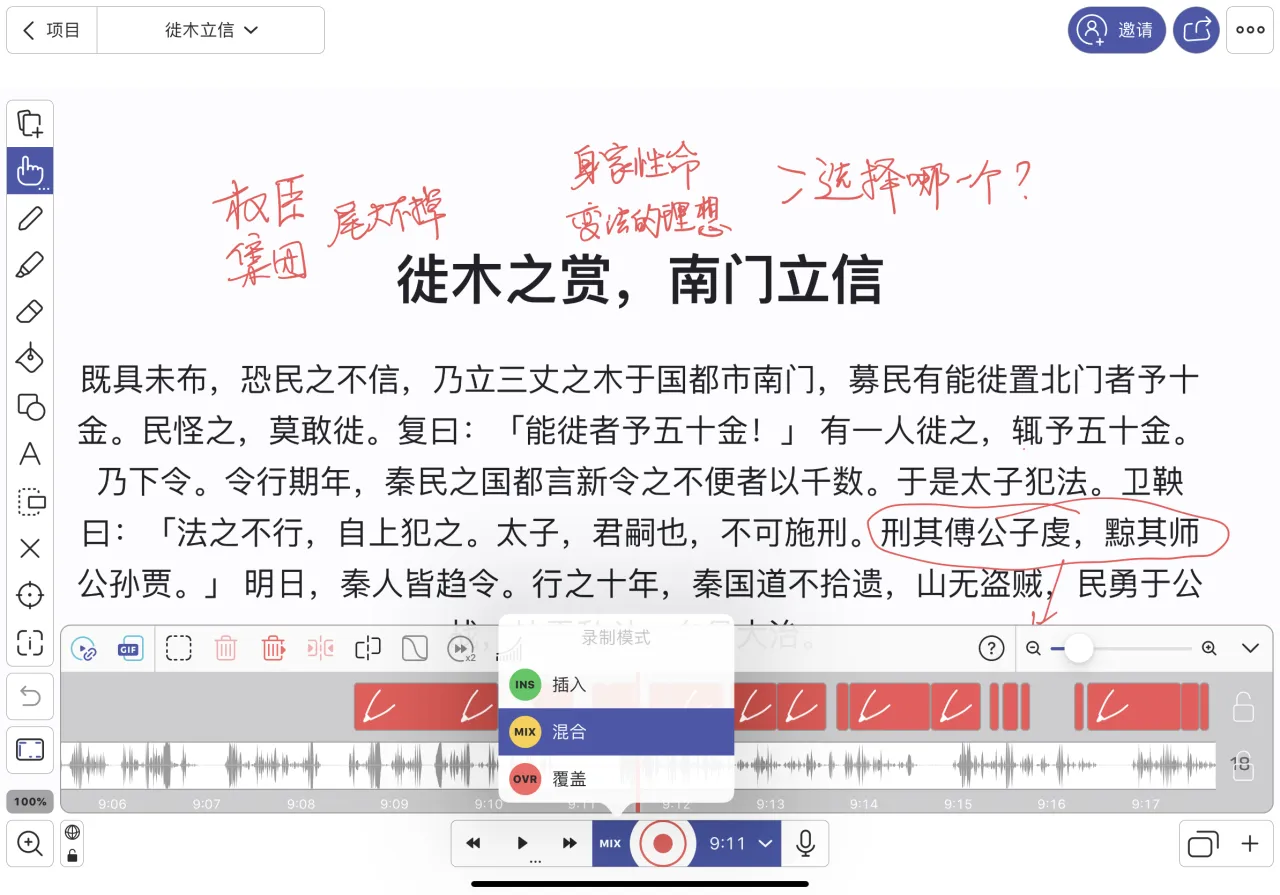
Once I’m more proficient, I can put together an episode introducing the Explain Everything app in detail.
This Saturday I began using Explain Everything extensively, from “When the ruler praises himself, no counsel will come” all the way to “Moving the Pole to Establish Trust.” All seven of these videos were made with Explain Everything. Altogether they took me six hours, a great improvement in efficiency. These videos average about seven minutes, and even without fine editing, they sound much better than before. I deliberately timed myself and found that at my very best, a five-minute video takes forty minutes to complete — I still need to keep honing my skills.
The video below, “Moving the Pole to Establish Trust,” won’t meet you on YouTube and Bilibili until next weekend; I’m putting it here for your appraisal:
Once the videos were made, I put them on Bilibili and YouTube. The Bilibili experience was a delightful surprise — it offers upload templates, so I don’t have to set the same title, tags, and description every time. For creators uploading multiple videos at once, that’s a godsend. YouTube has no template feature, and uploading there is a pain. Both apps support scheduled publishing, so content I finish in one weekend can go out at 8 p.m. Beijing time each evening.
On Bilibili and YouTube I’m a nobody. So view counts are pitiful — but that also gives me more time to keep experimenting and improving my video-making ability. If the “Moving the Pole to Establish Trust” video above interests you, you can search Bilibili for “程序君” (Programmer Jun) or “喜欢历史的程序君” (The History-Loving Programmer) and follow; or, if you use YouTube, search “程序君” to find the videos.
I hope you enjoy this kind of content. For now I plan to finish the five volumes of the Zhou Annals, then, depending on time, try to finish the three volumes of the Qin Annals as well (the corresponding stories are already organized: tongjian.qiaopang.com/story-qin). I’ll think about what comes next later. If you have any suggestions for this video series, please don’t hesitate to share them; and if you know of better tools, please share those with me too. Thank you!