Beats: Monitoring and Log Processing

Before I knew it, one twenty-fourth of the new year had slipped by, and I found that I had not written even a few words—which must disappoint the readers of ‘Programmer’s Life.’ If my previous claims of being busy were just busywork, now I know what it means to be so busy that even the walk to the restroom must be made at 6 km/h. But busy or not, the WeChat account still needs updating. Today I’ll start with a short piece to thank you for your patient waiting.
There are plenty of off-the-shelf tools for system monitoring and log processing. Beyond the commercially successful New Relic and Datadog, there are also quite a few open-source solutions, such as the ELK stack (Elasticsearch, Logstash, Kibana) and Riemann. ELK is widely used, and you can find all sorts of success stories; especially after Amazon began offering Elasticsearch Service, the only thing left to worry about is installing and configuring Logstash, which greatly lowers the operational barrier.
Still, configuring Logstash alone is no easy task: you have to master a pile of input/output/filter plugins, understand the config-file syntax, learn to write working Grok patterns, and so on. Sometimes you just want to consume log files on disk. Is there a way to make a log agent plug-and-play without configuring Logstash?
Of course! The itchy-scratch law of the software world—when a problem itches unbearably for you, a fair number of other people are itching just as badly, so someone will scratch it—guarantees it. A startup, building on ELK for their own system, created a Beats system capable of handling most log formats. And so, like Found, the company doing Elasticsearch SaaS, they were acquired by Elastic (the parent company of ELK). Acquisition or not, what matters is that Beats remains open source under the Apache 2.0 license. Below, a brief introduction to this system.
Introduction to Beats
Beats is a set of collectors written in Go (it feels like Go is gradually taking over the ops-software market). They can pull information from the operating system, files, and the network, send it to Logstash, or send it directly to Elasticsearch, where it can be visualized. At present, the Beats project includes these subprojects:
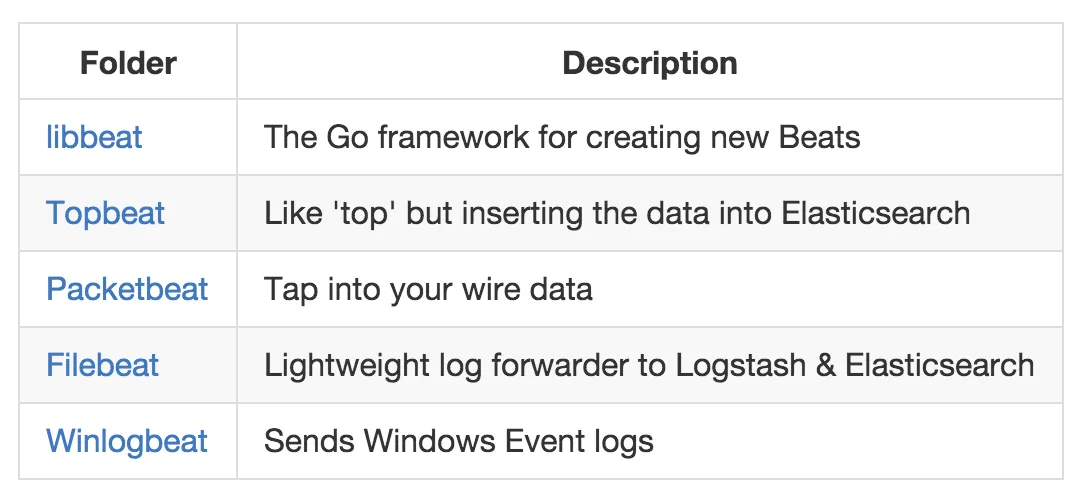
The relationship between them looks like this:
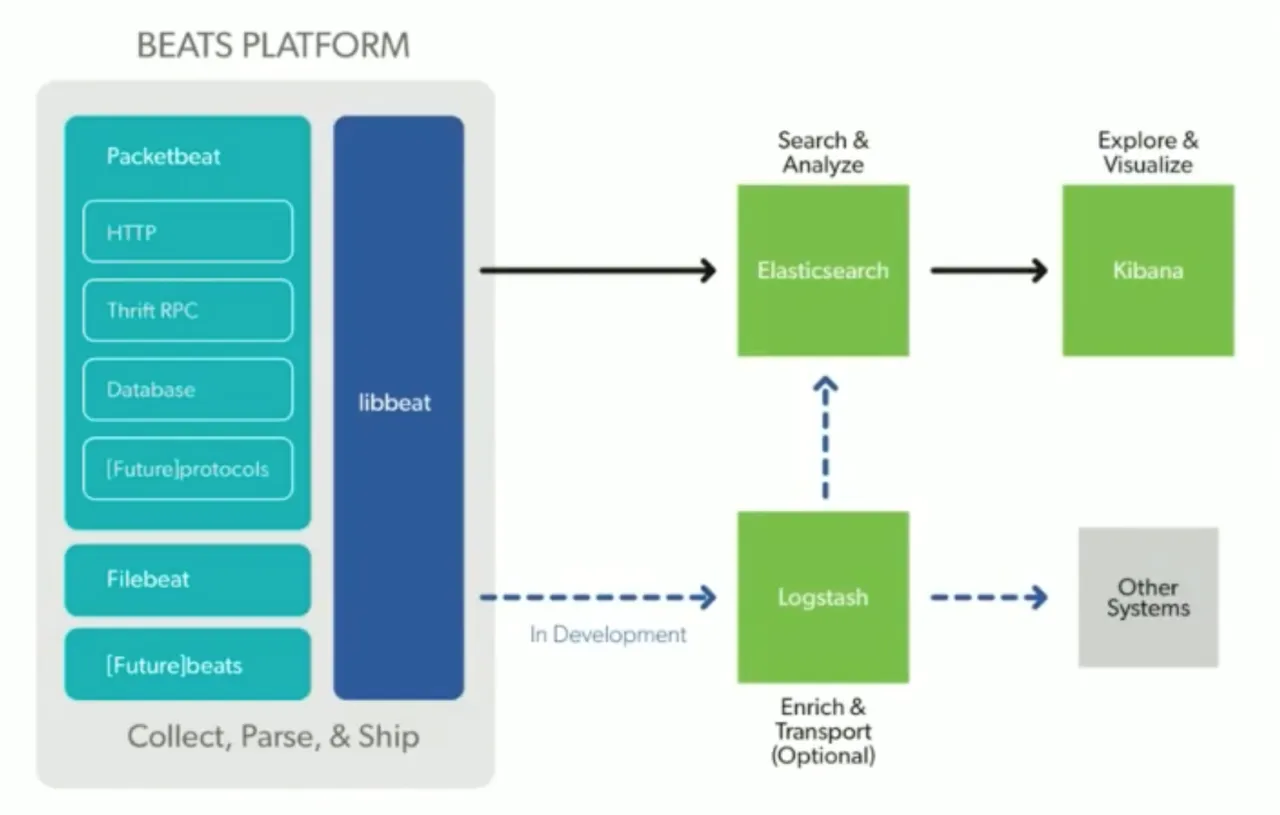
We’ll focus mainly on Filebeat and Packetbeat.
Filebeat
Filebeat is mainly intended to replace Logstash Forwarder: you can capture information from system log files and send it to Elasticsearch. Installation is simple (on Red Hat):
$ curl -L -O https://download.elastic.co/beats/filebeat/filebeat-1.0.1-x86_64.rpm
$ sudo rpm -vi filebeat-1.0.1-x86_64.rpm
If your Elasticsearch cluster is not on localhost, modify the corresponding settings in /etc/filebeat/filebeat.yml. Then:
$ sudo /etc/init.d/filebeat startAfter that, you can use Kibana to query your current log data.
Filebeat is fairly intuitive, so I won’t dwell on it.
Packetbeat
Packetbeat is a godsend worth having. Logging should be thought of in layers: network layer, web-server layer, application layer, etc. The higher the layer, the richer the means of collecting logs; yet the network layer—at least for me—had long been neglected. Packetbeat uses libpcap to capture packets directly from the network interface, performs protocol analysis, and stores the results in Elasticsearch, essentially making it a beefed-up Wireshark. Currently Packetbeat supports protocols such as DNS, HTTP, MySQL, Postgres, MongoDB, Redis/Memcached, and Thrift RPC—enough for a typical web application (though it probably ought to support AMQP as well). With Packetbeat you can do things that would otherwise require special handling at the application layer, such as discovering slow queries in the system in real time (whether SQL or MongoDB), or discovering the network topology in real time (in many complex server applications, even the developers don’t know which servers a given kind of traffic traverses or what it does there).
As an aside, vendors that build network equipment should develop systems like this for themselves or their customers. For themselves, it can aid debugging: visualize tcpdump data with the ELK stack to discover correlations. For customers, it can help them better identify latent risks and application bottlenecks, and provide better debugging capabilities.
I digress.
Packetbeat’s installation is a bit more involved; you need to install libpcap first:
sudo yum install libpcap
curl -L -O https://download.elastic.co/beats/packetbeat/packetbeat-1.0.1-x86_64.rpm
sudo rpm -vi packetbeat-1.0.1-x86_64.rpm
Then modify the Elasticsearch address in /etc/packetbeat/packetbeat.yml and run:
$ sudo /etc/init.d/packetbeat startThat’s all. I hope it’s useful.