More Terrifying Than Forgery: A Phishing Email Signed by Robinhood Itself
A thousand-li dike collapses from a single ant hole. — Han Feizi, “The Illustrations of Laozi”
A note before we begin: yesterday evening, a Robinhood “login confirmation” email was sitting in my inbox. I stared at it for a long time, and once I had lowered every last defense, I clicked the Review Activity Now link. When the link turned out not to lead to a robinhood site, I realized something was wrong — so I downloaded the raw message and had Claude Code help me take it apart.
First Glance: So Authentic It Disarms You
By any measure: this email is not forged.
Every byte of it flowed out of Robinhood’s own transactional email pipeline, signed by the private key Robinhood uploaded to SendGrid, delivered to Gmail from a SendGrid egress IP that Robinhood authorizes. SPF passes, DKIM passes, DMARC alignment passes, ARC inheritance is fully intact — all four authentications green.
The sender is noreply@robinhood.com, the signing selector is s1._domainkey.robinhood.com, the Return-Path is bounces+1739348-...@sg-email.robinhood.com, the egress IP is SendGrid’s 167.89.11.250. Whatever you try to question, you end up back in Robinhood’s own hands.
Visually it’s even crueler: the MJML template, the brand imagery, the CDN assets, the footer legal links — it looks exactly like Robinhood’s everyday compliance notices, because it came out of that very template.
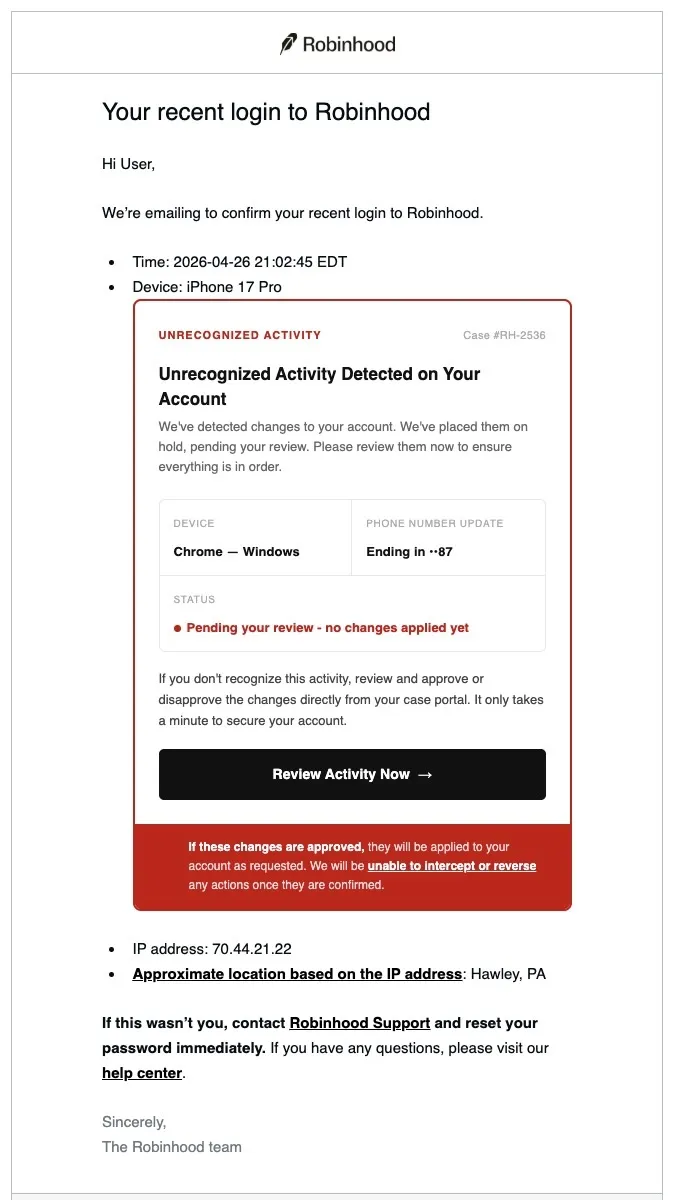
So how does it hook me? Buried in the middle of the email is a blood-red card that reads “UNRECOGNIZED ACTIVITY · Case #RH-2536 · your phone number was changed to ••87 ·〔Review Now〕”. The button points at a googletagmanager.com link.
Your reaction is probably mine: wait, how is that possible? Which part is fake?
I’ll peel it apart layer by layer below. But first, hold onto this moment: all that muscle memory — check the From, hover the URL, check the auth results — fails completely in the face of this email.
Why Every Existing Defense Fell
The anti-phishing infrastructure the industry spent decades building rests on a skeleton of three parts: SPF, DKIM, DMARC. But their design goal is actually “stop forged senders,” not “stop all phishing.” Those are not the same thing.
SPF: Stamping a Birthmark on the Envelope
Received: from o1.email.robinhood.com (167.89.11.250)
Return-Path: <bounces+1739348-f13e-xxxx=gmail.com@sg-email.robinhood.com>
spf=pass
The bounce domain is sg-email.robinhood.com, Robinhood’s dedicated subdomain on SendGrid. 167.89.11.0/24 belongs to SendGrid and is authorized as a legitimate sending source by that subdomain’s SPF record. SPF validates the envelope sender, not the From: the user sees — this is SendGrid’s standard compliant configuration for enterprise customers.
DKIM: A Private Seal Pressed by Robinhood’s Own Hand
DKIM-Signature: v=1; d=robinhood.com; s=s1; b=r2O3Vjwp...
DKIM-Signature: v=1; d=sendgrid.info; s=smtpapi; b=p6FRnY7Z...
The first one is the key: d=robinhood.com s=s1. The body and headers are signed with the production private key Robinhood uploaded to its own SendGrid subuser. Only Robinhood’s legitimate production pipeline holds that key; an attacker can’t obtain it, and if it ever leaked it would be noticed immediately.
DMARC: Match the Name, Wave It Through
header.from = robinhood.com
DKIM d=robinhood.com (s1) → PASS → aligned with the From domain
dmarc=pass (p=QUARANTINE, dis=NONE)
DMARC’s logic is simple: if SPF or DKIM — at least one of them — aligns with the visible From: domain, it passes. DKIM is aligned, so the disposition is NONE; no quarantine.
The current DMARC policy sends suspected forgeries to spam (p=QUARANTINE); otherwise it passes. But this email isn’t a forgery, so the policy never gets a chance to fire.
ARC: Trust Inherited Down the Forwarding Chain
Gmail’s ARC-Authentication-Results inherits all three PASS results above. Any downstream system that respects ARC — auto-forwarders, mailing lists, enterprise SEGs — will keep trusting this email.
Look at the headers alone and there isn’t a hint of danger. Reputation-based filters will even raise their trust in this email. The Feedback-ID reads REGULATORY_REQUIRED:postoffice, marking it as traffic on the compliance-notification channel — perfectly consistent with the high-volume stream of legitimate transactional mail Robinhood normally sends.
The Real Breach: One User-Agent Tears the Whole Template Open
So how did the attack happen? The answer isn’t in the headers; it’s in the Device: line of the body.
Robinhood’s login-confirmation email is an old template with a simple structure:
Hi <name>,
We're emailing to confirm your recent login to Robinhood.
  • Time: <time>
  • Device: <user_agent>
  • IP address: <ip>
  • Approximate location: <city, state>
The Device: line should normally be a well-behaved string like iPhone 17 Pro or Chrome on macOS. But in this email, line 302 of the source looks like this:
<li>Device: iPhone 17 Pro<!doctype html><html lang="en"><head>
<style>...</style></head><body><div class="wrap">
<table style="border:2px solid #cc0000">
UNRECOGNIZED ACTIVITY Case #RH-2536
Unrecognized Activity Detected on Your Account
...
PHONE NUMBER UPDATE: Ending in ••87
STATUS: Pending your review – no changes applied yet
[ Review Activity Now → ] ← this button is the phishing link
</body></html> </li>
<li>IP address: 70.44.21.22</li>
<li>Approximate location: Hawley, PA</li>See it? The value of the Device: field is iPhone 17 Pro followed by an entire complete HTML document. That document was spliced verbatim into one <li> element of the legitimate template. After </html>, the original template keeps going: </li><li>IP address: 70.44.21.22</li>. The email is still “a complete email,” and the template’s post-processing noticed nothing amiss.
Why does it work? Because the vast majority of mail clients — Gmail on the web, the iOS Gmail app, Outlook — render nested DOM directly, and won’t reject a message just because it contains two <!doctype html> declarations. HTML’s error-tolerant parsing becomes a free gift to the attacker here.
Visually, that red “UNRECOGNIZED ACTIVITY” card fills the screen — bold, oppressive, countdown-flavored wording; while the real fields (IP address: 70.44.21.22, Hawley, PA) are reduced to two lines of small gray text beneath the injected card. The user’s attention is sucked entirely onto the card and never reaches the two lines that hold the actual login metadata.
The “Case #RH-2536,” “phone number ending in ••87,” and “Chrome — Windows” inside the injected card are all strings the attacker made up, imitating the real UI vocabulary of Robinhood’s security console.
How Did That HTML Crawl Into the Device: Field?
The Device: in the template is drawn from the User-Agent / device display name recorded on the authentication event. There are two plausible paths.
One is that the attacker already holds the victim’s credentials (credential stuffing, a purchased infostealer log, a previous phish, password reuse) and logs into Robinhood with a custom User-Agent header, sending an entire block of HTML as the UA string. Robinhood’s auth system dutifully records that string as the “device description,” passes it to the postoffice service responsible for sending mail, the template splices it into the login-confirmation email, and it gets delivered back to the real account owner.
The other is that the attacker went through some “register a new device / rename device” flow and landed a malicious string in that field.
Either way, the precondition is the same: the attacker must first produce an authentication event whose content they control. Then the phishing payload rides Robinhood’s own outbound mail pipeline back into the victim’s inbox, with DKIM and DMARC perfectly aligned — because this is the legitimate path.
This Is Stored XSS, Transactional-Email Edition
Web security has an old problem called Stored XSS: user input gets persisted to a database, spliced unescaped into HTML on every render, and finally executes in the victim’s browser.
When the postoffice template renders the Device: field, it concatenates the user-agent value directly into the MJML / HTML as a string. The fact that <!doctype html> wasn’t swallowed proves the point: that field received no HTML entity escaping on its way into the template — not even the bare minimum of stripping <.
The correct approach would have been at least one of these three: entity-escape < > & " ' before splicing; or use a template function that treats the value as a plain text node (Jinja autoescape, React {value}, that sort of thing); or reject any User-Agent containing < at capture time. None of the three was done.
The injection was persisted into Robinhood’s auth / device store and rendered on demand into outbound email HTML. That is Stored XSS, transactional-email edition. Its only difference from web XSS is that the render happens in Gmail’s mail client instead of a browser. Which is why “mail clients disable JS” won’t save you: visual deception, misleading links, and remote images need no JS at all.
The URL Shell Game: Riding Google’s Signboard Through Every Checkpoint
The entire email contains exactly one phishing link:
https://www.googletagmanager.com/debug/clearcookies?url=
   https%3A%2F%2Ftinzio.net%2Fvalidate%3Ftoken%3D
   <OPAQUE_PHISHING_SESSION_TOKEN_EXAMPLE>
URL-decoded, the real landing page is tinzio.net/validate?token=....
So what is googletagmanager.com/debug/clearcookies?url=... doing there? It’s a debug helper endpoint in Google Tag Manager that redirects the page client-side to the address specified in the url= parameter. Put plainly: an open redirect hanging off a domain Google owns.
Why take the detour? Because googletagmanager.com is a high-trust domain that is universally allowed worldwide. URL reputation engines (Google Safe Browsing, SmartScreen, Talos, VirusTotal, enterprise SEGs) see that domain and wave it through, almost never digging into the query string. Gmail’s link preview — the little card that pops up on hover or long-press — also shows googletagmanager.com; a seasoned “hover before you click” user sees a Google domain and relaxes. Enterprise link rewriters (Safe Links, Mimecast) don’t strip query parameters from trusted domains, so the redirect target is preserved intact. And a URL sandbox that follows only one hop sees Google’s server return 200 and stops there.
As for the actual phishing site, tinzio.net, a path like /validate?token=... with a long opaque token is imitating Robinhood’s own one-time links (password reset, magic link, and so on). The landing page is easy to predict: a Robinhood-skinned page asking for your email and password, then your TOTP / SMS code, which is relayed in real time to the attacker’s live session. This is an AiTM (Adversary-in-the-Middle) phishing kit, commercialized for years now, and it defeats SMS and TOTP alike.
Every other link in the email points at the real Robinhood: robinhood.com/contact, robinhood.com/support/, the official social accounts. Every image loads from cdn.robinhood.com and images.ctfassets.net (Contentful, Robinhood’s actual CMS). Content-based filters have nothing to flag: the whole DOM contains exactly one malicious anchor, and it’s wrapped in a trusted Google domain.
A Dozen-Plus Layers of Defense, All Silent
Lay Gmail’s phishing detection layers over this email one by one:
| Layer | What It Checks | Why It Failed |
|---|---|---|
| SPF | Envelope sender IP authorization | Passes; the egress IP is a SendGrid IP authorized by Robinhood |
| DKIM | Cryptographic signature over body / headers | Both robinhood.com and sendgrid.info pass; the body is signed with Robinhood’s production private key |
| DMARC | Alignment with From: + policy |
DKIM aligned → pass; p=QUARANTINE only fires on forgery |
| Sender reputation | Historical reputation of noreply@robinhood.com |
Extremely high — backed by millions of legitimate transactional emails |
| Brand impersonation detection | Brand content vs. sending domain mismatch | No mismatch; the brand is Robinhood and Robinhood is the sender |
| Lookalike domain detection | punycode / typosquat | None; From: is character-for-character correct, and the link domains are either robinhood.com or googletagmanager.com |
| URL reputation | Hostname vs. blocklists | The only public hostname is googletagmanager.com, allowed everywhere |
| Attachment / macro scanning | Not applicable | No attachments |
| NLP content classification | Phrases like “verify your account” | Those phrases already appear in legitimate Robinhood security emails |
| ARC | Forwarding chain integrity | Passes; any forward continues to be trusted |
The only thing that could plausibly have stopped this email is a structural-anomaly detector capable of recognizing “a second <!doctype html> nested inside one HTML document.” Mainstream mail providers don’t enable that by default, because marketing email platforms of wildly varying quality generate nested fragments all the time, and the false-positive cost is too high.
What gives me a chill is precisely this: it isn’t that some layer of defense has a bug. It’s that a dozen-plus layers of defense are, by design, not applicable to this attack. They were all built for “forgery” — and this email isn’t forged.
Not One Email, but a Class of Attack Taking Shape
This playbook has grown more common over the past couple of years. It has three ingredients.
First, the payload rides on a legitimate brand’s transactional email pipeline. Login notifications, order confirmations, password resets, receipt emails from banks, brokerages, and SaaS vendors — any transactional email that renders “user input” into an HTML template is a potential injection point.
Second, the injection points all live in fields that “look like structured data.” User-Agent, device name, order notes, recipient name, account nickname, beneficiary address, ticket title — in a product manager’s eyes these are “strings for display”; in a security engineer’s eyes they are Stored XSS sinks. But at many companies, nobody ever built the wall in between.
Third, outbound links get laundered through open redirects. Besides GTM, there’s the Google AMP cache, accounts.google.com/ServiceLogin?continue=, assorted marketing-tracking platforms, URL shorteners, and SaaS vendors’ deep-link endpoints. Any open redirect on a high-trust domain is circulating “trust currency.”
Put those three ingredients together and you have the most effective phishing path going today: legitimate sending domain + injection into a legitimate sending pipeline + open redirect on a trusted domain = a phishing email that can barely be stopped at the transport layer.
For Developers: The Gates You Must Close
If you happen to work on transactional email, please review the following right away.
First: any user-input string that eventually lands in an outbound HTML template is a Stored XSS sink. Even if the final render happens in Gmail / Outlook rather than your own web app, treat it by the same standard. “It doesn’t execute in a browser anyway” is no excuse — visual deception, misleading links, and remote images need no JS at all.
How, concretely? Hang two gates at once. Before the value enters your store, apply whitelisting / length limits / character filtering to fields like display names, addresses, ticket titles, account nicknames, User-Agent, and device name. When it leaves the store and enters the template, run it through context-aware entity encoding again. Then add a structural lint on the outbound HTML: anything that, once rendered, contains more than one <!doctype, two opening <html> tags, or content after </html> should be rejected and alerted on. These two gates cost almost nothing and stop the overwhelming majority of injection payloads.
Next, your DMARC policy. Robinhood is still sitting at p=QUARANTINE, which is far too loose for a financial brand. Once you’ve confirmed every legitimate sending source is aligned, tighten to p=reject.
And the scope of your audit. One broken template in postoffice means every template maintained by the same team on the same rendering logic may have the same problem. An audit is a one-time investment that plugs an entire class of holes.
For Everyone Else: A Few Rules Worth More Than Any Training
For those who don’t write code, the following will do more for you than any anti-phishing training.
Never act through a “review / approve / deny” button in an email — even when the authentication says it came from your bank or brokerage. Open the app, or type the URL in yourself. Get this one rule right and the majority of today’s phishing is inert against you.
When in doubt, hover or long-press the link and read the full URL, query string included. If an email from your brokerage contains googletagmanager.com/debug/clearcookies?url=..., accounts.google.com/ServiceLogin?continue=..., or anything where ?url=, ?redirect=, or ?continue= is followed by a cross-domain target, it is malicious beyond question.
Any phrasing like “within 7 days / cannot be undone once approved / immediately / urgent / X hours remaining” is a coercion frame. Real security notifications rarely resort to countdown-style urgency.
Finally: keep credentials unique, and enable hardware-bound second factors. Passkey / FIDO2 / hardware tokens. SMS and TOTP have already been broken at scale by AiTM kits; only origin-bound credentials can stop real-time relay. This is the 2026 security baseline, no longer optional.
Epilogue: Trust Is the Most Expensive Part in This Pipeline
For decades, the main thread of anti-phishing engineering has been “see through the forgery.” SPF, DKIM, DMARC, domain reputation, brand similarity — all of these mechanisms rest on one assumption: the bad guys will impersonate the good guys.
This Robinhood email made me realize something: the most advanced attack is not impersonation — it’s borrowing. The attacker doesn’t need to forge anything. They got Robinhood to send the phishing email for them, got Google to launder the link for them, got Gmail to stamp it “authenticated” for them.
It’s the same logic as the supply-chain attack that hit litellm/axios a while back: you don’t need to breach the target’s firewall, you only need to poison something upstream that it already trusts. The difference is that this time the “upstream” isn’t a third-party package — it’s the brand’s own transactional email pipeline, the one advertised as “internal to the system,” as “the compliance channel,” as “something users can’t unsubscribe from.”
Han Feizi’s line about the thousand-li dike collapsing from an ant hole has an exact engineering translation here: the Device: field wasn’t HTML-escaped. A single htmlEscape() call that should probably have been written two years ago is the ant hole in that thousand-li dike. Through Robinhood’s compliance mail pipeline, it connects to Google Tag Manager’s open redirect, and from there to a user’s entire family’s bank accounts.
That email is still sitting in my archive folder. I plan to keep it. The injection on that Device: line will stick with me longer than any training ever could.