The Diagramming Tools I've Chased Through the Years
Documentation is an indispensable foundational skill for an engineer, and high-quality documentation is usually accompanied by high-quality diagrams. “A picture is worth a thousand words” — complex concepts, logic, and ideas can often be expressed clearly and vividly through diagrams. A good diagram depends on the author’s mind describing the thought, but it depends just as much on the tools the author uses. Good tools make the same work twice as effective. I’m a tool enthusiast: even with a satisfying hammer in hand, I’ll keep exploring in search of a better way to drive nails.
Word
The first diagramming tool I ever touched was Word. From Word 97 onward, its built-in drawing capabilities were quite good and met ordinary needs. Its advantage is simplicity: if you’re already in Word, you don’t need to switch to another tool, draw something, and then insert it back into Word.
Visio
I came to Visio because Word’s available drawing components were too few. So if you want to improve your drawing efficiency, Visio became the best choice for software engineers. A rich component library, support for all kinds of diagrams, and seamless integration with Word are Visio’s strengths. If Visio has one great flaw, it’s probably that it can’t run on Linux footnote:[not entirely true — under Linux you can use WINE] or OS X. Plenty of the engineers around me use Linux/OS X, but when it comes to drawing they have to fall back on virtual machine tools like VirtualBox to bring Visio back to life under Windows.
OmniGraffle
Three years ago, when I switched my working environment entirely to a MBP/OS X, I went through a long, awkward stretch in which I simply couldn’t draw properly. I tried the virtual machine route, but switching back and forth was genuinely maddening. Then I discovered OmniGraffle, and my reluctant farewell to Visio finally came to an end. OmniGraffle is the wonder tool for drawing on OS X; its various stencils satisfy almost every need you could have. For a long time I used it for wireframes. In the years when Bootstrap was popular, third-party Bootstrap stencils followed immediately, indulging my mild Virgo-ish perfectionism despite my not being a Virgo.
OmniGraffle can even open diagrams made in Visio, which is a blessing for users migrating from Visio. The biggest obstacle to using it, however, is price. The standard version, at over six hundred RMB, is enough to scare off a crowd, let alone Pro. With Visio, the company can apply to install licensed software; under OS X it’s depressing — I applied twice and both requests were rejected. Frustrated, I had no choice but to walk away from it.
Graphviz
Used in parallel with OmniGraffle was Graphviz. Its simple syntax, powerful drawing capability, and its integration with Sphinx footnote:[a tool for writing with reST] made it my favorite for a while.
Describe a state machine like this:
…
All it takes is this DSL code (the dot language):
digraph finite_state_machine {
    rankdir=LR;
    size="8,5"
    node [shape = doublecircle]; LR_0 LR_3 LR_4 LR_8;
    node [shape = circle];
    LR_0 -> LR_2 [ label = "SS(B)" ];
    LR_0 -> LR_1 [ label = "SS(S)" ];
    LR_1 -> LR_3 [ label = "S($end)" ];
    LR_2 -> LR_6 [ label = "SS(b)" ];
    LR_2 -> LR_5 [ label = "SS(a)" ];
    LR_2 -> LR_4 [ label = "S(A)" ];
    LR_5 -> LR_7 [ label = "S(b)" ];
    LR_5 -> LR_5 [ label = "S(a)" ];
    LR_6 -> LR_6 [ label = "S(b)" ];
    LR_6 -> LR_5 [ label = "S(a)" ];
    LR_7 -> LR_8 [ label = "S(b)" ];
    LR_7 -> LR_5 [ label = "S(a)" ];
    LR_8 -> LR_6 [ label = "S(b)" ];
    LR_8 -> LR_5 [ label = "S(a)" ];
}
This is the power of a diagramming language: once you understand the rough syntax, you can describe a standard diagram. Very often engineers need to draw a lot of “standardized” diagrams; with a WYSIWYG tool you burn enormous time on the “drawing”, whereas with a diagramming language the time you need is merely the time to think and type. Artistic flair and aesthetic genes are no longer obstacles here — as long as you can think, the output is pretty much on target.
Apart from state machines, the diagrams I most enjoy drawing with Graphviz are data structures and function call relationships. Interested in Graphviz? Click: graphviz.org and start learning.
ditaa
At the company where I work, to stay consistent with the IETF, many documents are written in txt format, for example like this (excerpted from RFC 793, the TCP protocol):
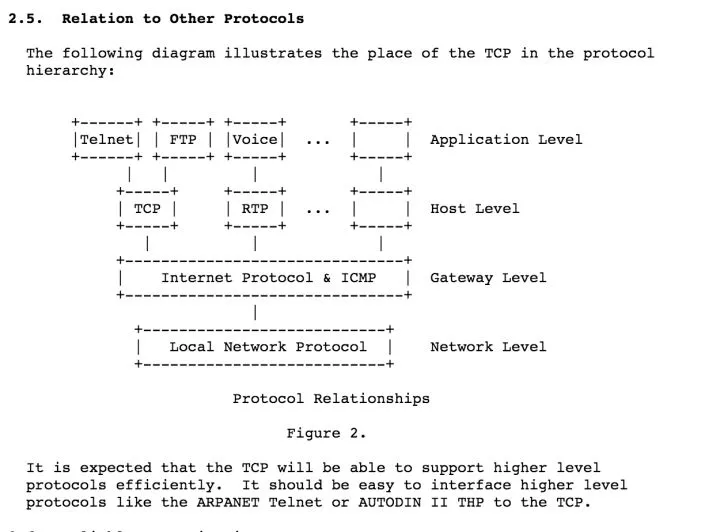
At first it was extremely uncomfortable — expressing graphics in ASCII under an 80-column limit, what a difficult thing that is! Later, I gradually got used to this way of expression; it makes you abandon all the bells and whistles and focus only on what matters most. More importantly, don’t underestimate this format — it can also be converted into “real” graphics and used in other settings (in Word, say). The conversion tool is ditaa. The image below shows how ditaa transforms the ASCII diagram above:
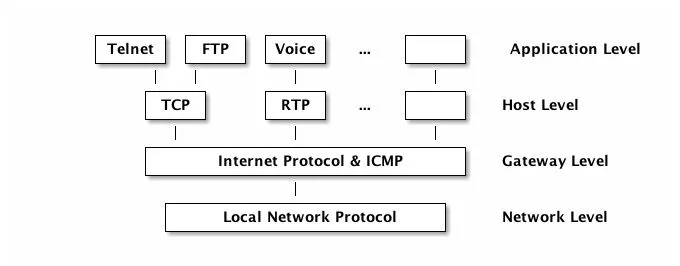
Pretty nice, isn’t it? ditaa is still a project on SourceForge, reachable at: http://ditaa.sourceforge.net/.
=== PlantUML
Finally, the most powerful diagramming-language-based tool I’ve found to date: PlantUML. Eclipse users may have heard of it long ago, or may even have been using it all along; unfortunately, this programmer has always been a devotee of IntelliJ, so it was only a couple of days ago that I got a peek at PlantUML’s power.
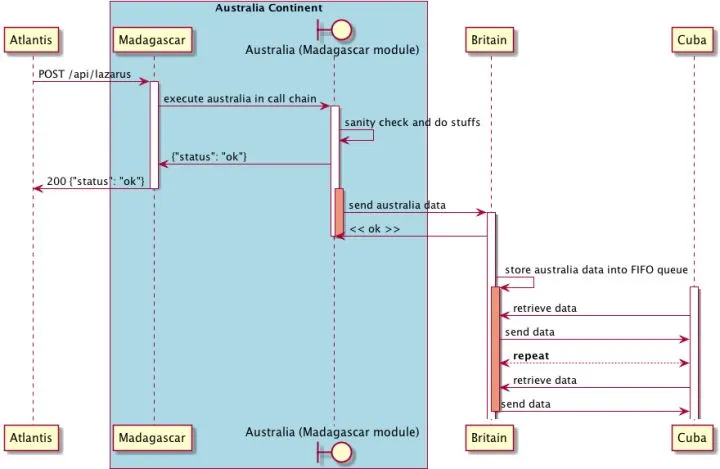
First, a diagram:
 pla
pla
The language describing it isn’t complicated; looking at the diagram, you should be able to follow it quickly:
@startuml
participant Atlantis
box "Australia Continent" #LightBlue
    participant nginx
    boundary "Australia (nginx module)" as Australia
end box
participant Britain
participant Cuba

Atlantis -> nginx: POST /api/lazarus
activate nginx

nginx -> Australia: execute australia in call chain
activate Australia

Australia -> Australia: sanity check and do stuffs
Australia -> nginx: {"status": "ok"}

nginx -> Atlantis: 200 {"status": "ok"}
deactivate nginx

activate Australia #DarkSalmon
Australia -> Britain: send australia data
activate Britain

Britain -> Australia: << ok >>
deactivate Australia

deactivate Australia

Britain -> Britain: store australia data into FIFO queue
activate Cuba

activate Britain #DarkSalmon
Cuba -> Britain: retrieve data
Britain -> Cuba: send data

Cuba<-->Britain: **repeat**

Cuba -> Britain: retrieve data
Britain -> Cuba: send data
deactivate Britain
@enduml
PlantUML, as its name suggests, supports almost every kind of UML diagram — good news for those who draw UML often. Class diagrams, for instance:
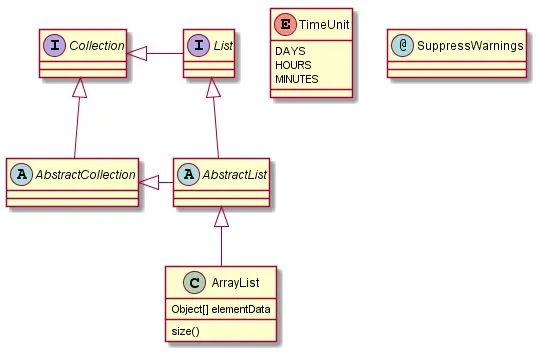
Even better, PlantUML also integrates ditaa and Graphviz, letting you draw with each of their syntaxes under PlantUML — with a strong air of unifying the world.
Like ditaa, PlantUML is also a SourceForge project; visit: http://plantuml.sourceforge.net/.
Let’s now go through PlantUML in detail.
PlantUML supports the following UML diagrams:
- Sequence diagram
- Usecase diagram
- Class diagram
- Activity diagram
- Component diagram
- State diagram
- Object diagram
- GUI Wireframe
Of these, the ones I use most are the sequence diagram and the activity diagram, so those are the two I’ll mainly cover; for the rest, please read the PlantUML documentation yourself.
Sequence diagram
In a sequence diagram, each role is called a participant, and participants can exchange messages. Take this most basic sequence diagram:
@startuml                       // (1)
participant Tars                // (2)
actor Copper                    // (3)
database Murphy

Tars -> Copper                  // (4)
Copper --> Murphy: morse code   // (5)
@enduml // (6)- (1) declares the start of a diagram
- (2) declares a participant; can be omitted
- (3) if you want a different figure type (not participant), it cannot be omitted
- (4) declares a message between two participants; –> is a dashed line, -> is a solid line
- (5) a message can carry a label
- (5) declares the end of a diagram
The generated output looks like this:
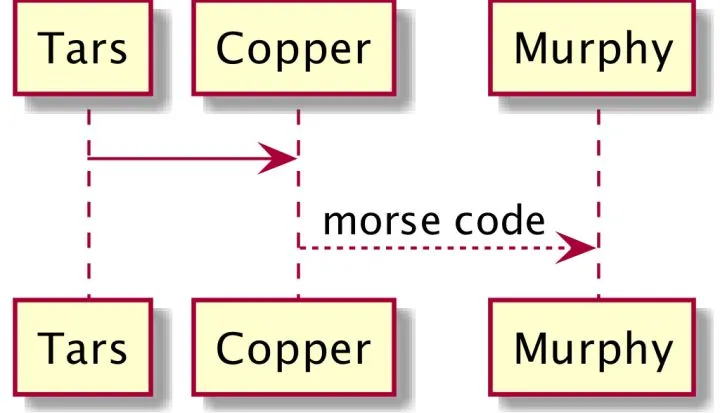
No explanation needed — everyone gets it.
You can try replacing participant with the figures below:
- actor
- boundary
- control
- entity
- database
Each gives a different effect. If your participant’s name is complicated, you can use as to give it an alias:
@startuml
actor "星际穿越的\n<b>男主角</b>" as copper #99ff99 // (1) (2) (3)
actor "星际穿越的\n男主女儿" as murphy #red

copper -[#orange]> murphy: 爱和<font color=red>引力</font>可以穿越时空      // (4) (5)
@enduml- (1) you can give a participant an alias; the alias need not match the displayed text
- (2) the displayed text can use ASCII control characters such as \n, and HTML tags as well
- (3) a participant can be assigned a color at the end
- (4) a message can insert a color between
-and>, delimited by[] - (5) startuml supports Chinese; if you run into problems when compiling, check the charset setting (set it to utf-8)
The generated diagram looks like this:
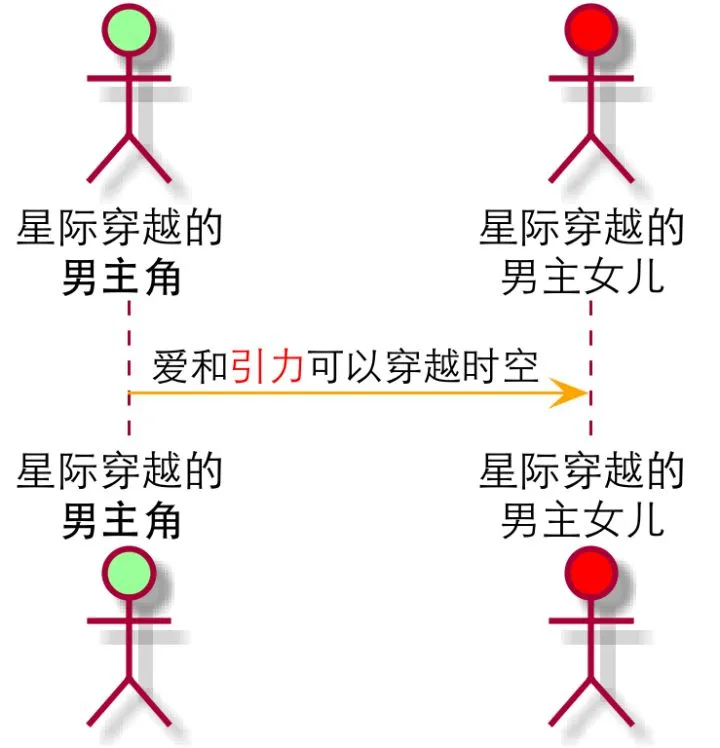
If you’ve understood these two examples, let’s continue:
@startuml
scale 1024*768      (1)
[--> Tars: "They" provides data inside singularity (2)

activate Tars       (3)
Tars -> Copper: sending data
activate Copper

Copper -> Copper: translate it to morse code    (4)
activate Murphy

Copper -> Murphy: send morse code through watch

Copper -> Tars: ask for next batch
deactivate Copper   (5)

Murphy -> Murphy: record and parse morse code

Murphy -->]: figured out the formula    (6)

deactivate Murphy
deactivate Tars
@enduml- (1) we want the generated image to be a bit larger
- (2)
[->(note: no space in between) — a message coming into the current sequence diagram (the participant is not in this diagram) - (3)(5)
activate/deactivatespecify a participant’s lifeline - (4) a participant can send a message to itself
- (6)
->](no space in between) — a message going out of the current sequence diagram (the participant is not in this diagram)
The generated diagram is as follows:
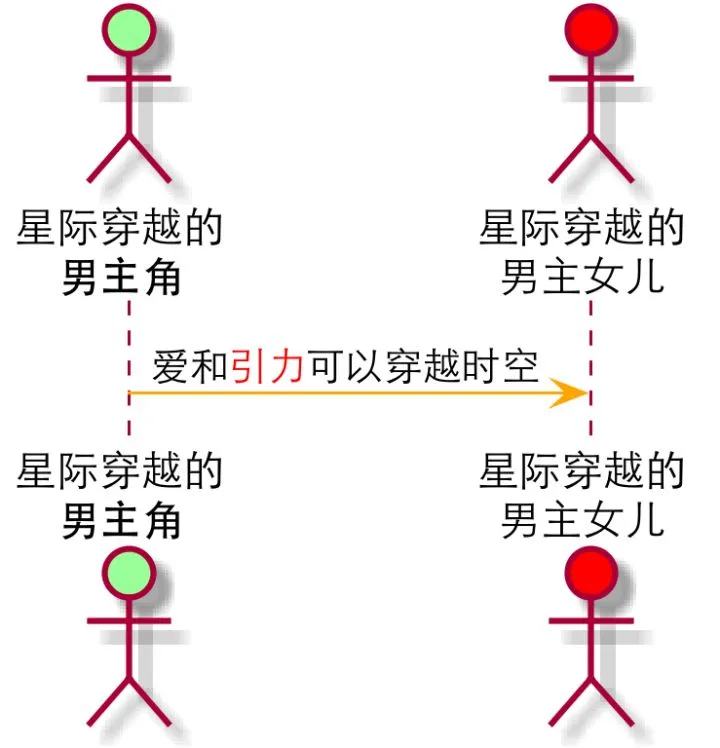
Activity diagram
With the basics of sequence diagrams under your belt, learning activity diagrams is a piece of cake. Straight to the code, without much explanation (programmers should be quite familiar with if/else):
@startuml

scale 1024*768

start

if (exec Lazarus?) then (yes)
    :find a livable planet;    (*)
    :save **human beings**;
else (no)
    :keep adapting,
    __keep farming__ and <font color=red>keep dying</font>;
endif

stop

@enduml
(*) an activity begins with : and ends with ;. Even with the sequence diagram basics, when you start writing activity diagrams you’ll always forget the trailing semicolon.
The generated diagram looks like this:
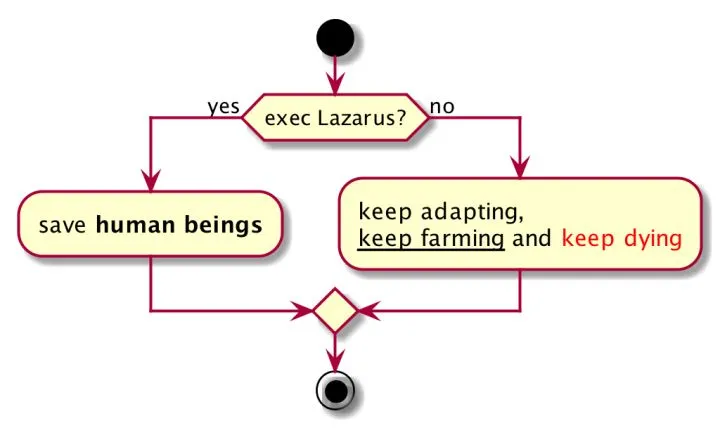
Here’s a more advanced one:
@startuml

scale 512*1024

|Romilly|  (1)
start
repeat     (2)
    :record the data from black hole;
    :keep waiting;
repeat while (Copper & Brand are not back?)

|#AntiqueWhite|Copper| (3)

:enter the Endurance;

while (has more video tapes?)  (4)
    :watch it;
    :cry;
endwhile

end

@enduml- (1)(3) use
|to create an activity diagram with swimlanes; from the swimlane declaration onward, the following activities all belong to that lane, and lanes can be given colors - (2)(4) two different ways of looping — doesn’t it look like writing code?
You can grasp it almost at a glance, can’t you?
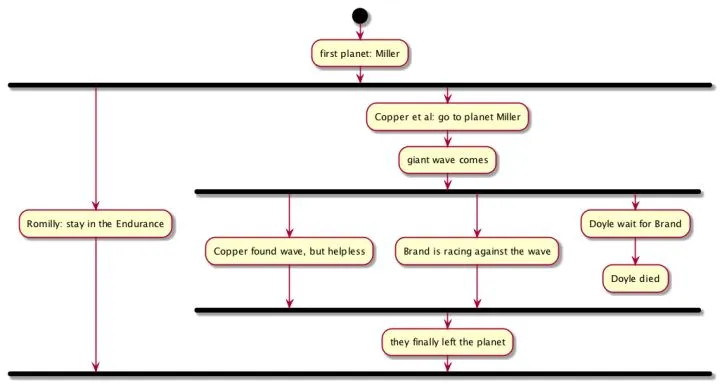
Advancing further:
@startuml
scale 1024*768

start

:first planet: Miller;

fork        (1)
    :Romilly: stay in the Endurance;
fork again  (2)
    :Copper et al: go to planet Miller;
    :giant wave comes;
    fork
        :Copper found wave, but helpless;
    fork again
        :Brand is racing against the wave;
    fork again
        :Doyle wait for Brand;
        :Doyle died;
        kill    (3)
    endfork
    :they finally left the planet;
endfork         (4)

@enduml- (1)(2)(4)
fork,fork again, andendforkdescribe concurrent threads - (3)
killterminates a thread; PlantUML’s examples usedetach, but on testing,detachdoes not work
The generated diagram is as follows:
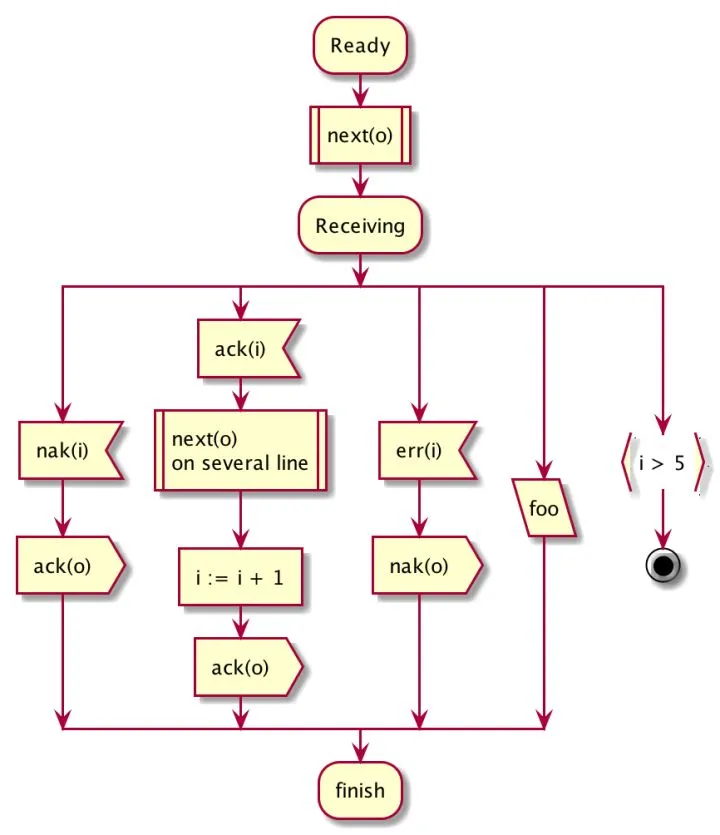
Finally, ; as the terminator of an activity is the most standard figure; if you replace the trailing ; of each activity with other symbols — |, <, >, /, } — you get different figures. No explanation; just look at the code below and the corresponding diagram:
@startuml
scale 2
:Ready;
:next(o)|
:Receiving;
split
 :nak(i)<
 :ack(o)>
split again
 :ack(i)<
 :next(o)
 on several line|
 :i := i + 1]
 :ack(o)>
split again
 :err(i)<
 :nak(o)>
split again
 :foo/
split again
 :i > 5}
stop
end split
:finish;
@enduml
The generated diagram: