Rediscovering Git in 10 Minutes
Recently I’ve been unusually obsessed with Git’s internals. Over the weekend I found time to build a bare-bones object store in Rust and RocksDB—one that can store three kinds of objects: blobs, trees, and commits. I used RocksDB because I’m not fond of the countless tiny Git objects scattered across the filesystem, and I also haven’t studied how packfiles perform delta encoding. RocksDB neatly solves both annoyances. I originally wanted to write an article about the pitfalls I hit during implementation, but since most readers probably use Git every day without truly understanding it, I thought it necessary to first revisit Git’s ideas and main object types through some examples.
Git’s Origins and Fundamentals
Git is a tool (its first generation) that Linus built in roughly ten days more than a decade ago because he was fed up with the existing version-control software—that’s the kind of badass he is: when something annoys him, he rolls up his sleeves and gets to work, with no time wasted on idle talk. Unlike traditional centralized version-control systems such as CVS and SVN, which store updates as diffs, Git treats every file written into its object database as immutable. Even the slightest change creates a new object in the database. An object’s ID is its SHA-1 hash. On this foundation, file objects (blobs) can be organized into trees—more precisely, Merkle trees. A commit is the process of generating a new tree from information about the changed files. The new tree and the old tree share the same subtrees; only the changed parts diverge. After a long series of operations, the object database contains countless trees, which together form a Merkle DAG. Using refs such as HEAD, heads/master, and tags/v0.1, Git can easily track the exact state of every tree the user cares about.
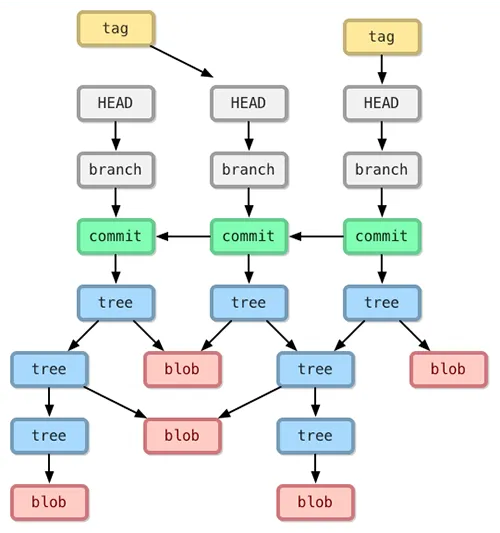
OK, that’s enough prose. Let’s get our hands slightly dirty and look at some implementation details of Git.
Exploring Git’s Object Database
First, we run git init under /tmp/test to create a new repository. Git automatically creates the following directories:
.git/
├── HEAD
├── config
├── description
├── hooks
├── info
│   └── exclude
├── objects
│   ├── info
│   └── pack
└── refs
    ├── heads
    └── tags
Split the current terminal, then run watch -n .5 tree .git in the right-hand pane to monitor the .git directory. After we run git add README.md (where README.md is an empty file):
.git
    HEAD
    config
    description
    hooks
    index
    info
          exclude
    objects
          e6
                9de29bb2d1d6434b8b29ae775ad8c2e48c5391
          info
          pack
    refs
        heads
        tags

9 directories, 17 files
We can see that a new file has been created in Git’s object database. Its contents are the contents of README.md, and its filename is the base16 encoding of its SHA-1 hash. Note the two-level directory structure: this prevents a directory from becoming overloaded with too many entries when there are many objects. This design pattern appears in many systems, such as nginx cache.
Using git show -p e69d, we can see that this is an empty file.
Git internally has four main types of objects:
- blob: stores the actual file
- tree: stores the directory structure of files
- commit: stores commit information (primarily the root of the current tree and the root of the previous tree)
- tag: stores version information, essentially an explicit marker on a particular commit in the object database
Git’s object database stores all these object types in the same way; from a base16 object ID alone, you cannot tell what kind of data lies behind it.
Let’s commit the current change. After we run git commit -m 'create empty readme':
.git
    COMMIT_EDITMSG
    HEAD
    config
    description
    hooks
    index
    info
          exclude
    logs
          HEAD
          refs
              heads
                  master
    objects
          66
                d70e87e9fd27f086ebf88c9a725dcd3658d27d
          e6
                9de29bb2d1d6434b8b29ae775ad8c2e48c5391
          f9
                3e3a1a1525fb5b91020da86e44810c87a2d7bc
          info
          pack
    refs
        heads
              master
        tags

14 directories, 23 files
Two new objects have appeared in the object database. Let’s see what they are.
f93e is a tree object:
$ git show --pretty=raw f93e
tree f93e

README.md
We can also see more detailed information about the tree:
$ git ls-tree f93e
100644 blob e69de29bb2d1d6434b8b29ae775ad8c2e48c5391    README.md
The filename is not stored in the blob object; it is stored in the tree. This has two advantages: 1) files with identical contents store only one copy of the data even if copied many times—common with binary files such as images; 2) renaming a file only creates a new tree and does not require creating a new blob.
From this, we can see that Git cares about project snapshots, not individual files.
If you have followed my previous steps exactly, then at this point the SHA-1 hashes of your file blob and tree objects should match mine. This is the greatness of Git: anyone, on any hardware, will generate identical objects from identical content (blockchains add computation on top of this).
At the commit level, however, our data diverges. On my machine the commit is 66d7; yours may be a different hash. This is because the author name, email, and PGP key I’ve configured are certainly different from yours. Consequently, my PGP signature differs from yours, and the hash naturally differs as well.
66d7 is a commit object:
$ git show --pretty=raw 66d7
commit 66d70e87e9fd27f086ebf88c9a725dcd3658d27d
tree f93e3a1a1525fb5b91020da86e44810c87a2d7bc
author Author <xxxx@gmail.com> 1573839165 -0800
committer Author <xxxx@gmail.com> 1573839165 -0800
gpgsig -----BEGIN PGP SIGNATURE-----

 iQB1BAAWCAAdFiEEDAfXiyARvxtLDYya/74NqNQekKwFAl3O4T0ACgkQ/74NqNQekKxdmgD+Nw+1JNrV148xIkqfrLLGrFNAJdESu1h+StYVCGAbtLgA/R56Za+ABgLAM/IRGxYXRlZ0MwTmlfCwsznYCPdKyC8E
 =6QP9
 -----END PGP SIGNATURE-----


    create empty readme

diff --git a/README.md b/README.md
new file mode 100644
index 0000000..e69de29
What happens if we delete this file and run git commit -a -m "deleted README.md"?
.git
    COMMIT_EDITMSG
    HEAD
    config
    description
    hooks
    index
    info
          exclude
    logs
          HEAD
          refs
              heads
                  master
    objects
          4b
                825dc642cb6eb9a060e54bf8d69288fbee4904
          66
                d70e87e9fd27f086ebf88c9a725dcd3658d27d
          e6
                9de29bb2d1d6434b8b29ae775ad8c2e48c5391
          f9
                3e3a1a1525fb5b91020da86e44810c87a2d7bc
          fd
                03a139f6b861be4d54247888213a723c24eb99
          info
          pack
    refs
        heads
              master
        tags

16 directories, 25 files
We can see that two new files have been generated. Let’s guess: one is the commit object, and the other is the tree object:
$ git show --pretty=raw fd03
commit fd03a139f6b861be4d54247888213a723c24eb99
tree 4b825dc642cb6eb9a060e54bf8d69288fbee4904
parent 66d70e87e9fd27f086ebf88c9a725dcd3658d27d
author Author <author@example.com> 1573840228 -0800
committer Author <author@example.com> 1573840228 -0800
gpgsig -----BEGIN PGP SIGNATURE-----

 iQB1BAAWCAAdFiEEDAfXiyARvxtLDYya/74NqNQekKwFAl3O5WQACgkQ/74NqNQekKznZwEA+tFOIwzcEAt+j8FD0Sv3722Gfi21ZT56feOHktD1K9gA/3GNilWvdloA4t4mS1kX8HMc1Kr5zvA0iF9F54t3FV4B
 =NGh7
 -----END PGP SIGNATURE-----


    deleted README.md

diff --git a/README.md b/README.md
deleted file mode 100644
index e69de29..0000000
And:
$ git show --pretty=raw 4b82
tree 4b82
As you can see, there are no files left in the tree 4b82.
I hope this simple introduction has given you a deeper understanding of Git. Later this week, I’ll write about the pitfalls I encountered while implementing a bare-bones Git in Rust.