What I Talk About When I Talk About Scheduling
scheduling has a great many aspects worth discussing; any single one of them could make an entire lecture. This time I will give only an overview.
What is scheduling?
Wikipedia puts it this way:
In computing, scheduling is the method by which work specified by some means is assigned to resources that complete the work.
This sentence is a bit opaque. We need to face it with the same subject-verb-object hunting skill and focus we used for middle-school English final reading comprehension. Let me translate it into programmers’ favorite language: scheduling is a function that maps a set of tasks onto a set of resources.
Take an example—the most familiar one, the Linux CPU scheduler (hereafter the Linux scheduler)—which maps a series of processes (workloads) onto CPU cores:
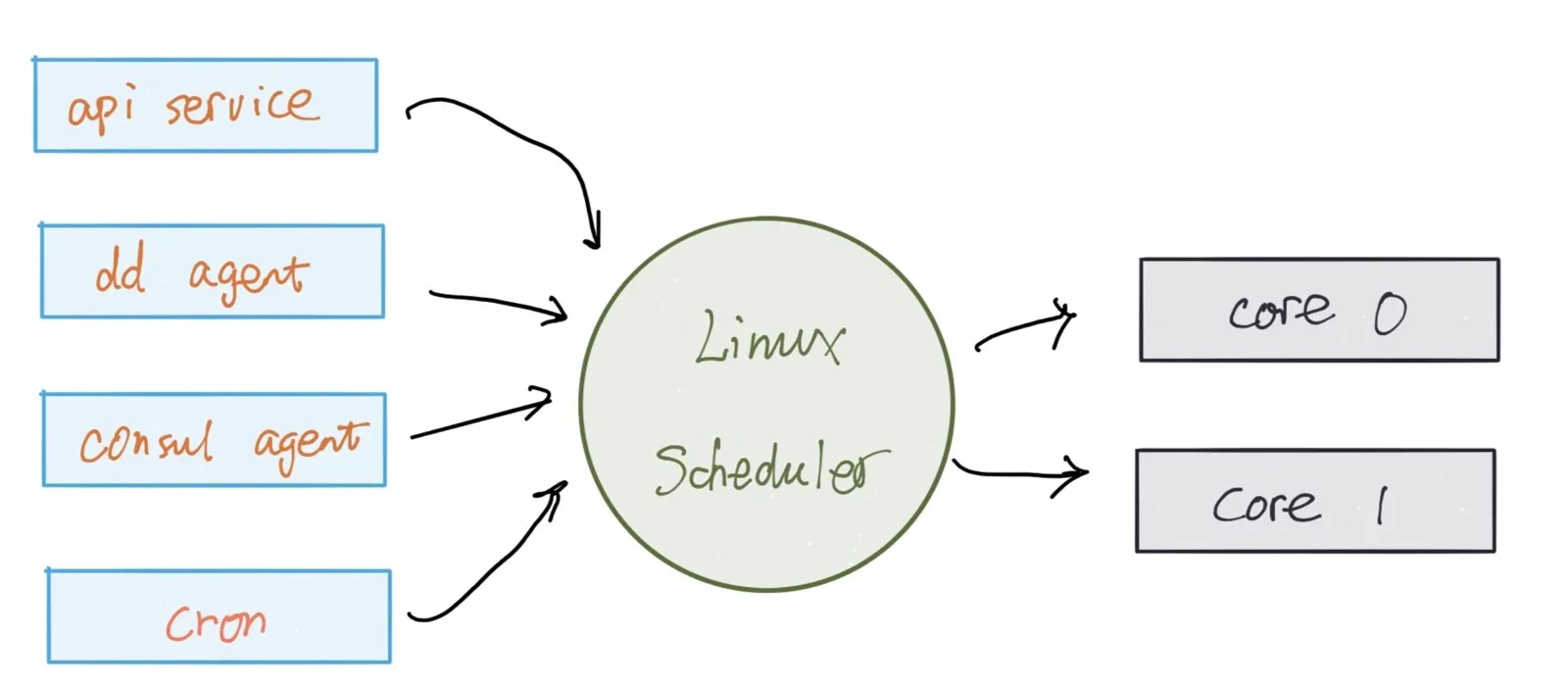
Here the main tasks include: long-running system services, all kinds of agents, one-off scripts, and periodic jobs. For the Linux scheduler, its scheduling function bears enormous functional pressure: fairness, priority, preemption (interactive tasks must be able to run immediately), efficiency, scalability (from single core to multi-core to NUMA), and so on.
Beyond the Linux scheduler, our lives contain many schedulers you have never noticed. A few examples:
- Erlang scheduler: mapping Erlang processes to threads.
- nginx: mapping HTTP/HTTPS requests to processes/applications.
- Memory manager: mapping virtual memory to physical memory.
- hypervisor: mapping VMs to physical machines.
- AWS EC2 service: mapping VMs to hypervisors.
- Spark: mapping map/reduce jobs to compute nodes.
Through these mappings, we gain many benefits:
- Resources are used more efficiently.
- By adding a layer of indirection, tasks are decoupled from the resources they need.
- Better quality of service (QoS).
Looking carefully at the examples above, it is not hard to see that the number of tasks to be processed often far exceeds the number of resources—sometimes by several orders of magnitude. This shameless behavior of using a small amount of resources to puff itself up and finish a large number of tasks has a beautiful name in computing: over subscription. If you think about it, the secret of many business domains, especially the internet, lies in this little phrase. Consider the carrier that gives you a 50M monthly network plan; early Gmail offering ever-growing 1G mailbox capacity; AWS confidently advertising to every customer: buddy, come to our venue—S3 is unlimited, and EC2 is whatever you want.
Conversely, if we want to support over subscription, adding a scheduler to decouple the two ends of resources solves the problem.
By now everyone has a rough understanding of scheduling—and at this point many questions surface. The most important one is: there is no free lunch in this world. What is the cost of enjoying the scheduler’s massage?
How fast (or slow) is scheduling?
Let us stay with the Linux scheduler. The scheduler itself consumes resources when it runs; this is its main cost. Naturally, we want this cost to be as small as possible. So the next question is: when Linux performs a reschedule, how many resources (CPU time) does it actually consume?

To answer this, we first have to answer another question: how do we measure it?
To measure the orange part in the figure above, there are two intuitive approaches. One is to record the time at entry and exit, compute the diff, and average it—but the scheduling action is not under our control, and it is hard to find its entry and exit in user space. The other is to make the cyan region approach zero and let the entire time slice be filled by the orange region, so that the duration of task execution becomes the total time spent scheduling. Following this idea, user-space code must be simplified to do exactly one thing: as soon as it is executed, it immediately blocks itself, so the scheduler unhesitatingly yields the CPU to its friends.
The perf tool on Linux already implements this approach for you; just call it:
staging$ perf bench sched pipe
# Running 'sched/pipe' benchmark:
# Executed 1000000 pipe operations between two processes

     Total time: 20.026 [sec]

      20.026324 usecs/op
          49934 ops/sec
The principle is that two processes pipe to each other, exchanging courtesies, while the scheduler shuttles back and forth between them. There is a problem here: since the processes may be distributed across different cores, the measured performance is distorted, so we should use taskset to pin their affinity to a single CPU core:
staging$ taskset -c 0 perf bench sched pipe
# Running 'sched/pipe' benchmark:
# Executed 1000000 pipe operations between two processes

     Total time: 3.104 [sec]

       3.104995 usecs/op
         322061 ops/sec
One might ask: the kernel scheduler has tools that let you avoid writing code, but how do you measure the performance of a user-space scheduler, such as the Erlang VM process scheduler?
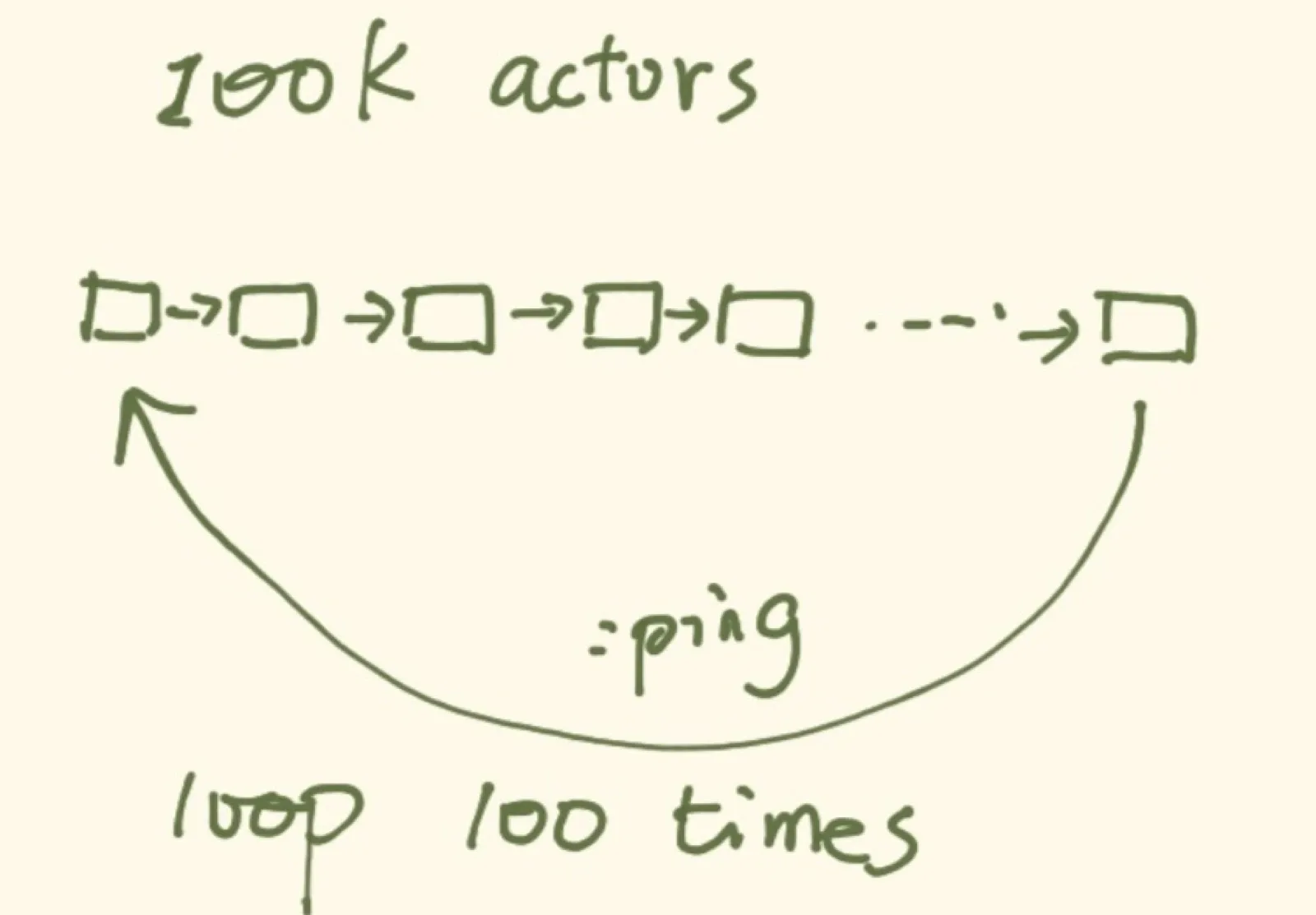
Here is what I did: first start 100k processes. The entry function of each process receives the pid of the previous process (the first one gets self()). After startup completes, self sends the simplest possible message to the last process, such as :hello. Each process, upon receiving :hello, sends :hello to the pid it knows, until the message returns to self. This completes one cycle. After 100 cycles—that is, 10M schedulings—we measure the time spent:
The final result is:
~/pingpong/elixir master [!]
staging$ ./pingpong
Start 100000 actors
All actors are started
Time elapsed 10000000 runs for message passing: 5.913704s
Single op spent: 0.5913704us
Interestingly, when we use CPU affinity, its performance is almost unchanged:
~/pingpong/elixir master [!]
staging$ taskset -c 0 ./pingpong
Start 100000 actors
All actors are started
Time elapsed 10000000 runs for message passing: 6.199335s
Single op spent: 0.6199335us
Likewise, we ping/pong between two goroutines:
~/pingpong/go master [!]
staging$ ./pingpong
2.895870s elapsed
0.144793 us per switch
After CPU affinity, performance is also almost unchanged:
~/pingpong/go master [!]
staging$ taskset -c 0 ./pingpong
2.880224s elapsed
0.144011 us per switch
The code is at tyrchen/pingpong. I will not paste it here and explain it in detail.
After these rounds of benchmarks, what have we learned?
First, none of these tests is rigorous. We did not eliminate the influence of other processes in the system, so the measured results are not precise. But we can get a rough sense of the order of magnitude. Knowing this order of magnitude is very important, because the time slice that the scheduler cuts out of CPU time should be higher than this order of magnitude; otherwise it is meaningless.
Second, this is less the performance of scheduling than the performance of context switching. But for those of us not specifically profiling scheduler algorithms, the two can be equated, because what we care about is how much CPU time the various chores around scheduling—from the end of the previous task to the start of the next—squeeze out.
Third, comparing the three, we can draw some inferences. The Linux scheduler does a great deal of work, and most of its time is spent on context switches: SAVE-n-LOAD, switching page tables, and so on, so its performance is the worst. The Erlang scheduler is about 5x faster than the Linux scheduler. This is because it switches its own defined ‘processes’ in user space, without bothering the kernel or involving page-table switches. SAVE-n-LOAD also handles state on the VM, which is simpler, and scheduling itself has no such complex requirements, so its victory is natural—if it could not win, that would instead be a problem. The Go scheduler has the best performance: 20x the Linux scheduler and 4x the Erlang scheduler. Like Erlang, Go’s user-space scheduler lacks many complicated demands, so its performance is naturally good. As for being so many times better than Erlang, there are probably two reasons:
- The Go scheduler is the simplest: no priorities and no preemption, and it is highly optimized (even sacrificing overall system efficiency by spinning threads when there is nothing to do).
- There is no burden of interpreting bytecode at runtime—Go compiles directly to a binary, while Erlang compiles to BEAM and interprets it.
So the Go scheduler’s victory is entirely justified.
Patterns / Trade-offs
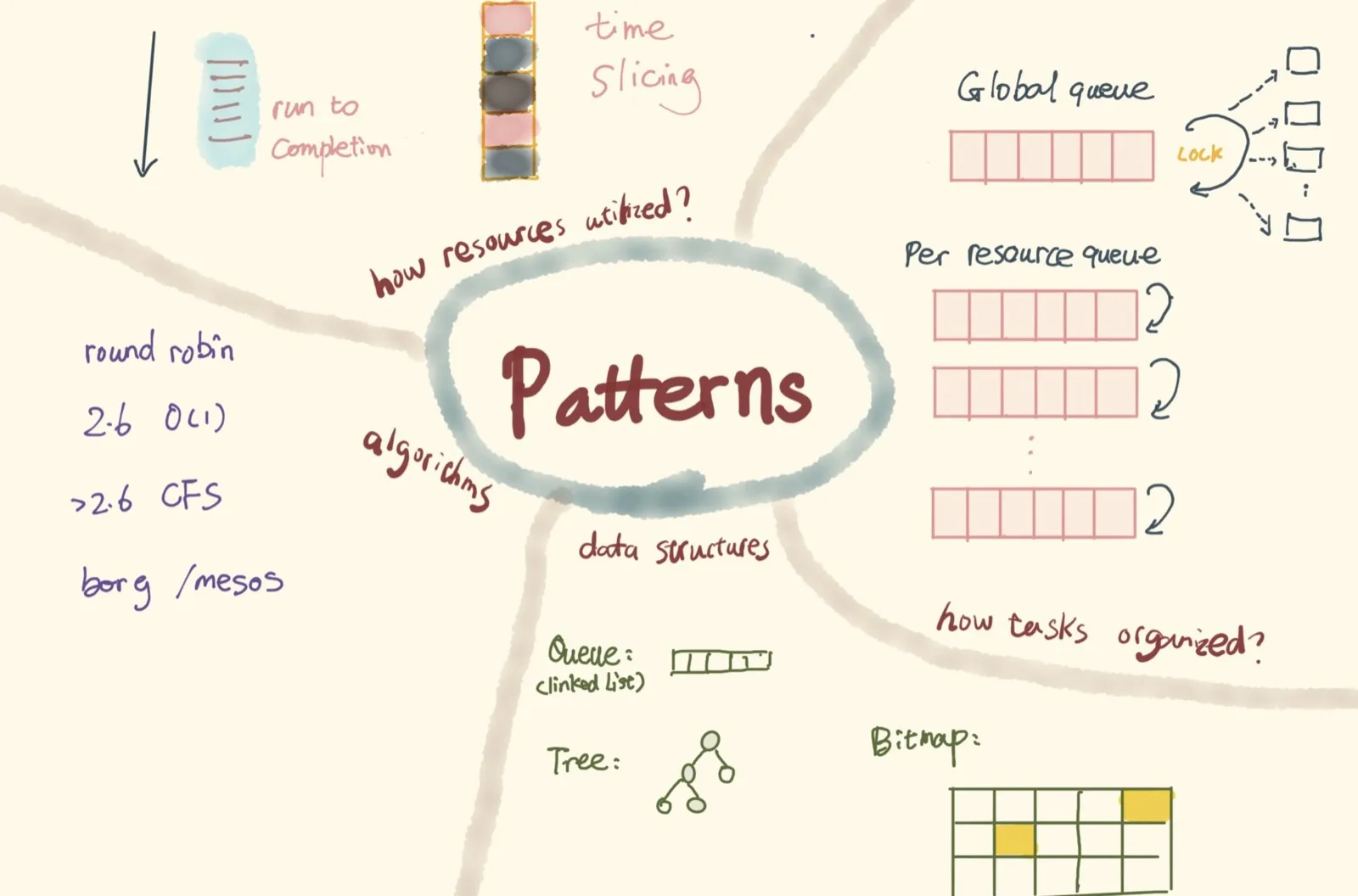
We have only briefly discussed three different schedulers, and already found that their implementations follow different patterns or trade-offs based on their business requirements. When considering a scheduler, we need to consider these questions:
- How should tasks be organized? Do all resources share a single task runqueue, with the scheduler locking to guarantee mutual exclusion? Or do we set up a separate runqueue for each resource to reduce lock overhead? Then another question arises: if a resource’s task list is empty, should the resource sit idle, or can it go to another resource’s runqueue and steal tasks for itself?
- How should resources be utilized? Run to completion, or time slicing? Run to completion is very valuable for compute-intensive, latency-sensitive scenarios; hence in network devices, apart from traffic-shaping requirements, packet processing mostly uses run to completion. Time slicing is suitable for I/O-intensive scenarios or when overall system utilization matters.
- What data structure should organize the runqueue? A FIFO queue (linked list), an rb tree, or a bitmap plus FIFO queue? What are the pros and cons of each?
- What algorithm should be used? A while loop that traverses in O(N) to find the most suitable task, or round robin (weighted round robin) for arbitrary tasks? What algorithm did the Linux 2.6 O(1) scheduler use? Why did CFS (Completely Fair Scheduler) replace it? For cluster scheduling in today’s large clusters, how does the scheduler handle it? What are the stories behind Borg, Mesos, and Omega, which became famous one after another, and how should they be chosen?