How to Approach TDD the Right Way
TDD (Test-Driven Development) has long been a coveted ideal in the programming world. Yet achieving a form of TDD that genuinely benefits a project is no easy task. I’ve seen plenty of teams practice TDD as mere ritual — writing test cases for the sake of writing test cases — which ends up dragging down the project, costing far more than it’s worth and shaking the whole team’s confidence in continuing to use TDD. If you happen to be someone who’s been tortured by TDD to the point of spitting blood, or you’ve heard a mountain of examples where TDD was meaningless and held back progress, leaving you unable to decide whether to adopt it — read on.
Wikipedia defines TDD like this:
Test-driven development (TDD) is a software development process that relies on the repetition of a very short development cycle: requirements are turned into very specific test cases, then the software is improved to pass the new tests, only. This is opposed to software development that allows software to be added that is not proven to meet requirements.
Note the emphasis on requirement here.
TDD was first introduced by Kent Beck in Extreme Programming. He laid out the following steps:
- write a test for the next bit of functionality you want to add
- write the functional code until test passes
- refactor both new and old code to make it well structured
On the subject of TDD, in 2014 several big names — Kent Beck, Martin Fowler, and others — kicked off a high-profile debate: Is TDD Dead? Opinions differ, with arguments on both sides; feel free to google and read up.
TDD’s definition and steps appear deceptively simple: requirements are turned into a clear set of test cases, then we write code so the tests pass one by one, and finally we refactor so that incremental code and existing code coexist peacefully, meeting design norms and principles (DRY, OCP, …). And so the cycle repeats, iterating continuously until the whole project is done.
Misconceptions About TDD
The steps above are so clear and simple that many teams, the moment they introduce TDD, make one blunder after another and throw themselves into disarray. Let’s look at a few common misconceptions.
Tests Belong to QA, Development Belongs to RD
This mindset is often the specialty of traditional IT companies. Their R&D and QA teams are sharply delineated — each may even report up through separate VPs. When practicing TDD they naturally adopt the “render unto God what is God’s, and unto Caesar what is Caesar’s” approach, going down the wrong path from the very start.
TDD is an inseparable part of the development process. The “T” here is meant for requirements analysis and design — it has little to do with QA.
More Tests Is Always Better
In TDD, the biggest taboo is writing too many tests — especially tests unrelated to the requirements. Writing tests has a cost, and introducing too many during TDD points to one of three possibilities: 1) you haven’t thought the requirements through; 2) you’re over-engineering; 3) you don’t know what you’re doing.
Most teams that write too many tests in TDD fall into the third category: they’re transitioning from a traditional development process, they’ve brought in consultants for some training, gotten fired up, and started churning out tests — yet the old development process is too deeply ingrained in their minds, so the way they churn out tests is identical to how they used to write tests; they’ve merely moved the tests that used to be filled in at the end to being written upfront. If we picture the development process as a singly linked list, this kind of TDD thinking is like taking the tail node off the original list and inserting it at the head.
Not knowing what you’re doing is the most fatal of all. TDD means a paradigm shift.
TDD Means You Don’t Need Software Design
This idea is as laughable as saying agile development doesn’t need design. Hold your laughter — no one practicing agile or TDD would ever say we don’t need design. Everyone pays lip service to design being important, but when it comes to execution it goes sour: “Spend time on design? Then what’s the point of small steps and rapid iteration? Let’s just roll up our sleeves and code!”
My experience is that the more you commit to TDD, the more important the upfront requirements analysis and design become.
How to Do TDD
The “T” in TDD maps to requirements in the real world, so the first step on the TDD journey is to nail down the requirements. Let’s walk through TDD using a generic news feed as an example.
In a social network, a news feed is a collection of the activities generated by other users’ actions. If Bob follows Alice, then every movement of Alice — every smile, every frown — is captured in Bob’s timeline. That’s the basic requirement.
So how do we deconstruct this process? Suppose Alice likes a photo of a cute kitten. We might describe it like this:
Alice liked photo http://abc.xyz/little-cutie
Sometimes we further need to know where the photo comes from, which we could describe as:
Alice liked photo http://abc.xyz/little-cutie on Cynthia’s album.
Let’s generalize this description:
Alice (actor) liked (verb) photo … (object) on Cynthia’s album (target).
From this we extract four elements: actor, verb, object, target (optional). Through these four elements, we can describe a user’s action.
The actor is usually a user, but sometimes it can be a system (or a bot). We can use a global id to distinguish actors, and even attach a type to each actor.
The verb describes what actions a user can actually take and what effects those actions produce. Common verbs include like / unlike, follow / unfollow, create, delete, add, remove, and so on. follow / unfollow is a special kind of verb; through these actions we can build the user’s subscription table.
The object describes the thing being acted upon by the verb. It can be anything. For example:
Alice created comment “bla bla bla”
Here the object is a comment. The object needs an id and a type to uniquely identify where it can be accessed from.
The target is optional. It’s often a collection of objects. For example, “Alice added a song ‘abc’ to album ‘best songs’” — the target is that album. When this action shows up in Bob’s timeline, Bob might be interested in the target as well.
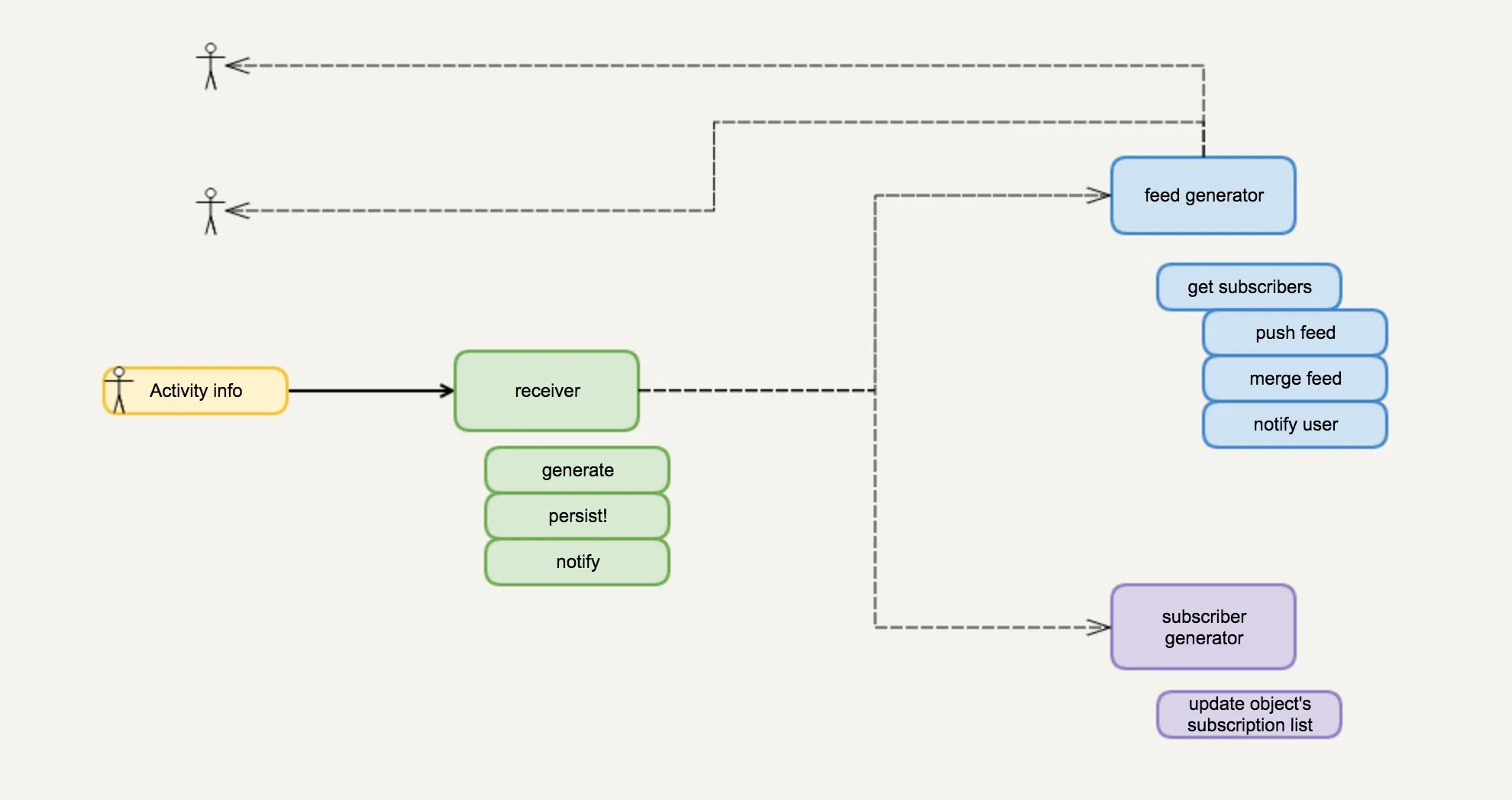
Once a user’s action can be described by such a data structure, we next need to consider how the system handles it when it receives that structure. Naturally, the first thing we think of is: the actor’s followers will receive the actor’s actions. Then we ask, how are followers created? Oh — if the verb is follow, we add the actor to the object’s followers; otherwise we remove them. Let’s turn this flow into a diagram:
This makes the system much clearer, and we can see it splits into several parts:
- activity receive and persistence — when an action occurs, external systems call the news feed to create an activity
- feed generator — once an activity is successfully created, it fans out to all subscribers to generate feeds
- subscription generator — when an activity has a certain kind of verb, we maintain the object’s subscription table (add/remove).
This whole process might be a requirements design we derived from research, or something we hashed out together as a team. So far we haven’t done anything related to TDD — but this process is absolutely indispensable for doing TDD.
With the big-picture requirements analysis and design in place, we can start refining the design of each part. TDD should only make its appearance at this stage. If it appears too early, it easily leads to rework; too late… well, you’re already writing code, so is it still TDD?
Defining the Interface
Based on our earlier design, let’s now tackle the first task: activity receive and persistence. Many people rush to start coding as soon as they get a task, but with TDD the first step is to define the interaction between the subsystem involved in this task and the outside world — in other words, the interface. Based on our earlier design, we can now design an interface like this:
test "other system should be able to create an activity" do
  actor = {1139, "Alice", :person}
  verb = :like
  object = {1483, "http://abc.xyz/little-cutie", :photo}
  {:ok, activity} = Activity.create(actor, verb, object)
  %{...} = activity
  assert ...
end
That’s right — I wrote a test case. This test case tells me how I want the newly created interface to be used. Even though we’re writing a test case, we’re thinking through several things:
- What is the interface for creating an activity?
- What kind of input does it allow (what parameters does it accept)?
- What kind of result does it return to the caller?
Yes — the process of writing this test case is the process of designing the interface. This is where I think TDD helps the most: thinking the interface through clearly before writing any code.
Interface Review (Optional)
This step can be skipped depending on how important the interface is and how skilled the engineer is. In a previous article of mine, I took a clear stance against excessive code review, emphasizing instead the importance of interface review. Most code reviews are mere formality, tackling things that static analysis should be doing. If resources and time are extremely tight, my rule is: I’d rather skip code review entirely than skip a proper interface review. Because if the interface is bad, then no matter how beautiful the local code is, within a global pile of shit it’s a flower stuck in a dung heap — wilting is only a matter of time. If the interface is right, then the worst local code is just a shit in a sea of flowers — pluck it out and throw it away, no harm done.
I digress. If we’ve resolved to do interface review, then TDD is simply your best choice. Some interface reviews I’ve been through are typically done in a Word document or on a wiki, and the biggest problem with that kind of review is that even if the review passes, the code implementation may still drift — is document-code inconsistency really so rare? When the interface changes later, who remembers to update that document that’s now God knows where?
To ensure the interface really is the product of review, the best approach is to express how the interface is used through test cases — and isn’t that exactly what TDD does?
Using TDD for interface review just requires slightly restraining your enthusiasm for writing code — after defining the test case, don’t rush to write the implementation. Send a PR to the relevant people (sometimes even hold a small meeting to discuss), see what others have to say, and then move to the next step.
Development
At last we can enter the Test-driven DEVELOPMENT phase. This is the software engineer’s favorite part, because we can finally roll up our sleeves and get to work!
But don’t rush — in TDD, the development phase is composed of several smaller TDD cycles. In fact, any software development process is a self-iterating cycle of requirements, design, development, and testing, strikingly similar to fractal geometry — both embody the idea of rings within rings, endlessly. Under a large design/interface lie several smaller designs/interfaces, and under those lie even smaller ones.
It’s just that TDD emphasizes this process even more. So across the various stages of development, you may need to keep adding new test cases for your ever-finer-grained interface designs. Generally, TDD should cover tests at these levels of interface:
- The “user” level. For many projects, the user-level interface is the API — REST API, GraphQL, RPC, a proprietary protocol, and so on.
- The “app” level. Note that “app” here doesn’t mean a standalone application but a logical concept. A system can be logically decomposed into several internal apps that interact with each other and together form the system. How apps invoke each other is extremely important.
- The module level. We only need to care about a module’s public interface. Private interfaces don’t matter.
No need to guard this list as an inviolable law; adjust it freely according to the needs of the project and system, or else you may write too many test cases and turn them into a burden. My experience is: for the uncertain or highly volatile parts of a system, don’t introduce too many cases; for the certain parts, or where the interface has grown stable, feel free to extend TDD down to the module level.
This raises another question: in development, should we go top-down or bottom-up?
I lean toward top-down, because it tends to match my own thinking process: I like to start top-down development once the big design is done and the general direction is set, with details settled gradually during development. Of course, some people prefer to settle everything first, then build up block by block and assemble them. Either way works (Kent Beck is a proponent of ground-up).
Back to the implementation of our activity create interface:
def create(actor, verb, object, target) do
  {actor, verb, object, target}
    |> generate
    |> persist!
    |> notify
end
I’ve broken this process into three small steps along a pipeline: generate the data, persist it, and notify (observer pattern). For the sake of example I’ve left out error-handling code. And just like that, the interface has an implementation. We can now think further about the interfaces of these small steps:
- generate receives the user’s parameters, validates them, and produces an activity data structure
- persist receives an activity, stores it in storage (possibly a database or memory), and returns the activity
- notify receives an activity, notifies every app interested in it (perhaps the feed generator or the subscriber generator), and returns the activity
Then write test cases for these small interfaces (optional), and keep refining each step pipeline-style.
A brief digression on design. In “The Beauty of Pipes” I mentioned that we can view a system as a series of transformations from input to output. This makes it easy to break the problem down into small sub-problems and write clear, readable code.
Don’t you feel that TDD and pipelines are a match made in heaven?
Some Reflections
Does TDD Apply to Every Scenario?
No. Front-end projects are somewhat awkward to do TDD with — though perhaps that’s because I’m not a competent front-end engineer. I find it seems infeasible to express a front-end page with one (or several) test cases, especially for a Single Page Application. So we need to separate the presentation layer from the logic layer, do TDD on the M and C in MVC, and leave V alone. Of course, corrections are welcome.
Additionally, data-analysis projects — and more broadly, projects where the goals and requirements are unclear, or where they’re clear but there’s no good way to express them, such as machine learning and AI — are hard to do with TDD. How on earth do you write the test case?
Beyond that, the vast majority of back-end projects can be divided and conquered with TDD thinking.
Is the T in TDD a Unit Test?
By Kent Beck’s definition, yes. But I think that’s imprecise. Obviously, test cases for user-level interfaces often go beyond the bounds of a unit test and look more like integration tests or functional tests. But I don’t think it matters whether it’s a unit test — what matters is whether your T reflects your design, your interface. Obsessing over UT or not just traps you in the mire of formulaic writing (like the eight-legged essay).
On Mockup Code
During development, we often find that the callers of the system we’re building need to start work as early as possible once the interface is settled, so the project can be completed sooner. For example, the back end provides an API and the front end implements the UI — here we need to provide a mockup API for the front end. In a normal development process, the mockup API gets progressively replaced by the real API until it has fulfilled its historical mission, swept into the dustbin of git history to become a sunk cost. In TDD, we can make the mockup code and the test code share the same fixture:
# lib/activity
def create(actor, verb, object, target) do
  get_activity_mockup(actor, verb, object)
end

# test/support
def get_activity_mockup(actor, verb, object, target) do
  "fixture.json"
    |> File.read!
    |> Poison.parse!
    |> retrieve(actor, verb, object)
end

# test/test1
test "other system should be able to create an activity" do
  actor = {1139, "Alice", :person}
  verb = :like
  object = {1483, "http://abc.xyz/little-cutie", :photo}
  {:ok, activity} = Activity.create(actor, verb, object)
  assert get_activity_mockup(actor, verb, object) == activity
end
This way, even after create is replaced by the real code someday, this test remains a worthwhile investment, not a sunk cost.
On the Hierarchy and Organization of Test Code
The test cases written at different stages of TDD are at different levels and can’t be lumped together. Normally we should put top-level, user-level interfaces in one directory, app-level ones in different subdirectories by app name, and module-level ones in different subdirectories by module name — don’t mix them together. User-level interfaces should be the most stable; adding new interfaces is fine, but if an existing interface must change, we need to analyze the reason and learn from it:
- Did requirements analysis go wrong — was there no clear, complete set of requirements?
- Was the interface design phase not thorough enough?
- Was the design skill insufficient, leaving the interface not open enough to change?
Then think about how to do better next time. Changes to app-level and module-level interfaces don’t need to be treated so cautiously. If you find that your module-level interface test cases keep changing, you might want to consider skipping those test cases at the outset — it signals either a design problem or a bit of over-testing. Solve the other problems first, then revisit the testing.
On Documentation
Well-organized test code is also great for documentation. When explaining how to use your code, you can link the docs to the relevant test cases, giving callers a clearer understanding of how the code is used.
An even better approach is doctest — embed example code showing how to call the code inside the documentation portion of the code, and that example code then becomes part of the tests. doctest first appeared in Python, and now nearly every language has tooling that supports it. For TDD’s user-level interfaces, you might consider using doctest to write the test cases.