Musings on Software Design
In this era where Lean/Agile sweeps all before it, design seems to have been pushed to the margins; delivery cycles are so fast that there seems to be no room for more thought. In many teams MVP (Minimal Viable Produce) has evolved into a metaphysical totem, giving engineers a perfect excuse: I’ll build an MVP first, and worry about design later.
If you’re just hacking around on a personal lark, having an idea and hacking it out is all very well; but if you’re building a project in earnest, you still need to put effort into design. Otherwise, endless rework will leave you speechless, tears streaming in a thousand lines.
Design Begins with Understanding the Problem
Most engineers are very smart people, and the greatest problem with smart people is arrogance. Many receive a requirement and, before they have grasped its denotation and connotation, code is already flowing through their heads. A system built this way, however ingenious, cannot escape the pain of rework caused by an unclear understanding of requirements.
Understanding requirements is easy to say and hard to do. There are correct requirements that are expressed incorrectly, correct requirements that are never expressed, and requirements that are over-expressed. So after receiving a requirement, don’t rush to find a solution; ask yourself, your coworkers, and your customers follow-up questions to clarify the vague parts.
Understanding requirements also means understanding the product, the company, and the current state of (potential) competitors; the context of the requirement; and its constraints. There are two kinds of knowing and two kinds of not knowing:
- I know that I know
- I know that I don’t know
- I don’t know that I know
- I don’t know that I don’t know
The process of clarifying requirements is the process of continually driving out ignorance and coming to grips with the current state, the context, and the constraints.
This topic is vast and very important, but it is not the focus of this article, so I will leave it at that.
Finding (Multiple) Solutions
If you already have a good grasp of the problem, the next step is a journey of discovery toward solutions. This is work that tests your big-picture thinking. If a child wants a car, you can satisfy that wish by:
a. Buying one ready-made from a toy store b. Buying Lego bricks and assembling them c. Making one out of paper, or finding a piece of wood and carving one
These correspond to several approaches to software engineering problems:
a. Buying ready-made software (acquire or license it), then doing secondary development (if needed) b. Finding building blocks and assembling them (glue) c. Building from scratch, or DIY
Most of the time, if the TCO footnote:[Total Cost of Ownership] of a or b is reasonable, do not choose c. The purpose of building a product is to provide some service to customers, not to prove that you can code it line by line.
Option a is a very important point, but most engineers have no concept of money—or, out of the selfish desire for job security, they ignore it. Engineers are increasingly expensive; any feature that can be handled at a reasonable price should not be staffed by hired engineers (a slap in my own face). In a product, the most core part is no more than 20% of the whole system; deploying human resources on that core part is the way of software design.
We’ll discuss b later.
For engineers, DIY-ing a feature is a huge temptation. One kind of DIY comes from engineers’ dissatisfaction. Any open-source software will always have some shortcomings when handling a particular piece of business logic; if you fixate on those shortcomings while ignoring its benefits, that is greatly unwise. A couple of days ago I heard someone say, “consul sucks, …, I’ll build our own service discovery framework…” and I had to smile wryly. I believe he can build a simple service discovery tool; it’s not especially difficult. The question is whether it’s worth doing. If you have to build even infrastructure components at the level of Consul yourself, then either your ambitions are too grand, or you haven’t defined the core value of your software system well (unless the core value of the system lies precisely there). Once code is written, whether 5,000 lines or 50, someone has to maintain it; over the system’s life cycle, every line you write yourself is a debt, and you must pay interest on it regularly or irregularly.
Another kind of DIY comes from engineers’ ignorance. “The ignorant are fearless” can have a positive effect in some situations, helping to break with convention. But in software development, the richer your knowledge and the broader your horizons, the better. When an ignorant engineer faces a problem (say, service discovery) and does not know that a ready-made solution may exist (Consul), he grits his teeth and writes one himself. More often than not it will be flawed (for example, no health checks for upstream services, or no high availability for itself). Bugs pile up; he painstakingly grinds through them one by one, only to discover that he took many detours and spent a great deal of effort building a subset of some open-source project’s functionality. Of course, for the engineer, the practice is very valuable; but for the company, it is a heavy and meaningless expense.
Horizons define a person’s height. If every day you meet the same kind of people, read homogeneous books and watch homogeneous videos, and read and write code in the same domain, your horizons are probably not broad enough. The Internet advances a thousand li a day and changes too fast; if you imprison yourself in a little corner of the world, you can easily become one of the people of Peach Blossom Spring as Tao Yuanming described them: they knew not that the Han had come and gone, to say nothing of the Wei and Jin.
Building Flexible and Resilient Systems
If everything above has been idle talk, what follows has something to do with real software design.
Decomposition and Composition
Software design is a process of continually decomposing a large problem down to atom-sized subproblems, and then continually composing them again. This is analogous to biology: atoms (keyword/macro) combine into molecules (function), molecules into cells (module/class), cells into tissues (micro service), tissues into organs (service), and then into an organism (system).
A system composed in this way satisfies Separation of Concerns. From as large as an organ to as small as a cell, each does its own job and does what it must do to the utmost. The heart need not concern itself with what the kidneys are doing; it only needs to do its own job: pump fresh blood out through the arteries, and collect used blood from the organs through the veins.
Decomposition and composition are so important in software design that if a system is decomposed sensibly, the cost of future maintenance will be far smaller. Separation of concerns is the same principle, but different engineers may separate concerns in completely different ways. Still, at bottom there are some patterns to follow.
System Bus
First we need to define the system’s buses. The human body has several major buses: blood vessels (arteries, veins), the neural network, the trachea, and the ureters. Some are entirely responsible for interaction with the outside world (trachea, ureters), some are purely internal information hubs (blood vessels), and some do both (neural network).
Buses separate producers from consumers and make them independent of each other. When the heart pumps blood out, it simply pushes it into the arteries. It does not need to know who the receivers are.
Similarly, returning to the computer systems we know, CPU access to memory works the same way: the CPU sends a message to the bus, the bus tells RAM to read data, RAM returns the data to the bus, and the CPU retrieves it. Throughout the process the CPU knows only a memory address; it need not know which memory slot or which block of memory is being accessed—the bus shields the two from each other.
Anyone who has studied computer systems should know that the classic PC architecture has several buses: data bus, address bus, control bus, expansion bus, and so on. Anyone who has worked on network equipment also knows that in a classic network device, the software system’s buses are divided into the control plane and the data plane.
Routing
Once we have the concept of a bus, routing must follow. Consider the blood vessels of the human body:
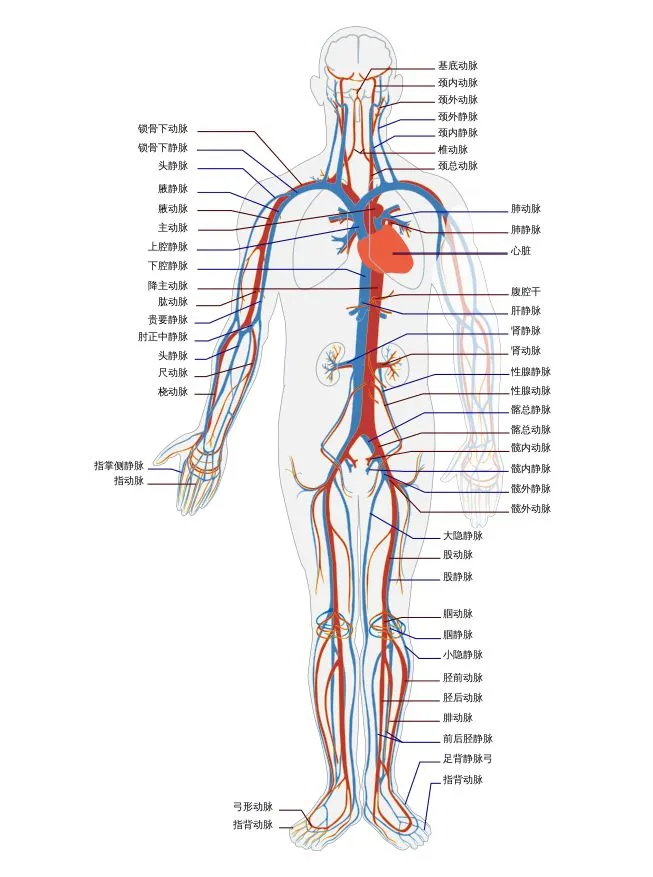
Every branching point involves a routing decision.
Routing is divided into external routing and internal routing. External routing handles input and dispatches different inputs to different components in the system. If you build web apps, you may not realize it, but one of the most critical components of every web framework is URL dispatch. The greatness of HTTP is that each request can be dispatched through a URL to a different handler. And URLs are directory-like and can evolve layer by layer—like fractal geometry, a large system composed through endlessly repeated patterns—which is extremely conducive to system expansion. Unfortunately, when we build our own systems, we consider neither buses for input nor the concept of routing; we just keep writing one if-else after another, and over time the code winds itself into spaghetti.
Another example: event bubbling in the DOM already implicitly contains the concept of routing when handled in JavaScript. You only need to define the callback function for when a certain event (such as onclick) occurs; you need not care how the event travels through the event loop to reach the callback. A good routing system unravels the threads and delivers complex information flows correctly into the hands of the right handlers.
External routing is at least handled for us by the “lower layers”; internal routing must be considered by engineers. Service-level routing (which service processes a data flow) can use service discovery components such as Consul; routing inside a service (how a data flow is processed once it arrives) must be done by you. There are many specific ways to route; pattern matching is the most common.
No matter which routing method you use, it is very important to define an Identity (ID) for data before it reaches the bus. You can call this process data normalization, data encapsulation, and so on; in short, for a message to be routed, it needs an ID for routing. This ID can be a URL, a message header, or a label (think of MPLS). Once we assign reasonable IDs to our data, how to route it becomes clear.
Queue
For data that does not need to be processed immediately, you can use queues. Queues also have the effect of separating producers from consumers. Queues include:
- single producer single consumer (SPSC)
- single producer multiple consumers (SPMC)
- multiple producers single consumer (MPSC)
- multiple producers multiple consumers (MPMC)
Think carefully: a queue is really a special version of bus + routing (optional) + storage. Generally, above the system bus are the system’s various services; each service then uses a service bus (or queue) to chain its micro services together; and then the components inside each micro service are connected with queues.
Queues help improve pipeline efficiency. Generally, a pipeline’s processing speed is determined by its slowest component. The existence of queues gives slow components a chance to run in multiple instances, compensating for the speed gap between producers and consumers.
Pub/Sub
Data stored in a queue can be handled in another way besides routing: pub/sub. Like routing, pub/sub separates producers from consumers; but the two differ in that routing’s destination is controlled by entries in a routing table, while pub/sub is generally controlled by the publisher: any consumer that subscribes to a piece of data registers with the publisher, and the publisher can thereby send messages in a targeted way.
Protocol
Once we decompose the system into services, and services into micro services, with each independent of the others and communicating only through buses or queues, we need protocols to define each other’s behavior. “Protocol” sounds grand, but it is not. Every function (or class) we write is actually defining an unwritten protocol: what the function’s arity is, what parameters it accepts, what result it returns. Callers must call it strictly according to the protocol to get the correct result.
A service-level protocol is an SLA: what the service’s endpoint is, what version it is, what message format it accepts, what message format it returns, over what network protocol messages are carried, what authorization is required, what the maximum throughput is for normal service, under what conditions throttling is triggered, and so on.
With buses, routing, queues, protocols, and other basic concepts introduced in Computer Science 101 in mind, system decomposition leaves a trail to follow: when faced with designing a system, what you have to do is no longer an essay question but a fill-in-the-blank question: fill in the names of several system buses and the data flowing in and out of them, and fill in the names and functions of services in the boxes above the system bus. Then repeat the same for each service, until you feel no further refinement is needed.
Essential Services That Make Up a System
Some management-oriented services are not directly related to business logic, but every system needs to consider building them. Here are a few.
Metabolism (Sweeping)
A living organism carries out metabolism at every moment: new cells replace old ones all the time, while the body’s “garbage” is excreted through the excretory system. A well-functioning city also has metabolism: sewers, landfills, sewage treatment, and so on maintain the city’s normal functions. Without metabolic functions, organisms wither and cities decay.
Software systems are the same. Logs fill up disks, software malfunctions, hardware fails, networks congest, and so on. A good software system needs a good metabolic system: a service that goes abnormal is shut down, and the same service is restarted and brought back into operation.
The metabolic system can draw on Erlang’s supervisor/child process structure and supervision trees. Many software systems run in a simple supervision tree model, such as nginx.
High Availability (HA)
Everyone has two kidneys. Sell one for an Apple Watch, and the other can still keep the body working normally. Of course, the human body’s two kidneys operate in Active-Active mode, and the internal nephrons (micro services) work as N(active)+M(backup) clustering (look at how well this service is built). Lose one, and performance takes a small discount, but it is negligible.
Various services in most software systems also need high availability—unless the service is completely stateless and its restart time is on the order of milliseconds. Service high availability is closely tied to routing: high availability usually means redundancy for the same service, and also means load sharing. A good routing system (such as Consul) can share the load of data routed to the same service across multiple redundant services, and after detecting a failed service, route data only to services that are operating normally.
High availability also means that non-critical services, even if they cannot be recovered, will only cause system degradation rather than making the entire system inaccessible. Just as a gecko can still escape even after losing its tail, and a person with an injured arm can still eat, an anomaly in a statistics module in a software system should not prevent a user from accessing their personal page.
Security
Security services are divided into active security and passive security. Authentication/authorization + TLS + encryption of sensitive information + minimizing input/output interfaces can be considered active security, while firewalls and other security systems are passive security.
Continuing the kidney analogy—the kidney has at least two major security systems:
- Input security. The kidney’s thick organ membrane protects the security of the organ’s inputs and outputs—the main inputs and outputs can only be the renal artery, renal vein, and ureter.
- Environmental security. The kidney is padded with a large amount of fat, preventing damage to core functions in the event of an impact.
In addition, the human body provides a whole series of security systems, including the immune system, skin, bones, and cavities, protecting an organ’s normal operation to the greatest extent from every dimension. If we study biology carefully, we find that security is a package solution: from as small as a cell to as large as the entire human body, each has its own security measures. A software system must likewise consider security at every layer of the system.
Overdraft Protection
Every system and every service has a service capacity—when that capacity is overdrawn, some contingency plan is needed. If you use a cloud service with auto scaling (such as AWS), dynamic scaling is the best solution, but limited by the solution you use, it is no panacea. AWS auto scaling depends on load balancers such as Amazon’s own ELB or third-party HAProxy, but ELB does not support certain workloads, such as WebSocket, well; and with a third-party load balancer, you need to consider deployment, integration with Amazon auto scaling (which requires writing some code), avoiding single points of failure, ensuring its own capacity, and a pile of other headaches.
In scenarios where auto scaling is impossible, the most common approach is back pressure, feeding pressure back to the source. It is like staying up late night after night until your brain can’t take it and forces you to sleep. Another approach is service degradation: shut down non-core services/micro-services, such as analytical services and ad services, to keep core functions working normally.
Presenting the Design to Others
After completing decomposition and composition, and after taking seriously the many necessary functions that are not directly related to business logic but must be done, the next step is to draw the design on a whiteboard and explain it to any stakeholder. Listen to their feedback. Design is not a process of building a cart behind closed doors; you need to communicate with various stakeholders throughout. However, many people overlook the necessity of continuing to communicate with the outside world after the design has taken shape. Many will think: my software architecture and design results are engineering matters, so why explain them to non-engineers? Will they even understand?
In fact, the pitch itself is part of self-learning and self-correction. At the moment you draw the design in your mind on a whiteboard in front of one or several people, you will have an intuition about where something seems wrong. This is a peculiar experience: drawing it for yourself does not produce that intuition. It is probably the effect of adrenaline from the anxiety of facing an audience. :)
Moreover, from listeners’ expressions, or from the seemingly silly and naive questions they ask, you will further learn where you thought you had figured something out but actually only half-understood it. Questions that are too simple and too basic are things we take for granted and disdain to ask ourselves; only when someone points them out do we realize: ah, so I didn’t understand this part either. This is the way to crack “you don’t know what you don’t know.”
I remember watching a video in which the speaker was holding forth on corporate culture, and a guy naively asked: “so what is culture, literally?” The speaker froze for a moment, then dragged out a pile of nonsense that could not even convince himself. I suspect he went off to check Merriam-Webster afterward.
Finally, there will always be people with deeper knowledge in certain domains who can tell you things you know you don’t know, filling in the gap of “you know that you don’t know.”
Tradeoffs in Design
Rich Hickey (the author of Clojure) said in a talk:
everyone says design is about tradeoffs, but you need to enumerate at least two or more possible solutions, and the attributes and deficits of each, in order to make tradeoff.
So next time you shamelessly say, “I made some tradeoffs,” make sure you’ve done your homework first.
Change in Design Is Inevitable
Design is not a one-off deal; change is inevitable. A former boss of mine liked to say: “change is your friend.” Throughout the entire software development life cycle, change is routine—so much so that change management has become a discipline of its own. This is even truer during the design phase. People make mistakes, designs have flaws, requirements change, bosses always micromanage, and one day the PM will bare his fangs and no longer be your caring big brother or your cute younger sister… So argue your case vigorously, and then accept the necessary changes.