Taming Expensive Compute: Notes on Building a Machine Learning Training Platform
To do a good job, one must first sharpen one’s tools. — The Analects, Book XV (Wei Ling Gong)
Preface: These past few days at work, there’s been a project that looked small: building a GKE cluster on GCP for the ML team to use for training.
I call it “small” because standing up the cluster itself isn’t hard. Bring up node pools, install GPU drivers, configure networking, identity, and the image registry, then run a few smoke tests. For a backend engineer who’s spent years in cloud and k8s, this is all familiar territory. What actually made me hesitate was something else: if I just built the cluster and handed it off to the ML infra team — or worse, dumped it on the MLEs to fumble with themselves — then the whole thing would have almost no value.
Because the cluster isn’t the destination. The cluster is just a stage.
The real trouble is how the play begins: how jobs get submitted, how resources get queued, how to see status, how to check logs, how to debug a training run that’s stuck, what to do when the GPU has been waited on for ages and still hasn’t been allocated, what to do when you discover after hours of running that the config was wrong all along. More realistically, nobody on the team has much GCP experience, and once Kubernetes, GCS, IAM, NetworkPolicy, GPU quota, JobSet, and Kueue are all standing in the way, endless back-and-forth is inevitable. You ask me why a Pending is still Pending, I ask you to paste a manifest; you tweak one line of YAML and try again, and half an hour has vanished.
And so it goes, round and round — before the compute ever catches fire, human patience has already burned out.
So from the start, I felt this couldn’t stop at “build the cluster.” It had to go one step further — to the point where an MLE can actually use it. “The skilled warrior earns no fame for his exploits,” as the saying goes; platform engineering is the same. The best platform isn’t the one that makes people marvel at how many complex components you’ve stacked up — it’s the one that makes users forget those components ever existed.
At First, I Just Wanted It to Not Be Too Painful to Use
Since this was an experimental POC on GCP anyway, I made the unilateral call to use Kueue.
Why Kueue? Because training jobs are nothing like ordinary backend services. A backend service can start three replicas and gradually scale out to ten; distributed training can’t. It needs gang scheduling: either all workers get resources together, or none of them do. Lose one rank, and the whole group can’t start work. Otherwise you end up in the worst possible state: a few Pods are already holding GPUs, but the training run can’t proceed, so they just sit there burning time.
GPUs are not CPUs. A CPU idling for a few hours costs you at most a pang of regret; an H100 cluster idling for a few minutes means the bill is bleeding.
So Kueue became the first gate. It doesn’t replace Kubernetes’ default scheduler; it just adds a layer of “admission control” in front: is there quota in the queue? Can this team borrow someone else’s allowance? Is there capacity for the GPU flavor this job wants? Should it be preempted by a higher-priority job? Sort all that out in Kueue first, then decide whether to let the job through.
Next, I designed a simple job submission script so MLEs could submit JobSets. It was crude back then — essentially stitching together templates, images, parameters, and queue labels to generate Kubernetes resources. But it was already pointed in an important direction: don’t make MLEs hand-write a pile of manifests.
To make sure the flow wasn’t just “looks like it runs,” I wrote several training examples at different specs: single-node single-GPU, multi-node multi-GPU; lightweight smoke tests, slightly more serious fine-tuning; things that could run on an L4, and things that could run on an H100. Finally I ran a Qwen 0.5B fine-tuning on an L4 end to end as a real smoke test.
This step was crucial. The thing platform engineering fears most is a beautiful chassis that can’t take its first breath. Only once a single example runs all the way through — image build, job submission, resource admission, Pod startup, data loading, training start, log output, checkpoint write — can you say the road is actually open.
The First Time I Handed It to an MLE, the Real Problems Began
Once it was ready, I handed it straight to an MLE to try. He ran a training job on the 8×H100 cluster and it went through smoothly.
That was a relief, of course. But the real acceptance test for a platform isn’t “it can run” — it’s “do people actually want to keep using it.” Very soon, he raised a few points of friction.
First, the infra was still too hard to use. Even with the script in place, the underlying layer leaked far too much Kubernetes vocabulary. You had to edit manifests, understand resource declarations, know why a field was written a certain way. That stuff is common sense to a platform engineer, but noise to an MLE.
Second, some problems that could have been caught much earlier only surfaced when training actually started loading data. A missing environment variable in the config, a dependency that didn’t get installed, a data collator mishandling variable-length labels. Every time, you had to wait for the image build, Pod scheduling, GPU allocation, and script startup — only to crash on the first batch. Sure, they were small mistakes, but they happened too late, wasting precious engineer effort and expensive GPU time.
Third, observability wasn’t good enough. Is the job queuing, or pulling an image? Is it stuck in an initContainer, or is the GCS mount failing? Is it a quota issue, or is there no H100 capacity? Where are the logs? How do I see the status? If the answer is “just kubectl describe it,” then the platform hasn’t finished its own job.
These bits of feedback sound plain, but they hit the mark dead on.
Many platforms don’t fail because they can’t run — they fail because every failure requires the user to understand the platform’s internals. Once or twice is fine; a few more times and people will instinctively route around it.
So I Stuffed Kubernetes Into a CLI
After that afternoon, I made a decision: abstract everything related to GCP and Kubernetes into a single CLI.
The goal was simple: leave only one concept in the MLE’s world — the run.
No Pods, no JobSets, no ResourceFlavors, no ClusterQueues, no Workloads, no namespaces. Those things still exist, of course, but they should live inside the platform, not inside the user’s head. Zhuangzi says, “Once you’ve caught the fish, forget the trap.” The platform is that trap. Once the fish is caught, users shouldn’t have to carry the trap around all day.
So the commands shaped up like this:
init      Generate a training run from a template, fully offline, without touching the cluster
submit    Build image → push image → validate config → render resources → create JobSet
status    Explain status in plain language, without flinging raw Kubernetes terms at users
logs      Show only training container logs, without sidecar and initContainer noise
resume    Resume from the latest checkpoint
cancel    Drain gracefully, then tear down
cleanup   Clean up residual resources by label
ls        List recent runs, stages, and costs
init generates training-related files from a template. MLEs only need to change the things that actually matter to the experiment: model, data path, batch size, learning rate, training steps, GPU count. As for service account, node selector, security context, Kueue queue, GCS mount, drain timeout, image registry — those shouldn’t have to be re-thought from scratch every single time.
submit does a bit more heavy lifting. It automatically builds a Docker image, pushes it to Artifact Registry, grabs the image digest, and renders the JobSet with that digest. I deliberately avoided :latest here, because a training job can’t run on a tag that drifts. Only if it’s reproducible today does it deserve to be tuned tomorrow.
Before submitting, it also runs a pile of checks: any unfilled ${...} placeholders in config? Is the training data path reachable? Are object storage permissions working? Are the required secrets mounted? Is the image architecture right? Are there any fields that would obviously get rejected by Pod Security? Anything that can be caught locally or at the init stage shouldn’t wait until H100s are allocated to be discovered.
status is where I put the most thought.
Because status looks like just one command, but it’s actually the nerve center of the platform experience. It can’t just dump raw underlying state at users — it has to translate it into information that’s understandable and actionable:
Run:               qwen-finetune-0529
Stage:             Queuing
Reason:            Needs 8 × H100; current queue has no full capacity
Queue:             ml-training / h100-flex
Recent event:      Entered Kueue 12 minutes ago, not yet admitted
Image:             Built and pushed, digest pinned
Config check:      Passed
Last checkpoint:   None
Suggestion:        Switch to another region, or lower GPU count for a smoke test
If training has started, it should look like this:
Run:               qwen-finetune-0529
Stage:             Training
Progress:          step 1450 / 100000 (1.5%)
Latest loss:       2.834 (3 minutes ago)
Last checkpoint:   step 1000, 12 minutes ago
Auto-restart:      Enabled (3 remaining)
GPU:               8 × H100
Health:            Normal
There’s a critical wall in the middle of this that I call the “Kubernetes vocabulary firewall.”
SchedulingGated needs to be translated into plain language. ImagePullBackOff needs to tell the user whether it’s a permission problem, a nonexistent tag, or the wrong image architecture. Init:Error needs to pinpoint whether the GCS mount failed, the identity token couldn’t be fetched, or DNS is down. Workload Suspended can’t just say “suspended” — it must explain that it’s still in the queue waiting for Kueue admission.
I have a hard target in mind: the output of status should be enough to diagnose 90% of failures, without MLEs needing to kubectl describe anything. The remaining 10% that genuinely need to go to the underlying layer should be explicitly told to them by the tool — which piece to look at — not left for them to grope around in the cluster blindfolded.
To make status fast and stable enough, I later wrote a k8s operator. It materializes various states during the training process: whether Kueue has admitted, whether the JobSet was created, whether Pods are all present, whether init completed, whether training started, the latest step count, where the latest checkpoint is, whether it’s draining, whether it’s resumable. This way the CLI doesn’t need to scan a bunch of Pods, Events, PVCs, and GCS objects on the fly each time, but reads a clean TrainingRun status.
This is a classic platform engineering tradeoff: the lower layer can be complex, but the upper layer must be simple.
Looking Back, Where Are Training Jobs Actually Troublesome?
I’m not an ML training expert. As a backend engineer, when I first looked at training jobs, my brain instinctively mapped them onto the traditional model: build image, toss into scheduler, start a few Pods, exit on completion, logs flow into the system, restart on failure.
Only later did I slowly realize that training jobs have a few temperaments that are completely different from ordinary backend tasks.
First, training runs long, and it’s expensive. A serious training job runs for hours at minimum, days or weeks at worst. It’s not eating ordinary CPU — it’s eating GPUs. Dozens of H100s running for a week is real money gushing out the door. So here, “the job ran for nothing” isn’t wasting a few minutes of CI time — it’s the equivalent of Chow Yun-fat lighting his cigarette with a dollar bill.
Second, training isn’t a process — it’s a group of processes that must live together. Single-node single-GPU training is fine; one process saturates one card. Once the model grows large, it won’t fit on one card, so you have to split it across cards and machines. At every training step, all the processes need to communicate and synchronize gradients. Crudely put, it’s everyone comparing answers at every step. Which means: the group must be in place at the same time. Lose one, and work can’t start. A backend service can start ten replicas, and if three come up they can start serving traffic; distributed training is not like that — it’s “live together, die together.”
Third, training state is expensive — if it isn’t saved, it never happened. Training, in essence, is reading data, computing, and nudging the model parameters a little in the right direction. That intermediate result is called a checkpoint. When a backend service crashes and restarts, you lose at most a few requests; when a training job crashes without a checkpoint, hours of computation are as if they never happened. You didn’t lose a Pod — you lost a stretch of expensive time.
Fourth, the people writing training code shouldn’t be tortured by Kubernetes. An MLE’s mental model is simple: one training run = my code + a batch of GPUs + a startup script. They don’t want to know what a namespace is, don’t want to understand ResourceFlavor, don’t want to debug SchedulingGated, and definitely don’t want to guess why they’re stuck in Pending by staring at kubectl describe pod. Every additional time you make them touch this stuff is another transfer of attention that should have gone to models into the swamp of infrastructure.
Keep these four points in mind, and the rest of the design follows naturally.
The fundamental problem a training platform must solve isn’t “how to run PyTorch on k8s”; it’s: how to let a group of expensive, must-live-and-die-together, state-fragile processes complete reliably, cheaply, and resumably — with the algorithm colleagues barely sensing the underlying complexity.
The Really Valuable Pitfalls Are All Hidden in the Seams
Looking back on this project, the most interesting parts weren’t GKE or Kueue — they were the seams.
In platform engineering, the most expensive incidents often aren’t caused by getting the big architecture wrong; they’re caused by one small default value, one small permission, one small placeholder that drags a pile of expensive GPUs down with it. A thousand-mile dike collapses from an ant hole; many training incidents begin exactly this way.
One Missing Variable in Config, and the Machines Start Burning
Training script config files often have a bunch of placeholders like ${SOME_ENV}, expected to be filled in by environment variables at runtime.
One time, a tracking_uri was missed. The job started, the model was pulled, the data was read — and then it crashed at the first training step. Every time it crashed, from Pod startup to crash, GPU time was burned for nothing. Several crashes in a row, and only then were the variables filled in.
Lessons from this are simple: before spending money on GPUs, use a nearly free step to parse every config placeholder. Miss one, and refuse to start. Don’t wait until eight cards are already occupied to have a string tell you “I wasn’t filled in.”
Trying to Keep the Machines Alive Ended Up Keeping the Bill Alive
Some cheap GPU capacity gets reclaimed by the cloud autoscaler at any moment. To avoid being reclaimed, someone added a “holder Pod” that stubbornly occupied the node. Sounds clever: grab the machine first, then replace it when training arrives.
Until the training job died before writing its first checkpoint. Training was gone, the placeholder Pod was still there, and eight H100s were still firmly occupied — running nothing at all, just waiting for someone to notice. What was meant to be a lifeline turned into a money-burning machine.
Lesson: any mechanism that occupies resources must be paired with a watchdog. As soon as the job no longer has recovery value — say, it died without a single valid checkpoint — the occupied resources must be released immediately. Occupying resources can be a strategy, but it can’t be a religion.
A New Job Has to Cross Five Layers of Landmines
The most classic pitfall: a brand-new training Pod, from submission to actually starting computation, has to pass through five successive gates:
1. Admission  — scheduler quota, resource flavor match, Pod security policy
2. Identity   — workload identity federation, so the Pod can access resources with cloud identity
3. Storage I/O — object storage mount sidecar, bucket-level permissions, metadata service reachable
4. Network     — DNS resolution, private API access, necessary public egress
5. Application — image dependencies, training code, data-collation logic
The nastiest part: the layer where the error appears is often not the layer where the problem actually lives. When PodInitializing hangs, nine times out of ten it’s not kubelet acting up — it’s the storage mount waiting on a 60-second timeout, or DNS failing to resolve at all.
Potholes I dug out of this included: Pod Security set to restricted, and the raw manifest missing runAsNonRoot and capability drops, getting rejected outright; when binding permissions to the Pod identity I added an IAM condition to “only access a certain prefix,” but the object storage mount does a bucket-level check on startup, and the condition didn’t match, manifesting as a mysterious timeout; network default-deny all, forgot to allow the metadata service, and the identity token couldn’t be fetched; node-local DNS caching bound to the link-local IP, but the network policy only allowed kube-system Pods, and DNS silently failed; some indirect dependencies in the Dockerfile weren’t installed, so the code only blew up at a specific point after starting; the image registry had immutable tags enabled, and the build script was still pushing :latest, so the second build failed outright; finally, all the infrastructure was green and training crashed on the first batch, because supervised fine-tuning used the wrong data collator, and variable-length labels wouldn’t collate into tensors.
See — the long list before that has almost nothing to do with machine learning; it’s all infrastructure dirt work. But each one can block an MLE for half a day. The value of a good training platform is 80% right here: seal these landmines off once and for all, so algorithm colleagues only have to face the algorithm problems that are truly theirs.
Layer the Platform First, and the Choice of Tech Won’t Get Messy
If you start by asking “Kueue or Volcano, Ray or Slurm?”, it’s easy to fall into tool idolatry.
The training platform space looks like tools galore: Kueue, Volcano, Ray, Slurm, JobSet, Kubeflow, SkyPilot — each one claims it can solve your problem. To actually make a judgment, first separate the layers clearly.
These days I prefer to slice a training platform into five layers, bottom to top:
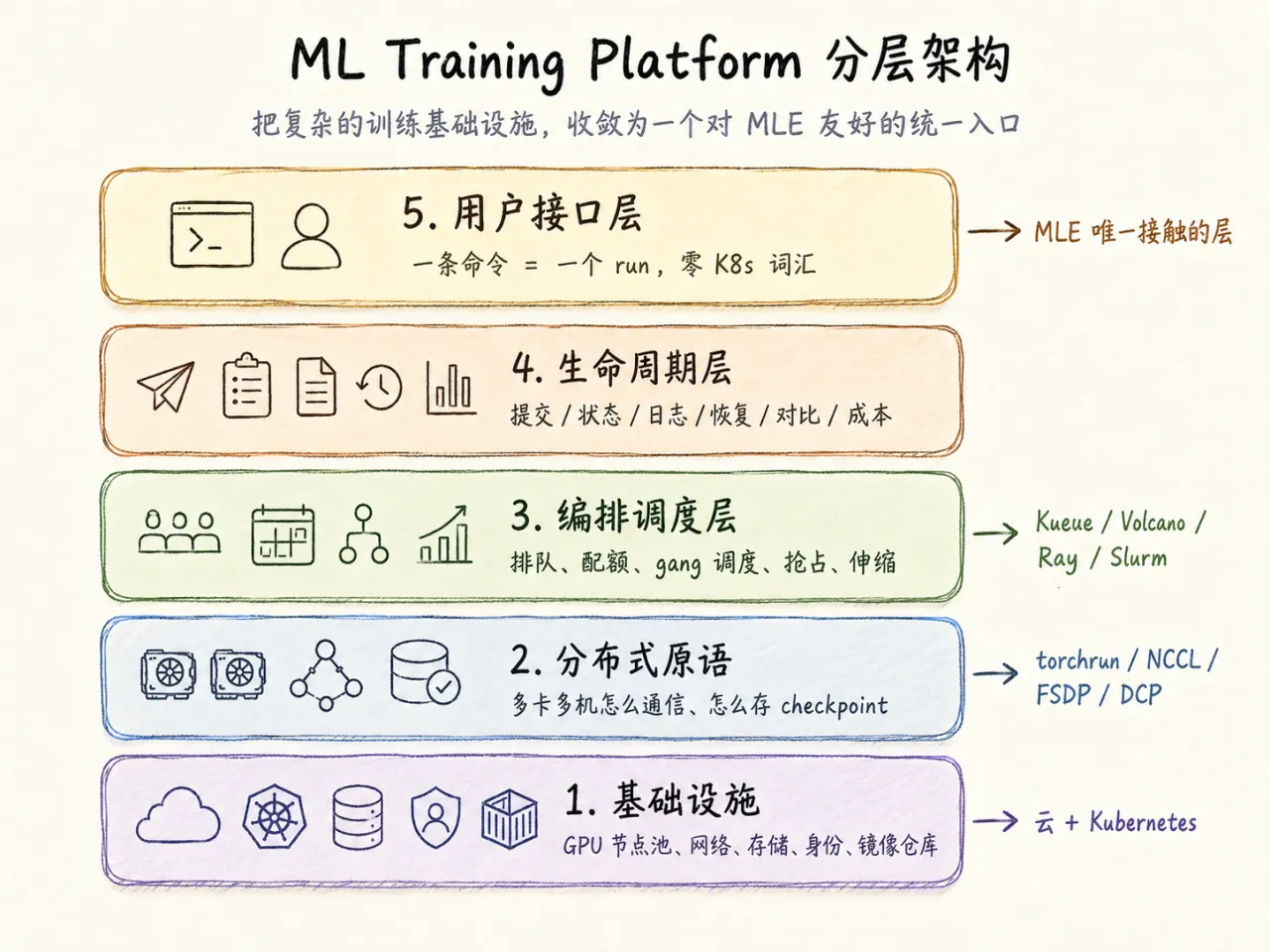
There’s a key judgment buried in there: don’t build layers 1 and 2 yourself; choose layer 3 carefully; layers 4 and 5 are where the platform’s real differentiation lives.
Many teams dump all their energy into the lower layers, because that’s the part that looks most “hardcore.” Result: the scheduler is installed beautifully, but users are still writing YAML every day, chasing Pending, and guessing at ImagePullBackOff. That’s putting the cart before the horse.
A good platform isn’t one that makes people see how many sophisticated components you used — it’s one whose users can’t feel the seams between those components.
Distributed Training Primitives: Understand Them, Don’t Rush to Reinvent
The PyTorch ecosystem already solves a lot of the underlying problems well. Platform engineers don’t necessarily need to write FSDP or hand-roll distributed checkpoints, but they must understand how these components behave — because all the reliability design at the upper layer is built on understanding their temperaments.
Multi-GPU training usually uses a launcher like torchrun. It’s responsible for spinning up N workers on each machine and injecting each worker with critical environment variables like RANK, WORLD_SIZE, and MASTER_ADDR. The training code reads these variables to know “who I am,” “how many of us there are,” and “where the head node is.” These values must never be hardcoded.
One behavior is especially important: if any worker dies, torchrun often kills and restarts the entire group rather than just saving that one. In elastic mode, if the node count changes, the RANK and WORLD_SIZE will change after restart.
This directly yields two iron laws: training code should try to load the latest checkpoint at startup; and checkpoints must be saved frequently enough. Because one failure means the whole group of processes restarts from the last checkpoint.
Gradient synchronization in multi-GPU training runs on NCCL. You don’t need to write AllReduce yourself, but you need to know one thing: multi-machine training performance depends extremely on network topology. Cards on the same machine go over NVLink quickly; across machines, it depends on high-speed networking, RDMA, NIC selection, and NCCL configuration. If cross-machine networking isn’t set up right, training may not error — it just becomes unacceptably slow. This kind of “not broken, just slow” failure is the most torturous of all.
When models grow large and won’t fit in a single GPU’s memory, you need FSDP or DeepSpeed ZeRO to shard parameters, gradients, and optimizer states across multiple GPUs. The platform layer typically doesn’t make this choice for MLEs — it’s part of the training code. What the platform must understand is: a job requiring 8 GPUs is often not for speed, but because it genuinely won’t fit on one. This also explains why training jobs must be gang-scheduled, not started piecemeal.
The foundation of the reliability system is the checkpoint.
The simplest approach is for rank 0 to torch.save the whole model into a big file. The problems are obvious too: slow, easily a bottleneck, and possibly unreadable if the parallelism degree changes. PyTorch’s torch.distributed.checkpoint lets each rank save its own shard in parallel, and re-shards on load. For example, a checkpoint saved with 64 GPUs can be loaded back with 8.
Here’s a critical detail: DCP writes the global .metadata file last. Only after all shards are written does the coordinator write that metadata file, declaring “this checkpoint is complete.”
This is the root of how to judge “what counts as a valid checkpoint.” If a checkpoint directory is missing the file that gets written last, it’s a half-finished product and must never be used for recovery. Treating a half-finished checkpoint as a save point will trap you in a loop: crash → recover from bad checkpoint → crash again.
Scheduling Layer: Why I Started with JobSet + Kueue
Kubernetes’ default scheduler fills Pods in one at a time. Fine for stateless services, dangerous for distributed training.
Training jobs need gang scheduling, meaning all-or-nothing. Suppose a job needs 4 workers; the default scheduler might squeeze in 3, and the fourth gets stuck for lack of resources. Those 3 workers that already got GPUs just wait — the job can’t run, and the cards can’t be released. That’s not queuing; that’s deadlock.
GPU scheduling has two more issues: fairness and preemption. GPUs are expensive and scarce; multiple teams share one pool, so it can’t be first-come-first-served filling up everything, and low-priority jobs can’t hog cards forever. The scheduler must know about quota, borrowing, priority, and returning resources to more important jobs when necessary.
The mainstream options can be understood roughly like this:
| Option | Mental model | Intrusiveness to users | Who it suits |
|---|---|---|---|
| Kueue | Adds a “quota gate” on top of the native scheduler; only decides when a job is admitted, then hands it back to the native scheduler to place Pods | Low. Jobs are still standard Jobs, just with one extra queue label | Teams that want to keep Kubernetes native scheduling and only add quota, fairness, borrowing |
| Volcano | Replaces the default scheduler, takes over Pod placement; gang, fairness, topology all live inside it | Medium. Pods must explicitly specify schedulerName: volcano |
Heavy batch workloads, HPC on K8s, needing strong gang and topology awareness |
| Ray | Uses a Python API to thread together data preprocessing, training, tuning, inference; runs RayCluster / RayJob on K8s | Medium-high. Code must be written according to Ray’s model | Workloads that aren’t just “a group of identical Pods” and need dynamic tasks and runtime elasticity |
| Slurm | Classic HPC job system; sbatch to submit, squeue to see the queue |
Users use Slurm, not directly facing K8s | Teams with an HPC tradition, researchers already familiar with Slurm, heavy MPI workloads |
| Kubeflow Trainer | Users provide a Python function, admins provide a runtime, JobSet underneath | Low. Users don’t touch Pod templates | Teams wanting to give MLEs a Python SDK and hide distributed details |
I lean toward starting with JobSet + Kueue.
Kueue’s philosophy is clean: it doesn’t replace Kubernetes’ default scheduler; it adds an admission gate in front. It abstracts capacity into several layers of objects:
- ResourceFlavor: describes a type of GPU node pool — e.g., H100 on-demand pool, H100 flex pool, cheap spot pool.
- ClusterQueue: usually built per-team, defining that team’s quota across various flavors.
- LocalQueue: the queue inside the team’s namespace, pointing to the ClusterQueue above.
The best-case scenario for what MLEs need to do is just one thing: tell the platform which queue this run should use. Whether the underlying layer tags the JobSet with kueue.x-k8s.io/queue-name is not something the user needs to know.
This is the paradigm a good platform should pursue: complexity exists, but it should never appear in the user’s field of view.
If the scenario isn’t just one training run but a pipeline — “pull data → preprocess → train → evaluate → register model” — then you need to look one layer up at workflow orchestrators. Airflow, Dagster, Metaflow, Flyte, ZenML all address DAGs, dependencies, retries, caching, and artifact lineage. They’re not either-or with Kueue / JobSet; they’re an upper-lower relationship: the workflow orchestrator manages the pipeline, and the heavy-GPU training node itself is still delegated to Ray, Kubeflow Trainer, or torchrun-on-K8s to run.
The Core Value of the Platform: Seal Up the Dirt Work
The foundation is built, the scheduler is installed, and if you stop there, MLEs still face a pile of kubectl, helm, YAML, and Pending — then the platform has only finished half, or even less.
The real value of a training platform is sealing up the dirt work.
Pod security policy: templates default to runAsNonRoot, drop ALL capabilities, and seccompProfile. Dockerfile templates default to creating a non-root user. Don’t make every training job relearn Kubernetes security contexts.
Identity: use workload identity federation to bind a Kubernetes ServiceAccount to a cloud identity and avoid long-lived keys. Don’t casually add path-prefix IAM conditions to object storage grants — the mount often needs bucket-level checks, and a mismatched condition becomes a mysterious timeout. Isolation can be achieved through different buckets, different prefixes, and application-side constraints — don’t let the identity layer become mysticism.
Network: default-deny is fine, but you must precisely allow three things: metadata service, DNS, and private cloud API VIP range. If you need to pull public model weights, then explicitly allow 443 egress. Node-local DNS caching bound to the link-local IP is a detail that must be handled in advance too.
Storage mounts: object storage FUSE caching parameters should be tuned uniformly by the platform — parallel downloads, file cache on local SSD, more aggressive metadata TTL for read-only mounts. Don’t make users search through a pile of mount options themselves.
Images: default to cloud builds, to avoid building an arm64 image on a local Apple Silicon and getting exec format error on an amd64 node. Image tags must be immutable; pin the digest at submission. Never let training run on :latest.
None of these should an MLE need to know about. What they perceive is just one thing: my job is running.
Inner Loop: Don’t Make One Line Change Wait Ten Minutes
With infrastructure sealed up, MLEs still have a huge pain point: the inner loop.
The most common debugging action is changing one line of code and seeing whether it runs. If the path is “change code → cloud build image → submit → wait for scheduling → wait for Pod → check logs,” then a misconfigured data collator, a missing import, a shape mismatch each costs a wait of ten minutes plus a bit of GPU money. This kind of daily frustration rapidly burns through goodwill toward the platform.
Which is why I increasingly believe the platform must separate “expensive training” from “cheap verification.”
First, interactive development Pods. Spin up a long-running dev Pod, default to a cheap L4 pool, rsync local code into it, and give the user a shell. After that, changing code means syncing code and re-running — not rebuilding images. With idle auto-shutdown, this is the biggest cost-saving lever for interactive GPU.
Second, cheap-hardware smoke tests. Add a --smoke to submission, forcing a single L4, running only one step with tiny batch. A few cents can surface config, dependency, and data-collation errors — don’t wait for 8 H100s to be allocated before discovering the first batch doesn’t even pass. On the first submission of a new image, you can even make the smoke test a default gate.
Third, the Notebook entry point. For researchers, JupyterLab is the natural interface. Once the dev Pod is up, spin up JupyterLab, set up port forwarding, and print the localhost URL. The platform doesn’t have to love Notebooks, but it has to acknowledge that a lot of exploratory work starts from one.
With this layer done well, the MLE experience jumps by an order of magnitude. Safety and cost are held in check by two lines: dev Pods default to cheap pools, and all interactive resources carry a TTL; plus a watchdog to reclaim orphan resources. Don’t let “convenient for debugging” become “the H100 you forgot to turn off.”
Experiment Tracking: Don’t Block the Standard Path
Training isn’t just about looking at logs. What MLEs need is real-time loss curves, throughput, eval metrics, and historical comparisons. A log-query UI is not experiment tracking.
You may not need to build this on day one. The right posture is to connect up the standard path first:
- Inject tracking config through environment variables, like
WANDB_*,MLFLOW_TRACKING_URI. - Derive run-id stably from the job name, so a restart still writes to the same tracking run — don’t split into a new experiment on each restart.
- HuggingFace Trainer, PyTorch Lightning, etc. already support
report_to; let the training framework record it. - API keys injected from a secret management service; never baked into images.
The platform doesn’t need to host W&B or MLflow from the start, but it must not block them. As long as the environment-variable and run-id conventions are wired through, MLEs immediately get curves. Whether to build your own tracking later is a next-stage problem, not a prerequisite for landing the platform.
Around runs, several verbs should naturally grow:
resume <run>: resume from the same run’s latest checkpoint.fork <src> <dst> --from <checkpoint>: fork a new experiment from some checkpoint.compare <A> <B>: compare loss, throughput, key metrics.cost <run>: join the cloud bill back by labels, and compute how many GPU-hours and how much money this run spent.
These verbs sound like icing on the cake, but they’re actually the core of the research workflow. An experiment isn’t a one-off task — it’s a river that keeps forking, rolling back, and being compared.
GPU Economics: Saving Money Isn’t an Optimization Item, It’s a Survival Item
On a training platform, cost isn’t a post-hoc optimization — it’s written into the design on day one. An H100 idling for an hour is dozens of dollars evaporated. The platform shouldn’t just ask “can it run”; it should constantly ask “is this money being spent on computation.”
Cloud GPU capacity roughly has four tiers:
| Tier | Relative price | Interruption risk | Duration limit | Suits |
|---|---|---|---|---|
| On-demand | Baseline | None | None | Critical jobs that can’t be interrupted |
| Spot / preemptible | Lowest, often a fraction of base price | Can be reclaimed any time | No fixed cap, unstable | Training with solid checkpoints, resumable |
| Flexible / dynamic | Close to spot-tier price or quota | All-or-nothing allocation | Usually 7 days max | Fine-tuning, experiments, jobs finishable within 7 days |
| Reserved / commitment | Saves a lot long-term | None | Locked 1-3 years | Steady, predictable long-term usage |
The biggest waste is usually not the unit price — it’s idling. The key cost-saving levers include:
Scale dedicated GPU node pools to zero. No tasks, no cards; tasks arrive, scale up from zero. This applies especially to dev and experiment pools.
Match hardware to stage. L4 / T4 for development, debugging, and smoke tests. H100 only for real distributed training. Don’t use an H100 to verify whether an import passes.
Cheap verification first, expensive training second. A smoke test isn’t a ritual — it’s cost insurance.
Share GPUs when necessary. Time-slicing and MIG have value for inference, small jobs, dev pools. Big training generally doesn’t use them, but dev environments can consider it.
Tag every run with cost labels. team, owner, run-id, model, capacity-type — don’t miss a single one. Only by aggregating the exported cloud bill by label can you know how much each run and each team burned. On submission, you can even echo the estimate: roughly how much 8×H100 costs per hour, and what the 7-day cap comes to. Do showback first, let everyone see the money; whether to do chargeback later is another discussion.
“Forethought brings success; without it, ruin.” GPU costs are the same. If you can’t see them, they’ll inevitably run out of control.
Reliability: Give Long Jobs a Way Out
The thing a training platform fears most isn’t the job failing — it’s failing too late, too silently, too unrecoverably.
A job running for seven days dies in the middle of the night on day six, with no checkpoint, no alert, and by the next morning there’s nothing but a pile of bills. This is the platform engineer’s nightmare.
Reliability needs to be stitched together from a few pieces.
The Checkpoint Convention Is the Foundation
First, define a platform-wide checkpoint layout. Synthesizing practices from PyTorch DCP, MosaicML Composer, NeMo, and others, a solid pattern is: temp directory + atomic rename + completion marker + latest pointer.
<checkpoint-root>/<run-id>/
  checkpoint-<step>/
      <shard files...>
      .complete
  latest
The write flow is: write to checkpoint-<step>.tmp/ first, and after all shards are flushed, rename the directory to its final name, and finally write .complete. Then update latest to point at the newest complete checkpoint.
A checkpoint killed halfway through has no .complete, and the recovery logic must skip it. Validity is not determined by “is the file big enough,” nor by “does the directory exist.” Size heuristics are too fragile, and directory existence says even less. Only the completion marker counts.
It’s best to give MLEs a small tool or library that wraps up the save / load / latest convention. Don’t let every training script invent its own save protocol. If everyone writes their own, you’ll end up with ten kinds of half-finished products.
Without a Checkpoint, Don’t Enable Auto-restart
Auto-restart sounds lovely, but if a run has no valid checkpoint yet and auto-restart is enabled, every crash means starting over from scratch. Many such jobs are fundamentally misconfigured, broken images, or failed data collation. Letting them auto-restart is just auto-burning money.
A steadier approach: start with maxRestarts=0. Once the first valid checkpoint lands — the controller sees .complete — then bump maxRestarts to N. That is, allow recovery only after there’s an anchor; without an anchor, fail immediately on failure.
This principle is counterintuitive but very important. Automation isn’t brainless retry — automation should know when to stop.
Preemption Recovery Must Form a Closed Loop
Spot / flexible capacity can save money, but only if the job can actually resume. The full loop is:
- Use cheap capacity.
- Training startup tries to resume from
latest; if there’s nothing, start from scratch. - When the node is reclaimed, torchrun / scheduler triggers a restart or resubmission.
- New processes start, read
latest, continue from the last complete checkpoint. - Checkpoints are frequent enough that preemption only costs recomputation of a small segment.
If the dataset supports streaming, deterministic shuffling, and mid-run resumption, even data loading can pick up from the middle. For large corpora and spot scenarios, this is almost essential.
Failures Must Not Be Silent
The thing long jobs fear most is a silent freeze. The process is still there, the GPU is still occupied, but the logs don’t move and the step doesn’t advance. It might be NCCL stuck, the data loader hung, or some rank so slow it drags down the whole group.
The platform needs a progress heartbeat: the training step must advance within N minutes. If several consecutive cycles don’t advance, judge it as stuck, kill it, trigger restart.
But probes can’t be hardcoded. Some people’s log field is step, some call it global_step, some emit metrics as JSONL with different field names. If the probe hardcodes grep on one field, it will wrongly kill healthy jobs after a few hours — with no clues. Progress fields must be configurable; the first missed heartbeat must write a clear diagnosis to the log. Failures can happen, but they must not be quietly concealed.
NCCL timeout is also a kind of “explicit error.” If some rank is stuck beyond a threshold, the whole process crashes. Painful, but better than silently occupying cards. What the platform needs to do is recognize this failure and explain it, not leave users guessing in a sea of logs.
Graceful Draining Must Actually Work
Flexible capacity has hard deadlines, and spot can be reclaimed at any moment. Hard deadlines are often SIGKILL, not a gentle SIGTERM. You can’t catch it; there’s no chance to clean up.
The right way is to reserve margin before the hard deadline — say, fire off a signal two hours earlier, so training saves a final checkpoint and exits.
Here’s a pitfall too: if you just kill -USR1 1 || true and the training code has no signal handler installed, that’s a silent no-op. When the time comes, it’ll get SIGKILLed anyway. The draining mechanism must check that training actually responded — e.g., drop an ACK marker, or see “draining checkpoint completed” in the status. If no response, alert — don’t pretend draining succeeded.
In platform engineering, the most dangerous thing isn’t failure — it’s the failure that looks like success.
Storage: Object Storage Is Not a Filesystem
In training platforms, storage misconceptions are plentiful. Let’s first make clear where each kind of data goes:
| Data | Where | Mode | Why |
|---|---|---|---|
| Training datasets | Object storage, read via FUSE or SDK | Read-only | Cheap, parallel downloads |
| Checkpoints | Object storage | Read-write | Persistent, recoverable across nodes and zones |
| Frozen model weights | High-performance read-only disk or object storage read-only mount | Read-only | Fast load, shared by many workers |
| Temp shuffle / spill | Local SSD | Per node | High IOPS, volatile but cheap |
| POSIX shared scratch | Parallel filesystem, e.g. Lustre | Read-write | True POSIX, supports random writes and locks |
The most important realization is: S3 / GCS is not a POSIX filesystem. A FUSE mount just gives you an interface that “looks like a directory,” but underneath it’s still object storage.
Its real temperament: writes usually write the whole object, not suitable for frequent appends; there’s no traditional file lock, and rename semantics may not match the local filesystem; small files hurt, latency is high, metadata operations are expensive; massive random reads and writes make GPUs wait for data, and money spins idle in place.
So in practice, keep a few things in mind:
Don’t write metrics and logs to a FUSE mount. They’re append-heavy data; go through network reporting, or write locally then forward.
Pack training data into large shards as much as possible. Don’t dump millions of small files straight into object storage and let each worker frantically stat / open them.
Pin the version of model weights. When pulling weights from HuggingFace or internal object storage, pin the commit, digest, or version number. Never use a moving main.
Local SSD is a cache, not the source of truth. It’s good for caching data shards, spill, temporary decompression — not for holding the only copy.
Finally, one often-overlooked point: low GPU utilization isn’t necessarily a slow model — it might be that the data can’t be fed fast enough. Streaming datasets, like MosaicML StreamingDataset, offer deterministic shuffling, mid-epoch recovery, and local shard LRU caching. For spot and large-corpus training, they’re not icing on the cake — they’re the piece that makes the recovery loop actually close.
Why Did I Spend My Time Doing This Myself?
Honestly, this could have been handed off to others.
Even from an organizational division-of-labor standpoint, building the GKE cluster, configuring Kueue, wrapping the submission tool, and writing the operator could all be chopped into tasks and given to different teams. Infra handles the cluster, ML infra handles the training runtime, MLEs handle training code, the platform team builds the UI. Sounds reasonable.
But in reality, the hardest part of this kind of work isn’t each module itself — it’s that at the beginning it has no clear boundaries. Its ambiguity is very high: which issues count as infra, which count as training framework, which count as user experience, which count as cost governance? Should a status come from Kueue, from JobSet, or should the operator compute it itself? Should a failure stop at the CLI, or expose Kubernetes events? If these questions get split across several teams on day one, they easily become meetings, handoffs, tickets, priorities, and “that’s not mine.”
Especially given that the whole team currently has no experience building and maintaining GCP IAM / GKE clusters, I felt it was actually most appropriate to wade through it myself.
Only by doing it with your own hands, or feeling the problems at the front line, can you truly grasp those pain points. And this past year-plus of AI coding’s sea-changes has dramatically compressed the feedback loop for this kind of work. When I do it alone, the feedback loop becomes a direct conversation between me and one ML engineer. He says this part isn’t usable — I go back and think about the abstraction; he says the status is unintelligible — I have the agent help me flesh out the operator and CLI; he says this check should happen earlier — I stuff it into submit or into an initContainer. Basically he raises a requirement, and my agent can have it done within two or three hours. The bottleneck is mostly me, of course: I have a lot of things going on in parallel, I can’t watch it in real time; and when feedback comes in, I still have to quickly judge whether to build it, how to build it, at which layer the abstraction should live, what should be sealed now, what shouldn’t be sealed yet.
More importantly, I’m a complete outsider to ML training. Most of the knowledge here was brand new, and I had to discuss and learn with Gemini/ChatGPT again and again. But gradually, through working with AI agents, through getting training jobs running, tripping, and picking them back up time after time, I’ve started to grasp some best practices, gotten to know quite a few good training frameworks, and become able to build some tools to lighten the MLE’s mental load.
This may be the new way of working for engineers in the AI era: not becoming an expert in each domain first and then acting, but rather — within real problems, using a very short feedback loop — weaving together expert experience, open-source practice, and my own engineering judgment, to clear wild land and open up the forest.
Waiting Five Hours for a GPU, and Suddenly I Understood Multi-region
This afternoon there was one very concrete moment.
A training job running on an H100 cluster had gone five-plus hours without getting GPU resources. The state wasn’t failure, wasn’t misconfiguration — just no complete capacity to let it start work.
At that moment, I felt the importance of multi-region very concretely.
Previously, when people talked about multi-region, it was usually from the angles of high availability, disaster recovery, low latency. But in a GPU training scenario, multi-region has a plainer meaning: capacity itself is uncertain. Having quota doesn’t mean there’s a machine at that moment; having a region doesn’t mean it can always give you a full gang; being willing to pay doesn’t mean capacity will appear right away.
For online services, multi-region is about keeping user requests from dropping. For training platforms, multi-region is often about keeping experiments from being blocked by GPU supply in a single region.
This in turn affects platform abstraction. A run shouldn’t be inherently bound to some cluster. It should be able to say “I need 8×H100, I accept these regions, I accept these capacity types, I’ll wait at most this long.” As for which cluster, which node pool, which queue it ultimately lands in — that’s for the platform’s scheduling layer to decide.
If we keep moving forward, this becomes a higher-level scheduling problem: cross-region capacity discovery, queue fallback, cross-zone reachability for data and checkpoints, image replication, cost differences, preemption risk, even network topology and NCCL performance across regions.
In other words, multi-region isn’t something you have to go all-in on from day one, but it must be left as an opening in the abstraction. Otherwise, when you really need it, everything will have grown rigidly into a single cluster.
Wrapping Up: Platform Engineering’s Value Lives in the Seams
If I had to compress these past few days into a few sentences, I’d say this: a machine learning training platform is, at its core, a machine for absorbing complexity.
It absorbs Kubernetes’ complexity, absorbs GPU idle waste, absorbs long-job fragility, absorbs all those invisible, intangible things on the cloud — quota, identity, networking, storage, images, logs, state — and condenses them into a run that an MLE can understand.
For the MLE, it must make the simple mental model “my code + a batch of GPUs + a script” come true. Everything about k8s should be kept outside their field of view.
For the bill, it must keep expensive cards from idling as much as possible, make cheap capacity usable without being dangerous, and let every GPU-hour be traced back to some run, some person, some team.
For reliability, it must make checkpoints trustworthy anchors, make auto-recovery kick in only after an anchor exists, make every failure loud, explainable, traceable.
The truly scarce thing isn’t how cool a scheduler you use under the hood. torchrun, NCCL, FSDP, DCP, Kueue, JobSet, Ray, SkyPilot — the community has already built plenty of good wheels. The platform engineer’s value is in weaving those wheels into a vehicle, tuning the suspension properly, so the people riding don’t feel the bumps in the road.
The Tao Te Ching says: “Hard things in the world must be tackled from where they’re easy; great things in the world must be tackled from where they’re small.” Training platforms are the same. Grand GPU clusters often end up defeated by one unfilled environment variable, one checkpoint that never hit disk, one silent no-op drain signal.
This is also why I’m willing to do this “small thing” myself. Because only by walking into those small places do you learn where the real problems are; only by placing yourself into the user’s waiting, confusion, and anxiety do you learn what the platform should shield them from.
Standing up the cluster is only the first step.
Taming the expensive compute — making it idle a little less, be a little less mystical, a little less “go describe it yourself,” with a little more certainty, a little more recoverability, a little more of the calm that comes from humans standing above machines — that’s the real value of this work.