On Writing APIs, Revisited
Background
Last year I wrote an article: Writing a Proper REST API. At the time, Juniper had laid off one of our teams in Texas — a team of a dozen or so people, half of whom had spent a long stretch of time building a REST API. When I took over the work, I found those APIs to be rather amateurish: they hadn’t accounted for the implementation of several foundational HTTP/1.1 RFCs (2616, 7232, 5988, and so on). So I spent some time rewriting them, and then wrote that article.
From today’s vantage point, the system I built back then had plenty of problems, and many concerns beyond the API itself went unconsidered:
- API documentation. My approach at the time was to write the docs in Confluence, the collaboration system the company used. But the biggest problem with that is the separation of code and documentation — hard to maintain.
- API monitoring. The whole API system lacked a systematic monitoring mechanism; the collection of various metrics depended heavily on each API’s implementer handling it — to use the trendy phrase, it couldn’t be orchestrated.
- API testing. Anyone who has done a lot of API work knows that writing test cases for an API is a painful affair. Not only do you need unit tests for the code that uses the API, you also need smoke tests (the most basic functional tests) for the API itself, to ensure all APIs are usable and behave as expected. Because the number of test cases to write is enormous, we generally just wrote unit tests and called it a day.
Ideally, once an API is written, documentation and test cases should be generated automatically, and the API system should provide a whole set of metrics APIs for generating statistics. By default, the API system itself should collect a great many metrics — such as each API’s response time and status code — using collectd/statd to gather the information and further forwarding it to APM systems like Datadog or New Relic.
At adRise, we had an API system that had run for years: non-compliant with the RFCs, (almost) undocumented, (almost) untested, (almost) unmonitored — and worst of all, with poor development efficiency and poor runtime efficiency. So over the past month or two, I led the development of a brand-new API system.
Goals
Before building a new system, we need to establish some goals. These are some I wrote down when designing the API:
- A well defined pipeline to process requests
- REST API done right (methods, status code and headers)
- Validation made easy
- Security beared in mind
- Policy based request throttling
- Easy to add new APIs
- Easy to document and test
- Introspection
Among these, introspection has two meanings:
- The API system automatically collects metrics and monitors itself.
- Whether you’re a writer or a caller, it’s easy to get the information you want.
Choosing the Stack
With the goals in hand, the next step is technical selection. Technical selection can’t be done in isolation from the team. If it were up to me alone to pick a base language and framework, I’d probably choose Phoenix, built on Erlang/OTP and developed in Elixir — or simply Plug (the cornerstone of Phoenix). Because the way Plug/Phoenix builds a pipeline through composition fits my thinking, Elixir’s support for macros and Erlang’s core pattern matching make subsystems like routing efficient, concise, and elegant, and the robustness of Erlang/OTP under high concurrency is exactly what an API system desperately seeks.
However, I had to consider the team’s reality. At adRise, we used node.js as the primary backend tech stack (along with some PHP/Python/Scala), so the API system was best built on node.js. Under node.js there are many frameworks suited to writing APIs — express, restify, hapi, loopback, sails.js, and so on. After a comprehensive review of these frameworks, I chose restify, for three reasons:
- Its interface and structure are very similar to express (which the team is very experienced with), but it focuses more on REST APIs than express.
- A series of middleware and route actions can form a flexible and efficient pipeline.
- Simple, highly extensible, easy to combine with other libraries, very suitable as the starting point for a new framework.
- The source code is easy to understand — you can finish reading it in a day (okay, this one’s just filler).
It turned out to be a fairly good choice.
With the base framework settled, the next step was choosing the core components. First, the validator. Many people don’t place much importance on validators when building systems, or lack a unified perspective on them — that’s not good. The runtime environment of any system is a filthy world, full of demons and monsters, reeking of filth; and we want the system itself to be pure, a pure land of bliss. So what do we do?
Easy — just build a Wall of Sighs to hold back the five Bronze Saints
Simple: purify the input and output. For an API, what headers, body, and querystring are permitted? What response body is valid? This needs to be defined clearly. So we need a suitable validator. If choosing a framework is like an emperor selecting concubines — plump Yang and slender Zhao leaving you dazzled — then choosing a validator is like Jiang Wei reviewing his generals: look as you might, only Wang Ping and Liao Hua are passable. After browsing GitHub for half a day, only joi and json schema made the cut.
json schema is actually quite usable, and maps closely to the schemas of various API tools (swagger uses json schema directly), but it’s unfortunately too verbose — making programmers write it is a bit too wordy:
{
    "title": "Example Schema",
    "type": "object",
    "properties": {
        "firstName": {
            "type": "string"
        },
        "lastName": {
            "type": "string"
        },
        "age": {
            "description": "Age in years",
            "type": "integer",
            "minimum": 0
        }
    },
    "required": ["firstName", "lastName"]
}
joi, on the other hand, is the validator provided by hapi, with a very humane interface; for the same schema, the code to describe it is only a third of the former:
joi.object().keys({
    firstName: joi.string().required(),
    lastName: joi.string().required(),
    age: joi.number().min(0).description('Age in years'),
});
Moreover, it can be relatively easily reverse-output (with various adaptations, of course) into json schema. What’s the benefit of outputting json schema? It can generate swagger docs! swagger is an API description language that defines the protocol between client and server. A swagger doc can generate API documentation and a testing UI, for example:
In a follow-up article, I’ll cover swagger in detail.
Next let’s look at ORM. Those who use express regularly should know that express itself doesn’t interfere much with how you store and retrieve data; anyone can use whatever data access method they need — raw db access, or an ORM. This flexibility is harmful during teamwork: it makes it easy for everyone to write code in wildly inconsistent styles, and the normalization of data going into and coming out of the database, without an ORM, also produces a lot of ad-hoc code. So despite the bad reputation ORMs carry, I still wanted to use one at the data access layer.
Our system’s databases are heterogeneous, so a purebred ORM that only works with one class of database — like Mongoose/Sequelize — wouldn’t be suitable. The best choice is an ORM whose interface supports multiple different databases and can drop to native when special queries or operations are needed. That balances engineer efficiency and system efficiency. Under node.js, such ORMs are few — the only viable one seems to be waterline. waterline is an ORM open-sourced by sails.js, supporting mixed use of multiple databases; for operations the databases can’t unify (like mongodb’s upsert), you can conveniently convert the model it generates to native and use the database’s interface directly.
Furthermore, waterline’s model schemas are described in json, which makes them easy to convert to joi schemas for validation at the system’s ingress and egress.
// waterline schema
const attributes = {
  user_id: { type: 'integer', required: true },
  content_id: { type: 'integer', required: true },
  content_type: { type: 'string', required: true },
}
Next is the logging system. An API system may span multiple servers, so logs need to be collected, processed, and visualized centrally. Generally we can use ELK, or a third-party service. If centralized log management is considered from the outset of designing the system, then log collection should use structured structures rather than strings. Though strings can be processed with grok, it’s inefficient after all, and you’d have to write a grok expression for each kind of log. Since node restify uses bunyan for logging by default, and bunyan can generate json-format logs, this directly meets our needs.
Finally, the test framework. A proper system is inseparable from a suitable test framework. My choices are ava / rewire / supertest / nyc. ava is a unit test framework, similar to common frameworks like mocha/tape that solve the same problems, except ava executes concurrently with high efficiency and has great es6 support — test cases can return a Promise and ava handles the rest. Sometimes we need to test functions that aren’t exported from a module, or Mock functions we don’t care about during testing; rewire handles these conveniently. supertest does API-level testing, i.e. functional testing, and nyc can do test coverage.
Deployment
The first architecture to consider is the deployment architecture. The deployment approach often profoundly affects the system’s structure. We need to ask ourselves a question: from a macro perspective, how do we want this system deployed?
Many API systems are deployed like this (Option One):
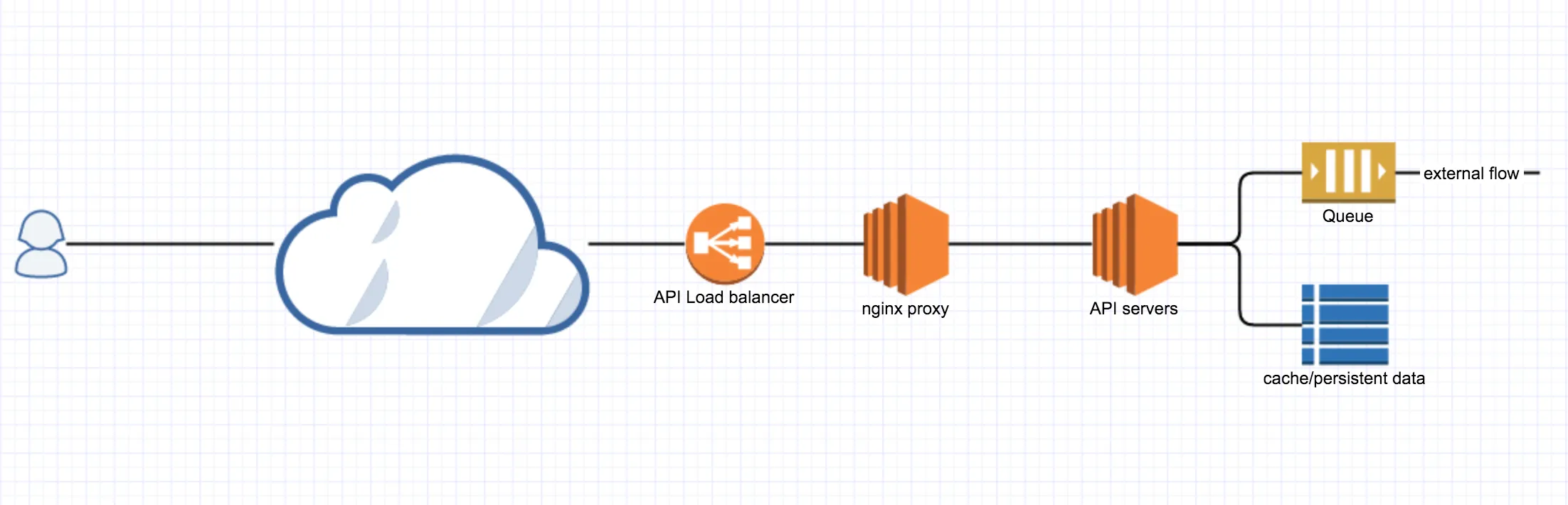
(The load balancer and nginx proxy (web server) may be the same cluster. Here they’re logically separated.)
This is a very typical approach: all APIs deployed in one system — simple, efficient, easy to pick up. However, as time passes and functionality grows complex, such a system becomes increasingly overburdened. For example, say we’re building an API system for a content publishing platform (like Zhihu Daily). At first we might only need content-related APIs; gradually you add tracking-related APIs; then we need user-behavior-related APIs. They each access different data sources, and behave very differently (content APIs can be cached, while tracking and user-behavior APIs cannot), and so on. When these logically disparate APIs are mashed into a single system, it becomes harder and harder to maintain.
So this deployment approach evolves into the following (Option Two):
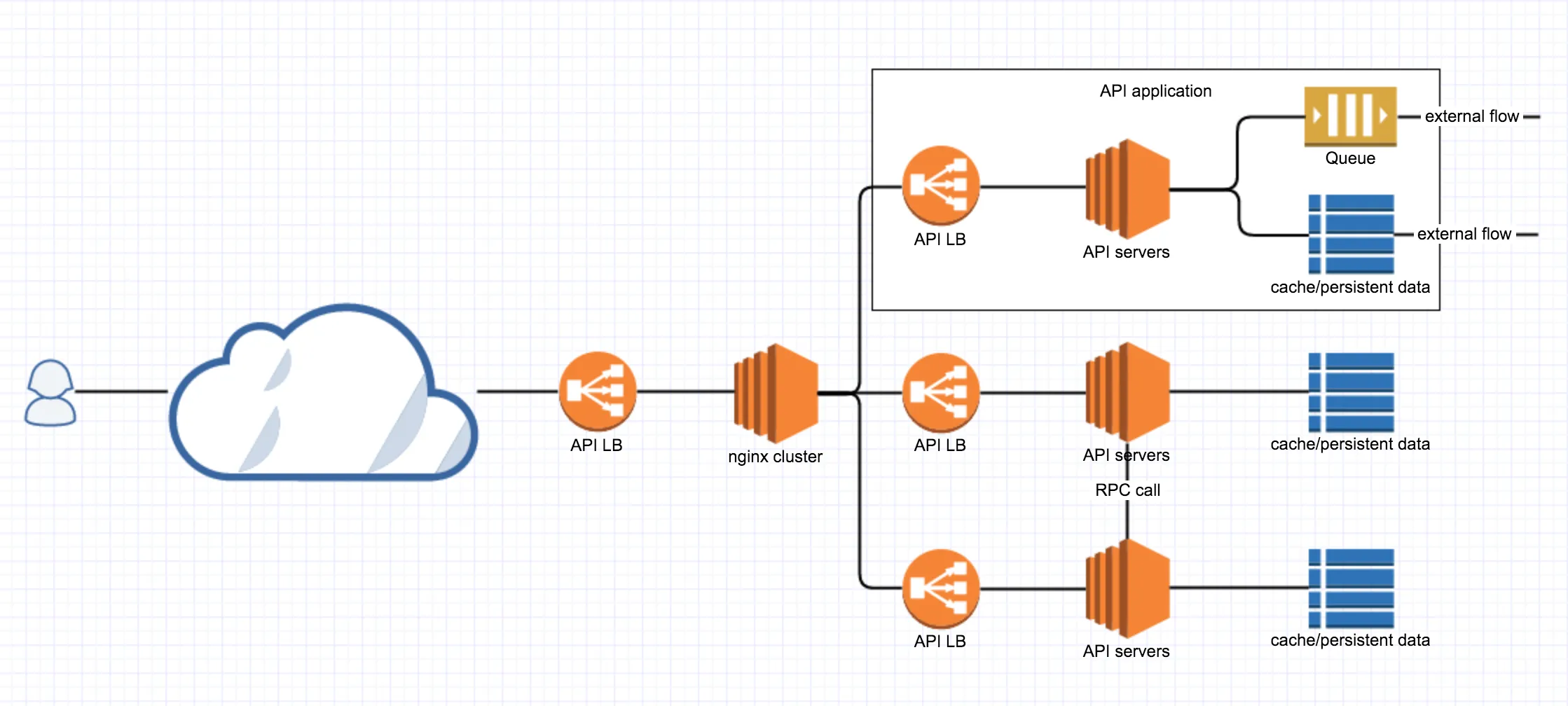
We split the APIs by function; behind the load balancer / nginx proxy are individual API applications. They have their own load balancer / nginx proxy, and can be scaled up/down according to each API application’s own scale. For example, if content-related APIs see 5x the traffic (converted to compute) of user-related APIs, then when deploying we can allocate resources at a 5:1 ratio; or if the whole system is overloaded at peak times, we can shut down the tracking API and return 503 directly at the proxy side, reallocating the saved resources elsewhere.
The deployment approaches discussed here deliberately omit some details — for instance, how logs are collected and managed, and the monitoring and information collection (APM) of the services themselves, aren’t mentioned. These are key links in a deployment plan, but since this article isn’t specifically about deployment, they’re omitted.
Obviously, the software architectures of Option One and Option Two differ too. In Option Two, access between two API applications is done via RPC (HTTP works too but is slightly less efficient), whereas in Option One it might just be a function call or direct access to the other’s database. Option Two embodies divide-and-conquer: turning a big problem into the solution of several similar small problems along a common path.
Pipeline
In the rest of this article, we’ll use Option Two as the blueprint to describe the architecture of an API application. Earlier we mentioned these goals:
- A well defined pipeline to process requests
- REST API done right (methods, status code and headers)
- Validation made easy
- Security beared in mind
- Policy based request throttling
- Easy to add new APIs
- Easy to document and test
- Introspection
Except for the last three, the rest all relate to the API processing pipeline. We know that the execution of an API, from request to response, can be divided into several stages: request -> pre-processing -> processing -> post-processing -> response. Here, “processing” refers to the code the API route actually executes. A good architecture should abstract as much as possible of the various processing along the API execution path, putting it on a common path (also called middleware), clearing obstacles for API writers while pushing APIs toward greater standardization.
The following diagram is a pipeline I conceived; it’s not the best, but it best reflects my thinking:
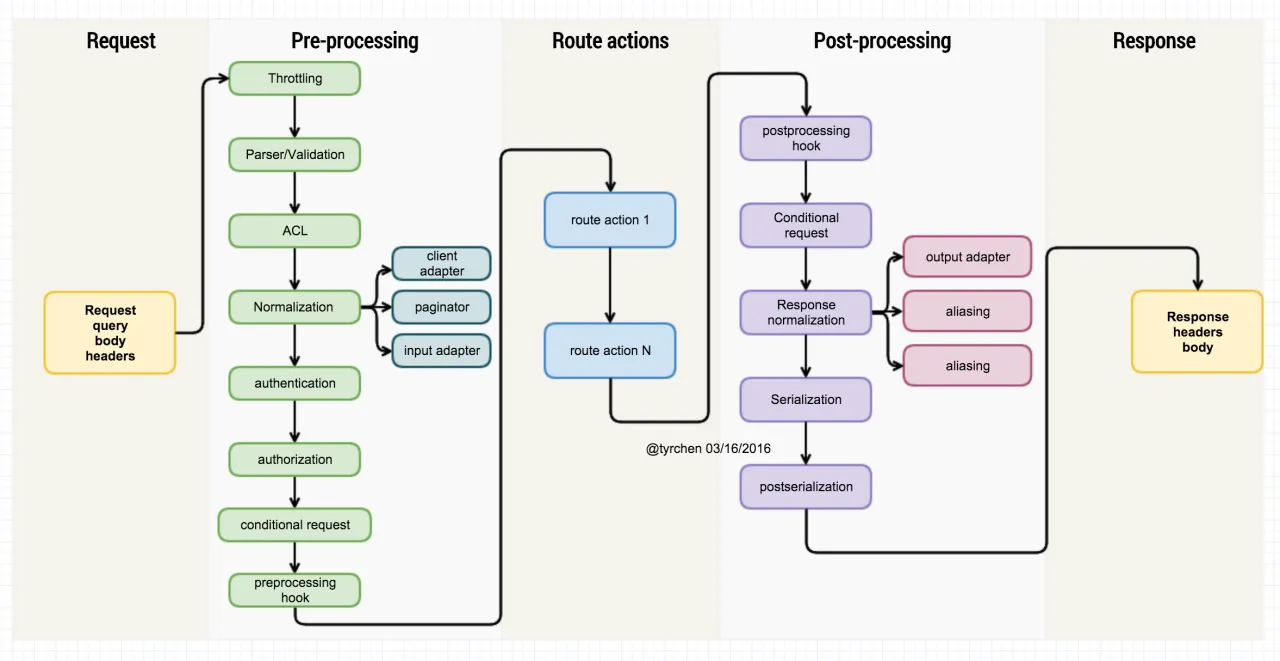
Let’s go through each component of this pipeline in detail:
- throttling: An API should have the most basic control over access rate. For example, for the same user, the rate of publishing tweets can’t exceed a threshold — say 1 per second (the actual average should be well below that). Exceeding this rate is abuse, and must be stopped with a 429 Too many requests. Throttling can be implemented with a leaky bucket (restify provides it directly).
- parser / validation: Next we parse the headers, body, and querystring in the URL contained in the HTTP request, and validate the parsed result. This process can fend off many service abuses and terminate execution early. For example, if your API requires callers to provide X-Client-Id, those not providing it, or providing it in a non-conforming format, are all rejected. This step is very important — like our skin, it isolates the filthy world from our organs.
- ACL: Besides basic throttling and validation, another way to control whether a resource can be accessed is ACL. Administrators should be able to configure rules that further filter out illegal/non-compliant access. For example: for a Zhihu topic at path “/topic/19805970”, during the window from 10 PM to 7 AM Beijing time the next day, allow it to be displayed in mainland China. Such a rule can be a complex expression; its trigger condition (url) can be placed in a bloom filter, and urls satisfying the filter further look up their corresponding rule expression in a hash map, are evaluated, and return whether display is permitted. As for how an expression like
country = "CN" && time >= 00:00CST && time < 07:00CST(this is an expression an administrator enters) is handled, please refer to The Little Parser. - normalization: As the name suggests, this component preprocesses the request’s content to make it uniform. normalization can be further divided into multiple strategies executed in series, such as:
- paginator: combine the page/sort-related information in the request to generate a paginator.
- client adapter: combine the API client’s identity-related information (device id, platform, user id, src ip, …) into an adapter.
- input adapter: adapting input data. This is for Virgos. Often the format of input data differs from the format the language uses to process data, which is unacceptable to Virgo programmers. For example, API input is usually snake case (show_me_the_money), whereas in some languages (e.g. javascript) the conventional naming rule is showMeTheMoney, so converting input names benefits programmers with code OCD.
- authentication: Verifying user identity. Not much to say here — mainly handling the “Authorization” header. For APIs that don’t need verification, this step can be skipped. When building APIs, never use cookie/session-based authentication; use tokens instead. Existing token-based authentication includes oauth, jwt, etc. If you use jwt, note that jwt is a stateless token, so the server generally doesn’t need the database to verify the token’s contents; therefore when using jwt you must protect the token with https and set an appropriate timeout so the token expires automatically.
- authorization: Once the user has an identity, we further need to know what permissions the user has to access what resources. For example, a user with uid 9527 has access to “POST /topic/” (create a new topic) and “PUT /topic/:id” (modify an existing topic); when they initiate “DELETE /topic/1234”, they’re rejected directly at the authorization layer. authorization is another kind of ACL (role-based ACL), handled similarly.
- conditional request: At the entry point, if the operation is a PUT/PATCH that modifies an existing resource, a good API implementation will require the client to do concurrent control via a conditional request (if-match / if-modified), the goal being to guarantee that when the client wants to update data, it’s using the latest version of that data on the server, not some historical version; otherwise return 412 precondition failed (for more details, please refer to my earlier article).
- preprocessing hook: discussed later.
- processing: the handling of the API itself. This is generally the handler function provided by the API author.
- postprocessing: discussed later.
- conditional request: At the exit point, if the operation is a GET, a good API implementation will support the client’s if-none-match/if-not-modified request. When the condition matches, return 200 OK and the result; otherwise, return 304 Not Modified. 304 Not Modified is a treasure for the client — besides saving network bandwidth, the client doesn’t need to refresh data. If your app has fifty articles under some category, and the pull-to-refresh returns 304 Not Modified, the client doesn’t need to redraw those 50 articles. Of course, many API implementations decide this via a custom status code in the returned data — that’s like “taking off your pants to fart” — needlessly cumbersome.
- response normalization: Similar to the normalization at the request stage, at the output stage we need to convert the result into a suitable format and return it to the user. response normalization also has many strategies, such as:
- output adapter: If the input adapter is for cleanliness-obsessed programmers and optional, the output adapter is not. It keeps the output format consistent and uniform. For example, if your database fields are camel case and your programs all use camel case, but the API output needs to be uniformly snake case, then handling it uniformly at the output adapter stage beats each API handling it itself.
- aliasing: Often the name of the data you get doesn’t match the name defined in the API interface, and handling it separately in each API is very verbose. This can be extracted and done at the normalization stage. The API writer only needs to define that name A should be aliased to B, and the framework does the rest.
- partial response: partial response is a very useful feature of the google API (see: https://developers.google.com/+/web/api/rest/#partial-response ); it lets the client decide what the server returns (a subset of the current result) without changing the API implementation, which is very helpful for saving network bandwidth.
- serialization: If the API supports content negotiation, the server, where possible, preferentially returns the output type suggested by the client. The same API — android can ask for application/msgpack; the web can ask for application/json; and xbox can get application/xml — each takes what it needs.
- postserialization: This is also a hook; before the data is finally sent to the client, the API caller can inject its own logic one last time. Generally, some statistics internal to the API system can be collected here (all error-handling paths and normal paths converge here).
A bit more on response normalization: if done well at this layer, much of the verbose handling inside APIs can be cleaned up nicely. You only need one rigorously tested set of code, and all APIs benefit greatly in their output. For example:
{
    errorName: 'world',
    errorMessage: 'hello world',
    details: {
        ...
    }
}
After response normalization:
- the output adapter turns camel case into snake case, so errorName -> error_name
- aliasing (if error_name -> err_name is defined) converts error_name to err_name
- if the client only wants err_name / err_msg on access, then partial response returns only these two fields
The result returned is as follows:
{
    err_name: 'world',
    err_msg: 'hello world'
}
Such a pipeline abstracts a basic process of API handling out of the concrete behavior of APIs, and is easy to extend at a few hooks.
The above description is essentially language- and framework-agnostic. Returning to node and restify themselves, we find that some things are not easy to handle. For example, in restify, a route’s action often directly calls res.send() to send data — so how can the various post-processing behaviors be injected? If you were building a framework from scratch, each component in the pipeline could return a Promise or Observable, and you’d just chain them together; but in restify, you can’t do that. For this concrete problem, I adopted an approach similar to python’s wraps:
function wrap(fn, skipEventFn, name) {
  return function newFn() {
    if (!this.server) {
      throw new Error('Cannot wrap to a function without this.server as context');
    }
    const params = Array.from(arguments);
    const getEventName = prefix => lodash.camelCase(`${prefix} ${name || fn.name}`);
    const skip = skipEventFn ? skipEventFn(params) : false;
    if (!skip) this.server.emit(getEventName('before'), params, this);
    fn.apply(this, params);
    if (!skip) this.server.emit(getEventName('after'), params, this);
  };
}

// usage:
// res.send = wrap(res.send.bind(res), skipFn, 'send');
Then, by listening to the ‘beforeSend’ and ‘afterSend’ events, we get the effect of injecting logic. Though it’s a hack, it’s probably the best solution at hand.
In an asynchronous system like node.js, another thing to note is that if the event emit listener functions are asynchronous, the order of processing may not be as you’d like. To that end, I developed an eventasync library that monkey-patches node.js’s event emitter to support async listeners.
The Interface
With the pipeline sorted out, the whole architecture is basically clear. Next we need to consider what kind of interface to provide so that writing APIs can be efficient. The interface restify provides:
server.use(function(req, res, next) { ... });
server.get('/topic', function(req, res, next) { ... });
Simple as it is, it can hardly meet our needs for the pipeline — for instance, validation. How to do validation can only be decided by each API’s author, and the framework collects those decisions and executes them at the pre-processing stage. So we must collect this information before route initialization. In addition, there’s a lot of other information — such as whether a route needs authentication, or how to do aliasing — that the API writer must provide to the framework, and the framework collects. So, as a framework, we need a better interface to provide to API writers. Here is my proposal:
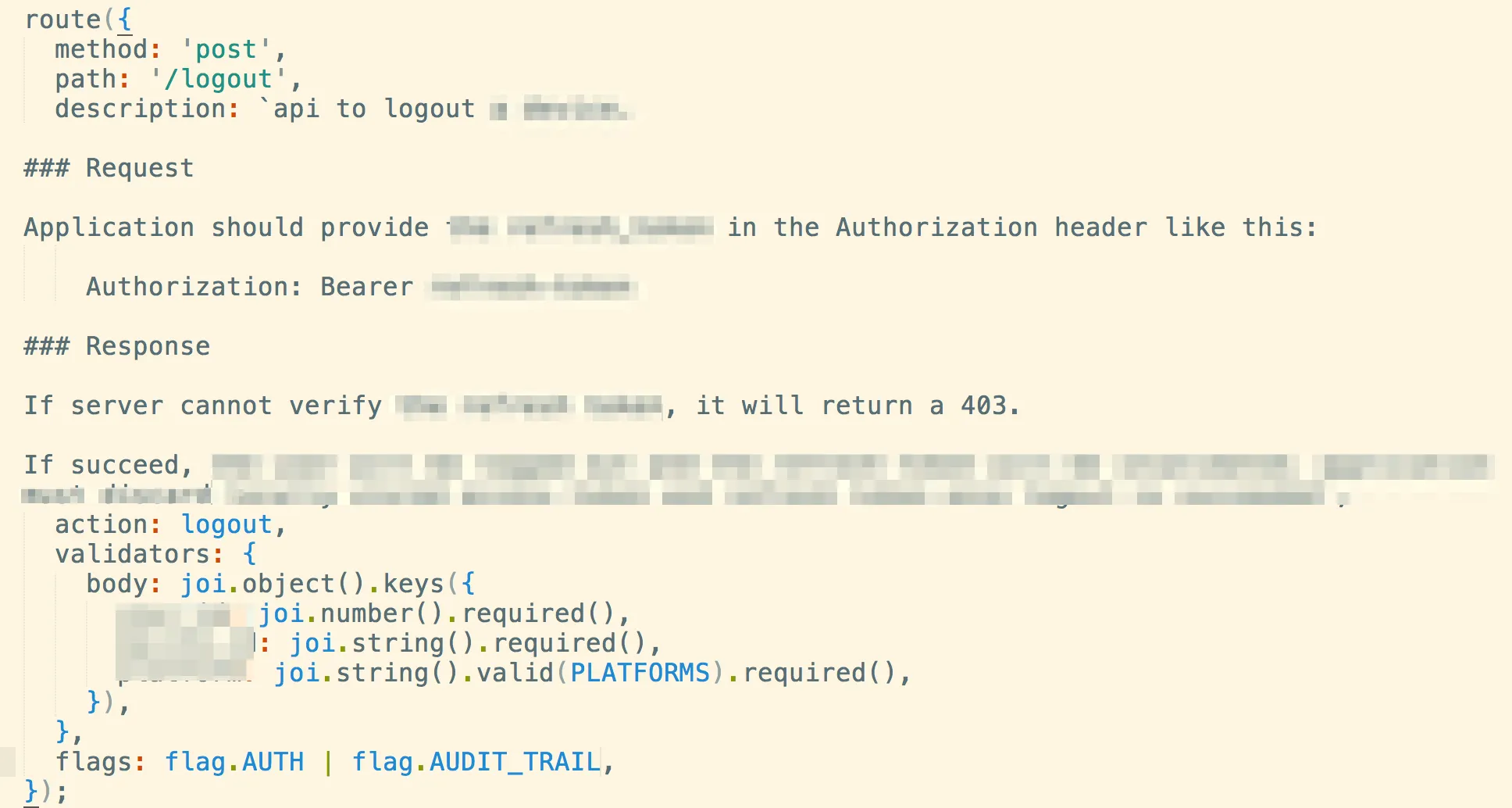
This interface conveys several pieces of information:
- The route accepts the POST method
- The route’s path is
/logout - The route has a very detailed document written in markdown (remember our requirement: easy to document?)
- It accepts an action function with parameters (req, res, next) (or several of them)
- It provides a joi validator for the body (besides the body, you can also validate header, param, and query)
- Using this API requires authentication, and an audit trail is recorded after the call completes
Through such an interface, we partition the API system into “compile time” and “run time”. An API written with this interface is more like a source file awaiting compilation. When the API system starts, it goes through a “compile” process that aggregates all the routes, generates the route forms restify recognizes, and at the same time collects the various pieces of information within (like validator, authentication) for the framework’s middleware to use.
Don’t underestimate this change to the interface and the separation of “compile time”/“run time”. Besides letting each piece of API information seamlessly connect to the pipeline, it also enables the introspection we desired:
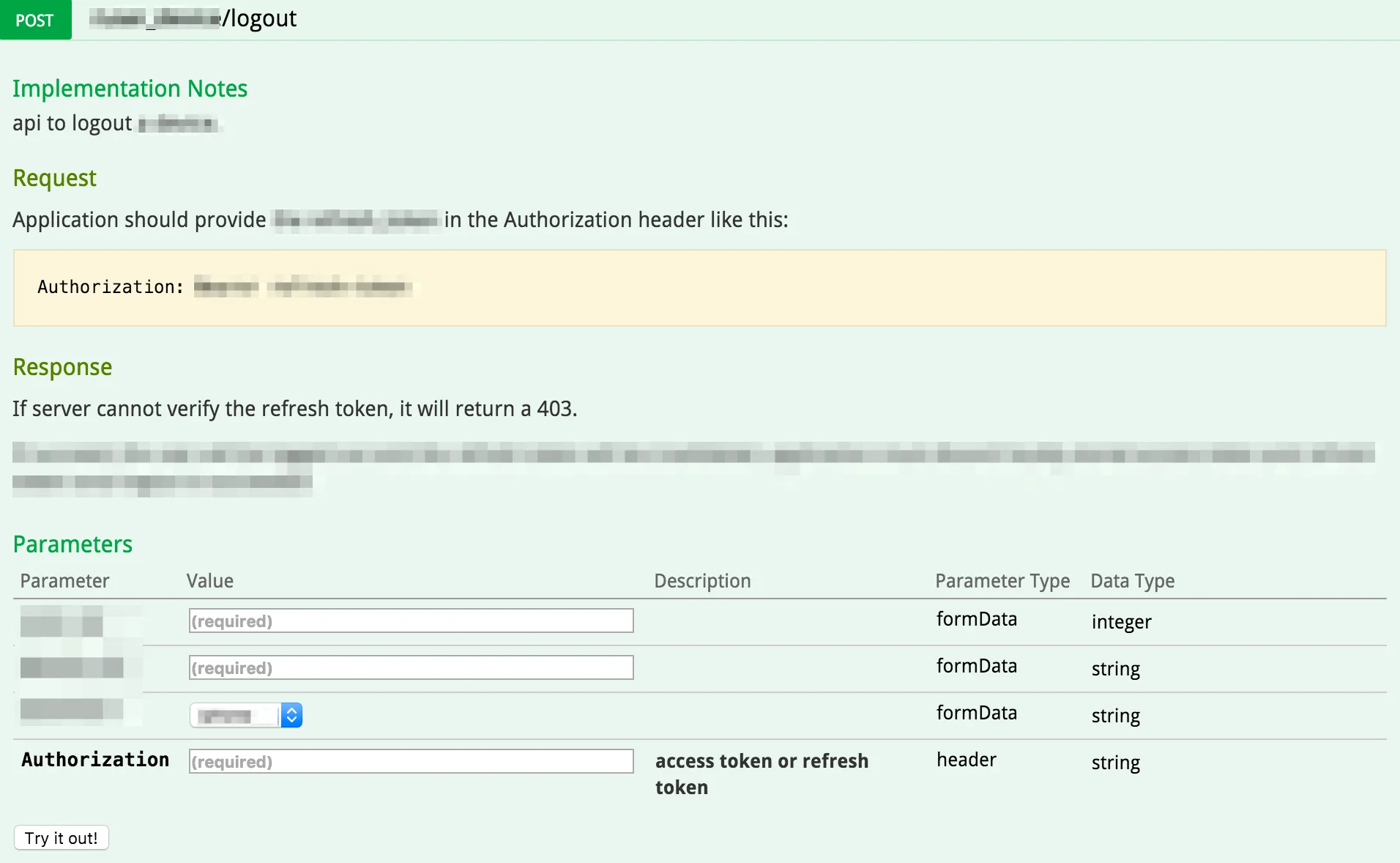
(The swagger doc generated from route, for API users)
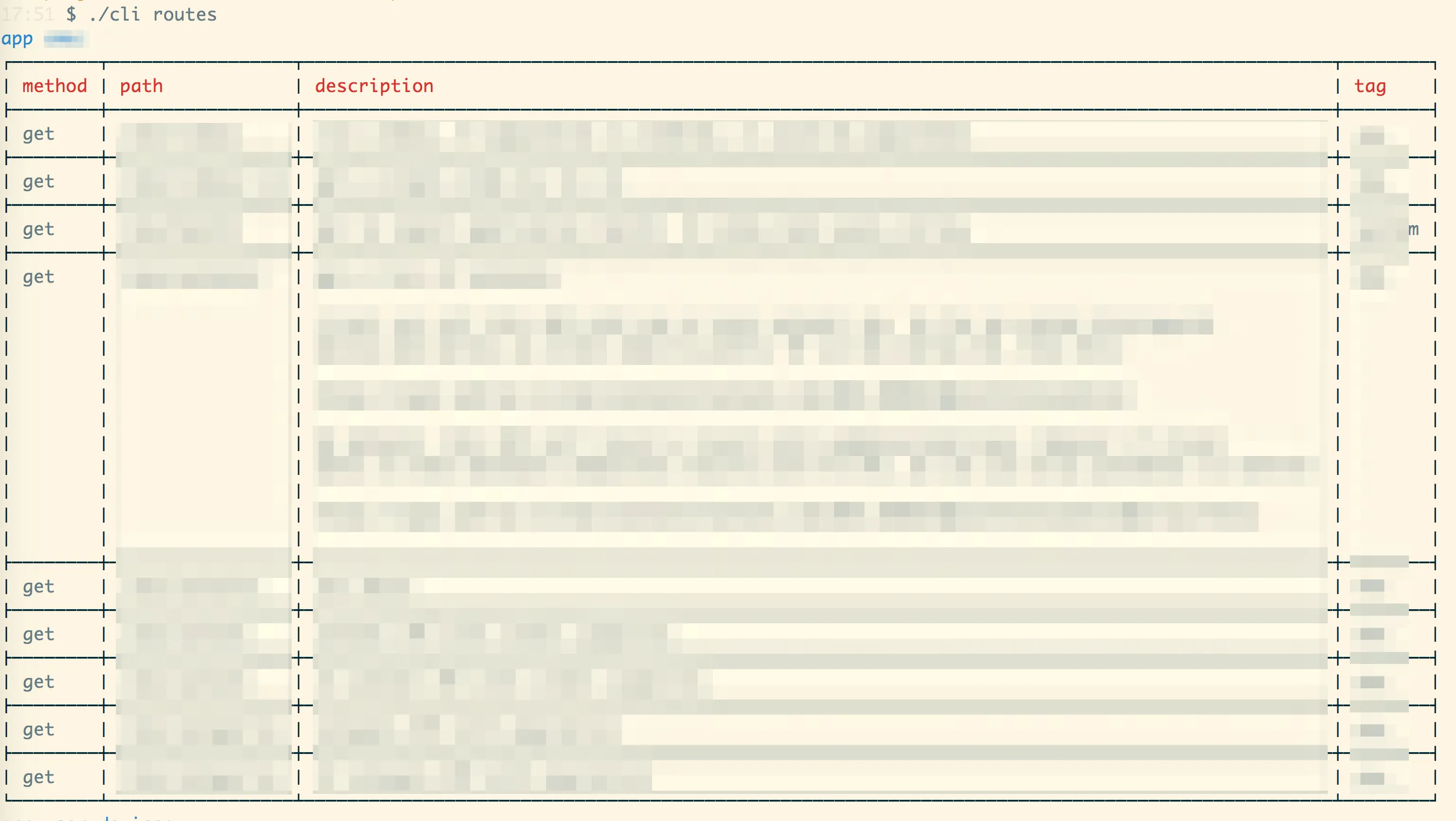
(The cli doc generated from route, for API developers’ introspection)
I believe that through this interface, you can better understand David Wheeler’s line:
All problems in computer science can be solved by another level of indirection.
Separating Compile Time from Run Time
On Wikipedia, compile / compiler is explained as follows:
A compiler is a computer program (or a set of programs) that transforms source code written in a programming language (the source language) into another computer language (the target language), with the latter often having a binary form known as object code.[1] The most common reason for converting source code is to create an executable program.
So compile is actually a kind of transformation (we’ve seen this word again): it converts some data (if you consider source code a kind of data) from one format to another. In compiled languages, this conversion is to generate machine code (like c / go) or byte code (java / c#) for convenient machine execution (byte code is further compiled into machine code via JIT).
(A digression: interpreted languages actually also have a JIT “compilation” process; pure languages that are interpreted statement-by-statement entirely at runtime can only survive in an ivory tower.)
With this layer of (indirection) compilation, source data and target data are separated, allowing many things — for example, a major benefit of a compiler as Wikipedia says:
Compilers enabled the development of programs that are machine-independent.
Here, this machine-independent can be swapped, as you need, for framework-independent, or even language-independent.
So what by-products can a piece of source code produce besides the target code (the main product)? Take java as an example:
- If your comments follow javadoc, beautiful docs (SDK) can be generated from the code.
- facebook/infer can do detailed static analysis of your code.
- jacoco can generate a coverage report from source and test cases.
- …
The benefits these by-products bring are obvious: we don’t need to do extra work for certain specific purposes.
Back to the API system we’ve been discussing these past few days. I mentioned such an interface:
You can regard it as a snippet of code that declares an API, but I prefer to regard it as a piece of data that describes an API. This data has:
- method: which http method the API is called with.
- path: what endpoint the API uses.
- description: the API’s documentation.
- validators: if validating the API’s input data, how to validate.
- action: what the API actually does.
- flags: what properties the API has (whether it needs validation, whether it supports certain specific operations, etc.).
If you look at this code through the lens of data, then every route() declaration can be aggregated into an array. In fact, that’s exactly how route is implemented:
function route(params) {
  const result = joi.validate(params, routeSchema);
  if (result.error) throw result.error;

  const value = result.value;

  value.tag = helper.app.getAppTag();
  ...
  value.description = mustache.render(value.description, helper.doc);
  registeredRoutes.push(value);
}
Whenever a user writes a route, we’re actually pushing that route’s data into a list. How exactly this list is used — whether to generate restify routes or hapi routes — we decide concretely at compile time. This is framework-independent.
So what is compile time, and what is run time?
const app = new Application();
app.compile(); // call app.setupRoutes(); etc.
app.run();  // call app.listen(); etc.
Simple as that. app.compile() converts the data in the route list into restify routes, and app.run() starts network listening. Many readers at this point will think: come on, I assumed this was something profound — I could write this code too. Indeed, there’s nothing profound here. What’s key, however, is whether it occurs to you to decompose the running of a piece of code into two stages: compile() and run(). Only when you think that way will you in turn consider whether your API code can step back and be encapsulated in a data structure; only then will you think about how this data structure should be set up, and only then will you write the implementation of route() in a similar way.
At “compile time” you can do a lot of tedious work, like a master cultivating qi and mastering the sword before a duel; that way, at “run time”, you can execute flowing, effortless moves.
Another example. For blogging, you can use wordpress, or a static site generator like jekyll. The former mixes compilation and running, generating posts when a page is requested; the latter completely separates the two — you must use jekyll’s tools to compile markdown-written posts into html before they can be accessed normally. After this separation, a whole new world opens up: at “compile time” you can generate a full-text search index for all posts, generate directories, related posts, menus, etc. based on category/tag, and in addition to providing lightning-fast speed at run time, it can also provide the dynamism and flexibility that only wordpress could.
Note that the separation here is entirely logical — like the pipeline in the previous article, each component exists logically and independently, without necessarily being physically separate.
Separating “compile time” and “run time” is a very important abstraction skill.
Configuration Management
Let’s first talk about configuration management. A system’s flexibility is inseparable from its configuration management. A system contains a large number of preset properties (hereafter, property), which need a common place to live. I say “preset properties” rather than “constants” because these properties may need to change at run time, and the notion of a constant can mislead.
The simplest configuration management is to put all properties into a config file, read at system startup. There are many choices of config file type: ini, json, yaml, toml, etc. Each has trade-offs; when choosing, note that config files should ideally support comments for maintainability. From this angle, json isn’t a great choice. toml may not be widely used — it’s a format defined by github founder Tom, similar to ini but much more flexible; those interested can search for toml on github.
We know a project has multiple runtimes: development, staging, production, test. Different runtimes may load different config files. So configuration management must account for this, allowing config files to override. The most common override strategy is to have the system provide a common config file: default, then each runtime-specific config file inherits and locally overrides it. At system startup, the two are merged.
Sometimes we need to rewrite configuration while the system is running. Since config is generally read into memory at system initialization, simply rewriting the config file won’t take effect immediately. At this point, you need to manage configuration-related data like you manage a cache, encapsulating it in a container: when the config is modified, call the container’s invalidate method — so that the next time any config item is accessed, the config is re-read and cached.
For distributed projects, configuration should be stored centrally in systems like redis, to facilitate unified handling (orchestrate).
CLI
Writing a CLI is not hard, but the difficulties of a CLI subsystem are:
- Discovery and self-registration of CLIs. As long as your framework’s users write CLIs following some convention, these CLIs are automatically integrated into the system.
- CLI writers can easily obtain system information — that is, the system has the ability of introspection.
The implementation of the former was already mentioned earlier when we discussed how routes are registered, so I won’t repeat it here. The latter is very important. Before expanding on it, let’s consider a question: in the process of building a system, what problems do we want the system’s CLI to solve?
First, a CLI obviously isn’t for users — it’s for programmers, so the CLI provides scripts that simplify programmers’ work. Then, as an API system, what CLIs do programmers need? Let’s look at some examples:
- Creating certain skeletons — rails / django both have CLIs to create a new project, new model/controller, etc.
- Getting system information. For example: knowing quickly, without reading code, what routes and models are in the system.
- Generating certain information or simulating certain behavior. When debugging your system, generating a certain state every time is annoying — for example, logging in can be done with one click via a CLI.
- …
Most of these examples require the system’s introspection ability, for example this CLI:
command(
  'swagger-gen [app-name]',
  'generate API documentation for swagger info',
  (appName) => {
    const apps = cli.getAppNames(appName);
    const baseDir = SWAGGER_PATH;
    apps.forEach(name => {
      const app = cli.getApp(name);
      const generator = new helper.SwaggerGenerator({
        title: app.config.app.description,
        description: app.doc.concat(app.config.app.doc, middlewareDesc),
        api_version: app.config.app.version,
        host: app.config.server.name,
      });

      generator.addRoutes(app.routes);
      fs.writeFileSync(`${baseDir}/${name}.json`, JSON.stringify(generator.doc), { encoding: 'utf8' });
    });
  }
);
In this CLI’s execution function, we use this system information:
- The names of all apps in the system.
- An app’s instance.
- The app’s configuration.
- The middleware the app enables.
- All of the app’s routes.
- …
If we can’t obtain this information at the system’s non-run time, the CLI’s power is greatly diminished. This also confirms the importance of separating “compile time” and “run time” as described in my earlier article. Many frameworks, like express.js, can’t clearly distinguish the two, so that wanting to get route/middleware information at non-run time is very difficult.
The Testing Framework
Testing APIs is quite dull (writing almost any test case is quite dull), but the importance of testing is beyond doubt, especially for constantly refactored code. If the testing of other systems can only find patterns locally for optimization, API testing — especially functional testing — can be considered globally.
For example, you have an API PUT /feature/:id; to test whether it works correctly, you’d probably consider these test cases:
- PUT correct data to a wrong id, to test whether an error occurs;
- PUT a wrong etag, to test whether concurrent update works;
- PUT empty data, to test whether the validator works;
- PUT wrong data, to test whether the validator works;
- PUT normal data, to test whether basic functionality works.
These test cases share these commonalities:
- A temporary server needs to be run
- Requests need to be sent to the temporary server
- The status code, as well as the response header / body, need to be checked to confirm whether the expected result appears
If you write a separate test case for each test, though the code per case isn’t large, testing one API requires 5 tests, and once the API grows in scale, the code becomes substantial, and adding and maintaining it is a hassle.
We can define a testing language for this purpose to describe test fixtures:
- test: 'get content with all valid ids'
  endpoint: '/contents/iphone/ids=1234,1235'
  expected:
    code: 200
    type: 'Object'
    headers:
      'etag': '#computeEtag'
      'content-type': 'application/json'
    body:
      '#length': 2
  tag: 'smoke'

- test: 'get content with both valid and invalid ids'
  endpoint: '/contents/iphone/ids=1234,1111111111111111'
  expected:
    code: 200
    type: 'Object'
    body:
      '#length': 2
      '1111111111111111': null
  tag: 'smoke'
This definition is very simple, and I believe everyone can understand it:
- The test’s description (used in the test report)
- The url used by the test
- The expected result, including status code, headers, and body
Here we use a very simple way to distinguish field names from functions. For example, #length under body — its result isn’t body['length'] but length(body); the former works for arrays (javascript) but not for objects.
Running such fixtures doesn’t require much code (assuming we use ava as the testing tool):
function runFixture(p, test, serverFn) {
  const data = fs.readdirSync(p)
    .map(name => path.join(p, name))
    .filter(filename => fs.statSync(filename).isFile() && filename.endsWith('.yml'))
    .reduce((acc, filename) => acc.concat(yaml.load(fs.readFileSync(filename))), []);
  data.forEach(item => {
    test.cb(item.test, t => runAssertions(item, serverFn, t));
  });
}
Here, runAssertion sends the request and compares the data in the fixture against the response to determine whether a test case passes or fails.
With this, we’ve successfully transformed the tedious writing of test cases into the writing of a parser plus a series of fixtures. The parser is written once and rarely changed afterward (though new features — like new functions such as the above #xxx — will be added), while fixture authoring, compared with the prior examples, is nearly impossible to get wrong. Writing one such test case in three to five minutes is effortless.
The Contract
The most basic manifestation of a contract in software is the function. When a function is defined, it tells its user: here’s how you and I should cooperate.
For example, a function could be defined like this: if you pass me data of type X, I’ll return a result of type Y; and if you pass in the same value, I’ll give you the same result. This is a pure function, and it’s also programmers’ favorite form of contract, because it’s black and white, crystal clear, and honest through and through.
The more common case is the less-than-pure function: if you pass me data of type X, I’ll return a result of type Y; of course, if the result doesn’t exist, I’ll give you a null, take it or leave it; and if something goes wrong in my processing, I’ll throw one or several bombs called “exceptions” — so either we’re good buddies (you handle the exception), or we go down together (you don’t). Moreover, I can’t guarantee that passing in the same value will return the same result (like database operations). Despite its many ambiguities, a function with side effects is still a kind of contract.
All parties to a function-level contract are programmers; the impact radius of a contract update is limited, so when a problem arises, the two siblings talk it over — change it! And a new contract appears. However, the appearance of a new contract doesn’t mean the termination of the old one; only when all places using the old contract switch to the new one can we safely abolish the old contract. For a single function, if it’s a matter between two people, changing the contract is a matter of an hour or so; however, in a complex system like linux, try changing the interface of list_add_tail() (assuming you have permission) — even if Linus doesn’t slap you to death, I guarantee the community’s spit will drown you. Why? You’ve touched a lot of people’s cheese.
After all this setup, I want to make one point: once you’ve drawn up a contract, you must abide by it and not change it lightly; the more people use a contract, the greater the cost of changing it. Let me define a Chen Index CEI — the Contract Employ Index, where every million users counts as 1. The higher the CEI, the more users there are, and likewise, the greater the cost of changing it.
What is a REST API (hereafter, any mention of API refers to REST API)? A REST API is a contract between server and client. This means a small-to-medium API has a CEI of at least 0.1. Once an API is released, you basically lose the right to modify it at will, because you can’t expect clients that have slipped beyond your control to upgrade in lockstep as we’d like.
So even if you’re used to creating functions at will and refactoring them as needed, when building APIs you’ll be constrained on many sides. Laozi said: “A ready promise is rarely kept; what comes easy often leads to much difficulty.” If you’re casual and easy at the start, you’ll bring endless pain to later maintenance and updates.
So we need to design API interfaces properly.
Defining and Designing the Contract
We know designing interfaces isn’t an easy job; we need to consider: usability, simplicity, security, reliability, and so on, and after designing we need to document it. So we’d best draw on the power of tools to design APIs, just as we use visio to design network topologies or software architectures. Currently the more popular API interface design tools are swagger, API blueprint, and RAML.
Their common feature is that you can conveniently describe an API’s input and output and generate interactive API documentation. By interactive API documentation, we mean that while reading the API docs, users can run the API online and get results. This way, the API designer can, before even starting to write code, repeatedly work out the API’s structure until a robust, clear, and highly usable interface emerges.
Swagger
swagger is the earliest and most mature API interface design tool. It can use json/yaml to describe an API interface; designing and describing APIs with swagger has many benefits: documentation of the API, visualization of the API interface, automatic generation of client libraries in various languages, and even server-side code can be generated automatically. The complete and mature toolchain — including code generation tools — is swagger’s killer feature, and an important factor in many API vendors’ preference for swagger.
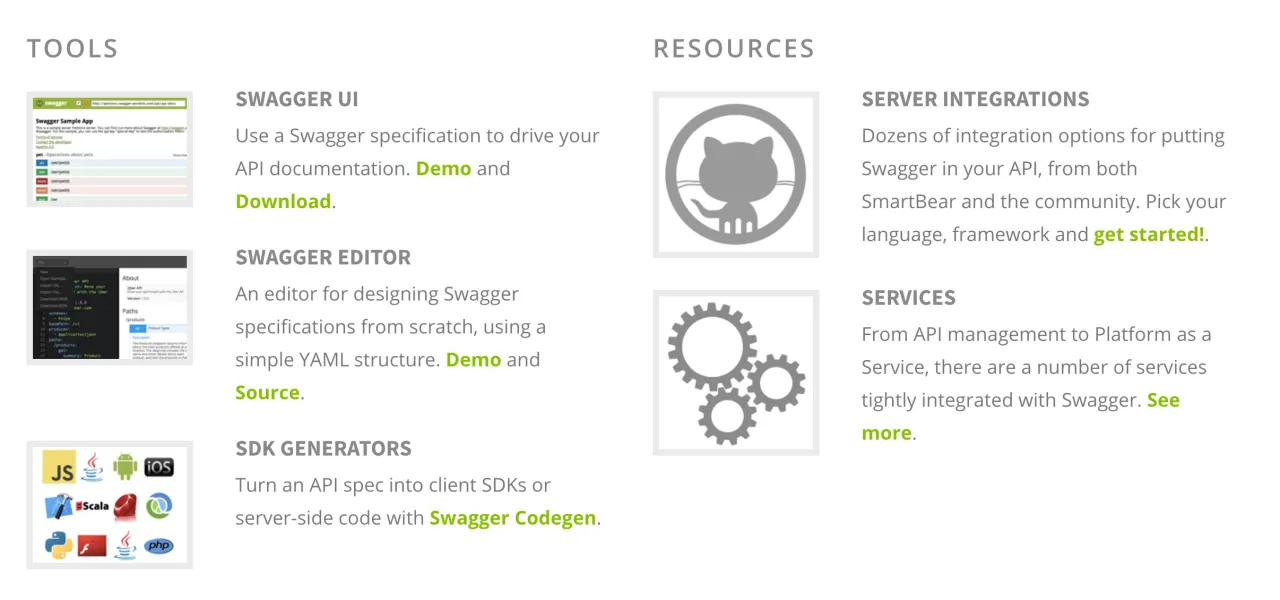
Let’s look at an example of swagger (instagram API):
paths:
  /users/self/feed:
    get:
      tags:
        - Users
      description: See the authenticated user's feed.
      parameters:
        - name: count
          in: query
          description: Count of media to return.
          type: integer
        - name: max_id
          in: query
          description: Return media earlier than this max_id.s
          type: integer
        - name: min_id
          in: query
          description: Return media later than this min_id.

          type: integer
      responses:
        200:
          description: OK
          schema:
            type: object
            properties:
              data:
                type: array
                items:
                  $ref: '#/definitions/Media'
Here an API endpoint /users/self/feed is defined; it accepts three querystring parameters and, on a successful request (200), returns an object like this:
{
    "data": [...]
}
swagger’s downside is that it’s too elaborate and cumbersome to write. But that’s not a big problem, so I ultimately chose swagger.
API Blueprint
API Blueprint leans more toward documenting APIs, so its chosen description language is markdown. Among the three, API blueprint’s description language has the strongest readability — it looks more like genuinely writing documentation. However, markdown’s strength isn’t in expressing grammar; describing validation-related content in markdown isn’t very comfortable — reading others’ docs is easy to understand, but writing your own is error-prone. API blueprint’s toolchain is also a weak link: many tools are missing or immature. If the lack of tools could be made up for with time, using markdown — a definition language not very friendly to machines — to define various grammars is the big mistake API blueprint made. Because, comparing the three’s syntax, their learning curves are all long, and their forgetting indexes are all high (not used often); expecting programmers to write them is worse than expecting machines to generate them for you. And for machines, generating the strongly structured json / yaml is relatively simple, while generating the weakly structured markdown requires filling many potholes.
So, on balance, among the three, the first I eliminated was API blueprint.
RAML
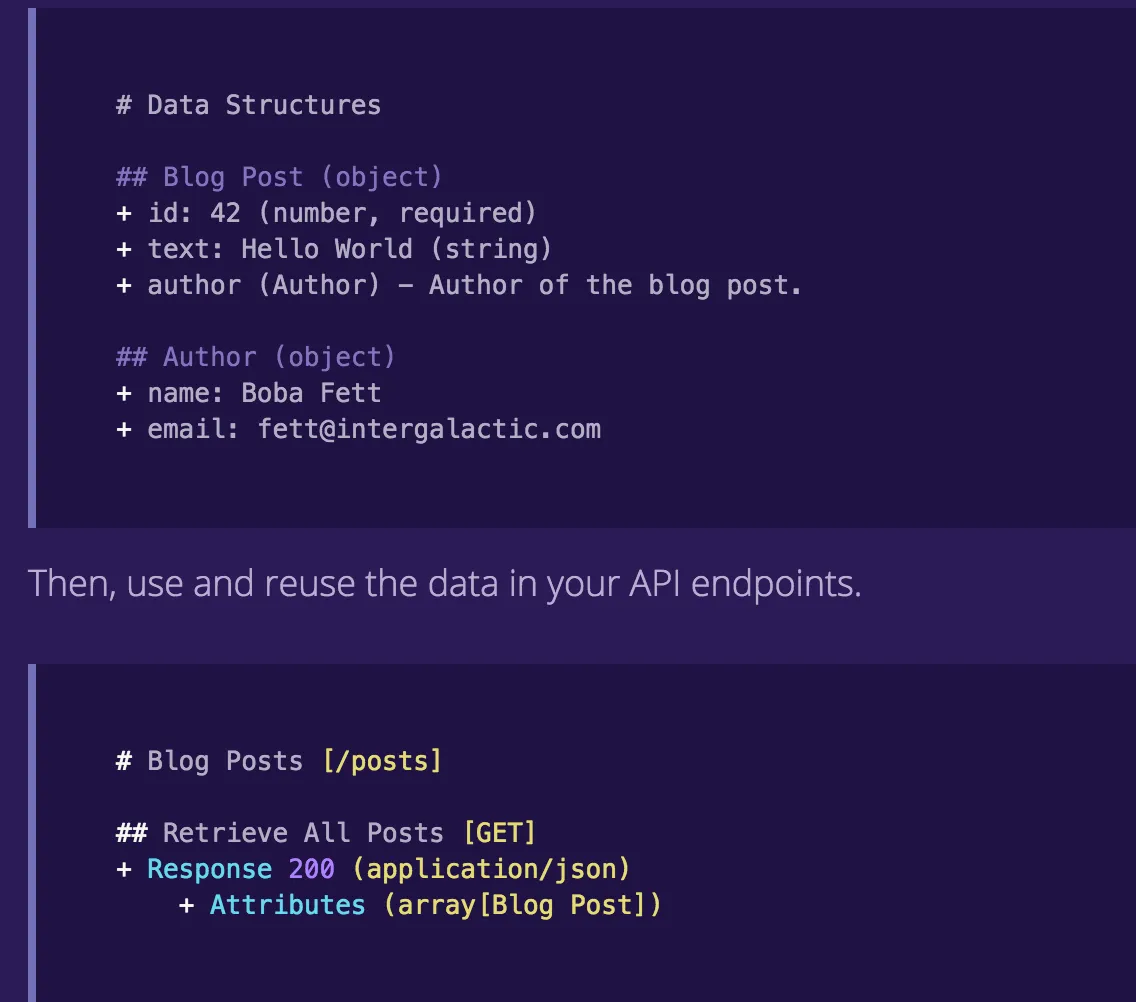
RAML uses yaml to describe APIs. It’s designed very flexibly, making it easy to decompose the description into multiple files that reference each other.
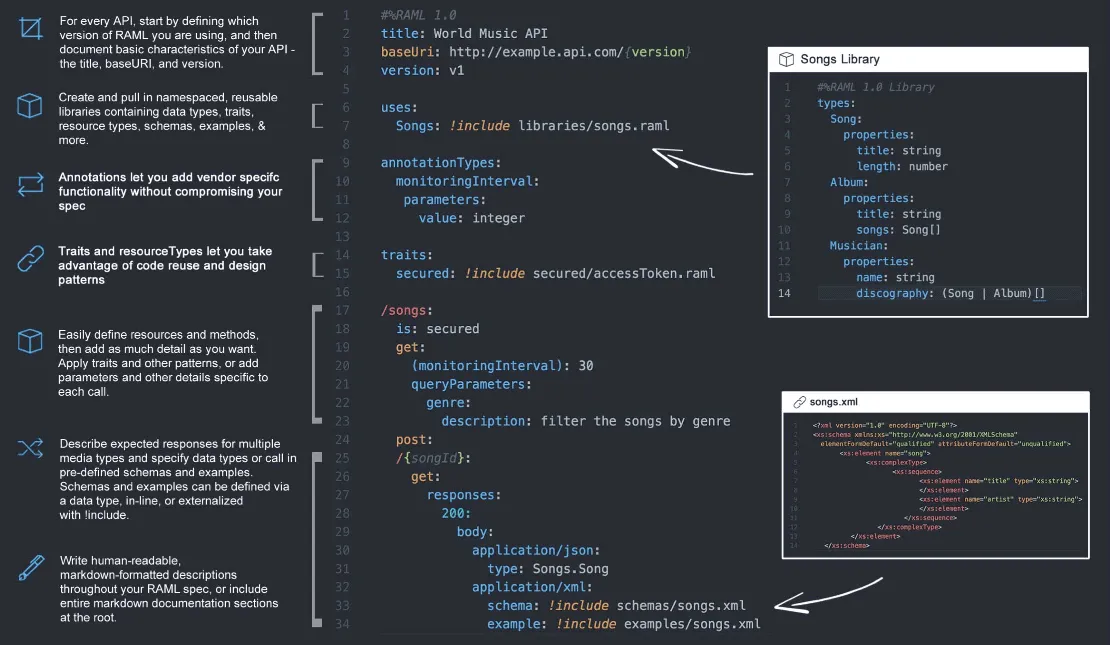
As a description language, RAML is like a vigorous youth — sharp and capable; while swagger is already old and frail — long-winded and dull. At first I vacillated between RAML and swagger, writing quite a bit of test code; if not for swagger’s toolchain being too attractive and RAML 1.0 still being in beta, I might have ultimately chosen RAML.
Merging Contract and Implementation
If we start from swagger, design the API interface, then implement it in some language, it feels a bit redundant: later when changing the interface, you have to change the code; if changing the code alters the interface, you have to go back and change the swagger declaration too. That’s too draining, and sooner or later inconsistency will arise. Once inconsistent, all prior effort goes down the drain: you provided a contract but didn’t act according to it.
swagger takes this into account — it can generate client SDKs and server stubs for you. The client SDK is fine; other client code calls the SDK one-directionally, so regenerating doesn’t affect things much. The server-side code needs to be implemented by the API implementer; even if a stub is generated, you’ll definitely modify and add functionality, so after modifying the swagger document you can no longer regenerate the server stub, because that might overwrite your modified code. So the way most people use swagger is to write the server side entirely by hand, not using the stub. In that case, the above problem persists.
Another solution is to reverse-generate swagger docs from API code. At first glance this seems to violate the original intent of API description languages: we’re writing code before we’ve even started designing.
No need to worry. We can adjust the code structure to be closer to a description language. You can first write code that clearly defines the API’s input and output, then use this definition to generate swagger docs, debugging and verifying in swagger-ui; once the interface design meets expectations, complete the concrete implementation. For example, describe the API in code like this:
Setting aside what the action is, this code is almost identical to describing the API interface in YAML (missing here is the content describing the response). We can use it to generate swagger docs for verification:
The benefit of reverse-generating swagger docs from code is that code and docs are always consistent — the API’s implementation and contract corroborate each other; the downside is that programmers, upon seeing code as if beholding a fairy maiden of the ninth heaven, get dazzled and enchanted, and having just defined the interface, before thinking it through, rush to implement it.
Epilogue
Han Feizi said: “One skilled at casting a net pulls the main cord; he doesn’t catch a myriad meshes one by one to succeed.” Making APIs is work of pulling the main cord — you must find, among the myriad tangled “meshes”, that one big rope of the net, and by tugging it, the net is set. That rope is, needless to say, the Pipeline I described in my architect article. With this as the guiding cord, top-down, layer by layer, you’ll suddenly see the light. However, no matter how well an API is written, without a corresponding contract it will never do — an API without documentation is like a product without a manual. Documentation and code are like the fish that, after the spring dries up, wet each other with their breath and moisten each other with their spit — neither can do without the other. Whether they can be kept from forgetting each other in the rivers and lakes as time passes and features accrue is a scale that measures every programmer’s ability and integrity.