The Black Box
Many people’s first impression on seeing this title may be: is this about the black box on an aircraft? It is somewhat related, but the main topic is the flight data recorder in software. Still, let’s start with the black box.
The Flight Data Recorder (FDR) is used to record various critical data during a flight. Its specifications are as follows:
- Power: 115V AC or 28V DC
- Power endurance: 30 days uninterrupted
- Service life: up to 6 years
- Includes an underwater locator beacon
- Can record 25 hours of continuous data
- Can withstand temperatures up to 1,100 degrees
The FDR’s hardware architecture:
- CPU card
- Ana log card
- Discrete card
- Frequency card
- Audio card
- Power supply card
The underwater locator beacon can operate normally in water as deep as 12,000 ft, transmitting a 37.5 kHz acoustic signal.
What does an FDR record?
- time
- pressure
- altitude
- airspeed
- vertical acceleration
- magnetic heading
- control-column position
- rudder-pedal position
- control-wheel position
- horizontal stabilizer
- fuel flow
The FDR—along with the CVR (Cockpit Voice Recorder), which records conversations among flight crew and cabin crew—is essential for determining why a flight crashed, because it provides first-hand material for RCA (Root Cause Analysis). Without an FDR, or if one cannot be found, an airliner crash will essentially remain an eternal mystery.
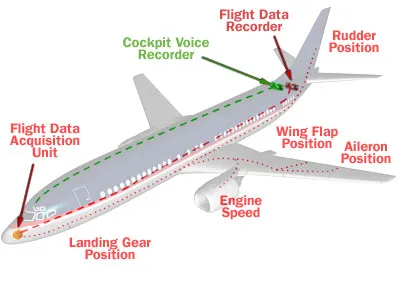
The figure below shows the FDR’s location on the aircraft and how data is collected:
Increasingly complex software systems suffer from the same problem. When client-side software crashes unexpectedly during operation, the core dump produced at the moment of the crash is often by itself insufficient to identify the cause (think of it as analogous to aircraft debris). At that point, we must turn to the software system’s FDR.
The most typical and most primitive FDR is the log. Almost all software has logs. By analyzing the logs from before a system crash, we can identify the causes of some problems, but many problems still cannot be traced to their root cause through logs alone. The reason is that logs are designed to record the system’s critical path, and the critical path is not always the same as the critical data.
Turn on a debug flag? Provide a debug build? Many problems are one-off incidents under specific circumstances, triggered only by obscure conditions. Debug switches and debug builds are hindsight—if the problem cannot be reproduced, they are useless.
This is exactly where the value and significance of the software FDR—the black box—lies.
There is still very little information online about FDRs in software systems. Apart from systemtap’s flight record mode (FRM), which I know about, the main example is Java’s support for FDR. Let’s look at Java FDR first.
Java FDR is built into the JVM, so as long as FDR is enabled in the JVM, every application running on top of it benefits (yet another proof of the value of indirection). It offers several major capabilities:
(1) Tracer: The tracer captures runtime data from the JVM and the application, including GC, synchronization, compiler (JIT), CPU usage, exceptions, I/O, and other information.
(2) Profiler: It periodically samples the system (to track system performance), or performs on-demand profiling; only when needed can it be turned on for full data collection (which has a significant performance impact, but is triggered only by specific events or specific configurations).
(3) After-the-fact analysis: The captured runtime data is placed in a circular buffer (in kernel memory or a file). When an unexpected event occurs (such as a crash), the data in this buffer is flushed out and used to locate the problem.
I have almost no exposure to Java and the JVM, so the above understanding is only skin-deep; I welcome brickbats from Java experts.
systemtap’s flight record mode (FRM) is another kind of FDR.
If you do systems development on Linux and have not explored systemtap, I suggest you look into it. systemtap gives you the ability to write a script that is injected into a target program at runtime and to extract information from that program. The capability is so powerful that you need ‘sudo’ privileges to run systemtap. Here is a brief explanation of how systemtap works:
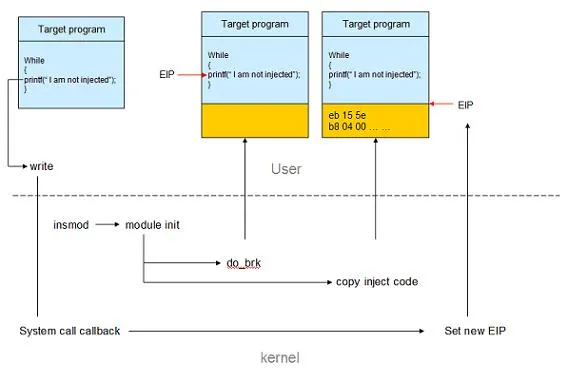
(1) First, the user writes a stap script and selects the process and functions to instrument.
(2) The stap script is compiled into a C file, then into a kernel module, and loaded into memory via insmod.
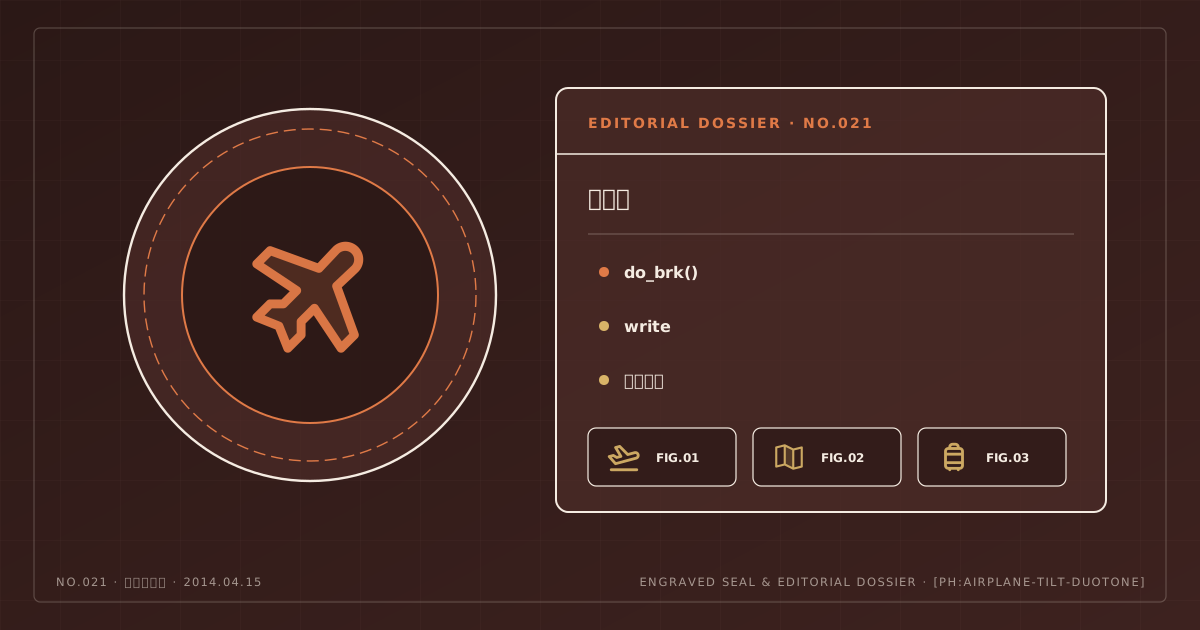
(3) During initialization, the kernel module uses do_brk() to allocate new memory for the target process and writes the code to be injected into that new memory region.
(4) If the probe target is an instruction, that instruction is replaced with a jump to the injected region; if the probe target is a system call, code injection is completed within the system call.
(5) When the injected code finishes executing, the code at the injection point is restored and executed, appearing to the target process as normal execution.
The figure below shows an example of probing the write system call:
The principle is basically the same as that of a virus. The difference is that its purpose is to obtain statistical information from the target without modifying the target program’s source code, achieving runtime debugging / performance profiling.
If systemtap’s flight record mode is enabled, it continuously writes monitoring data into a kernel buffer of 1 MB (configurable) and outputs it for analysis when needed.
For an FDR, having handy tools is far from enough. The most critical question is: what data is truly critical, worth recording, and useful for post-crash analysis? If too much system data is sampled, it will impact the system’s own performance, and excessive data creates a lot of noise that actually makes analysis harder. If too little data is sampled and root-cause analysis becomes impossible, then the FDR has failed to serve its purpose.
In addition, sensible visualization of the data is very important, because it helps people better understand the relationships among data points and thus provides clues for root-cause analysis.