Why You Need to Understand Information Security
These days, database dumps and breaches, leaked emails, stolen credit-card data, and exposed employee directories keep piling up; there is no end to them, and no foolproof defense. If your private emails and mine become the after-dinner entertainment that monitors relish, and if your identity details, passwords, and bank cards become the tools hackers use to fund their lavish lives, can you still believe information security has nothing to do with you?
So even if a person does not work in security, he or she still needs to know a little about it.
First, security covers three basic properties: availability, integrity, and confidentiality—CIA for short.
Availability means that information can be accessed by authorized users when needed. When you shop, for example, your bank card should be able to complete a transaction with an authorized merchant. Security without availability is worthless, like wealth buried underground that no one knows about.
Integrity means that information remains true to its original form throughout its lifecycle and cannot be tampered with. Suppose you send a friend an email saying, “The party is at 7 p.m.” When it reaches your friend, it should not have become “The party is at 8 p.m.” Security without integrity is meaningless and may even create danger.
Confidentiality means that information cannot be accessed without authorization. When you conduct an online transaction on a computer, why do you need a USB security token? Because the bank must guarantee throughout the transaction that no information leaks to any third party on the network. Security without confidentiality is not security at all.
Every security measure is built around these three properties; none can be missing.
The scope of security includes, roughly, the following:
(1) Physical security
(2) Operational security
(3) Social-engineering security
(4) Network communications security
(5) Application security
Security measures include the following (perhaps not exhaustively):
(1) Access control
(2) Information encryption
(3) Disaster recovery
Given the limits of space, this article will first discuss what security covers.
First, a very important realization: in information security, technology has always been an auxiliary means, used only to fulfill the requirements of some security domain; security management is the core. Pursuing security technology alone puts the cart before the horse.
Why is management the focus of security? Suppose you run a company and have exhausted every high-tech means to protect its information assets. But an industrial spy follows an employee into the building, strolls to the printer, takes the stack of documents that was just printed, and walks out. What role did technology play? An advanced access-control system and encrypted network devices are worthless against such an attack.
Once you understand this, you can see why I put physical security, operational security, and social-engineering security first.
Physical security is easy to understand. Despite having a very tight technical security system, a bank still needs an underground vault with heavy iron doors. Why? Because even if you apply every surveillance technique from the movies—lasers, heat sensors, temperature controls, and so on—to perfection, what good is surveillance if robbers can break in and escape? The heavy iron doors keep them from breaking in; the underground location makes escape difficult even if they do. That is the importance of physical security.
Operational security is not hard to understand either. It concerns logs, patching (fixing system vulnerabilities), preventive measures against potential attacks, and responses after an attack occurs. If you work on a company server and lack ‘sudo’ privileges but run a ‘sudo’ command, you get a conspicuous warning: “This incident will be recorded.” That is operational security. It draws a red line and tells people what they may and may not do; if they do what they should not, there will be an adequate record for further action.
Let us focus on social-engineering security. Social engineering means obtaining confidential information, directly or indirectly, through interaction with others. In any security system, people are the weakest link, so they are a prime target for hackers. All social-engineering attacks are built on inducing cognitive biases in a person’s decisions. A hacker may pose as some vulnerable woman, or falsely claim to be an old friend you have not seen for years, or appear as a transaction intermediary, and so on, to extract your information and set up the next stage of attack. According to Wikipedia, social-engineering attacks take these forms:
The first is pretexting. One day you suddenly get a call saying that a relative of yours has had an accident, is being treated at such-and-such hospital, and you must wire money immediately to a certain account. You panic, try to contact your relative, find the phone unreachable, and in a state of high tension tremblingly wire the money. Pretexting aims to produce exactly this effect: through a plausible false scenario and a tense atmosphere, it puts you into a psychological state called “tunnel vision,” in which your eyes can see only the sliver of light at the end of the tunnel.
Of course, the scam in that example is widely known and may no longer work on most people, but a hacker may still construct another scenario you have never encountered and trap you in tunnel vision.
The second technique is luring the tiger from the mountain (diversion theft). Watch a few bank-robbery films and it becomes easy to understand: an armored cash truck has heavy security along its fixed route, but if it is forced to change course, attacking it becomes much easier. If you have confidential material on your computer, someone who wants it can ask you out for coffee on short notice while another person steals information from your machine.
The third technique is phishing. Most people have probably heard of this one: you get an email saying that a security incident may have leaked your password at such-and-such bank, followed by a link to change your password. The page that opens looks almost identical to the bank’s password-change page; the obvious (or not-so-obvious) difference is the URL. If you fail to notice this and enter your card number and password to change it, the hacker obtains your bank-card information and may use it for fraudulent charges.
Phishing can also be carried out through various chat tools and by phone.
The fourth technique is baiting. There are countless ways to do this: software you download and attachments you open in email may all be injected with various malicious code. People always have weaknesses. Jiang Ziya said, “There are three leverages in fishing: wealth as leverage, death as leverage, office as leverage.” Weaknesses tied to material things (wealth), emotions (dying for a cause), and the spirit (office, power) can all be used as “bait.” More concretely, every level of Maslow’s hierarchy of needs can be used to set bait. For example, a hacker can send out “The Latest and Most Complete 2015 Catalog of Island-Country Films” to hook people with basic physiological needs, or “Real-Name Exposé of Senior Internet-Company Salaries” to hook people with social needs.
The fifth technique is quid pro quo. In psychology, people show blind obedience to authority and even “fear the house because of the crow”—they feel awe toward particular uniforms. When someone posing as a company IT staffer asks for your account password, you may obediently comply; when a suited “discipline inspection” official drags you away, you immediately confess everything you should and should not; in a foreign land, when someone in a police uniform asks to see your passport, you may not even have the courage to question them. So when hackers use these various techniques, they can easily break through your defenses.
All of the above is only part of social engineering. Any human weakness (or flaw) discussed in psychology can be adopted by a hacker well versed in social engineering as the first step of an attack. Therefore, the way to counter social engineering is to learn some psychology, then read books on social engineering, and know both yourself and your adversary.
Finally, let us talk about network security and application security.
Network security is a huge subject and cannot be explained clearly in one or two sentences. But its goal is clear: to reduce security threats as much as possible while the communicating parties’ content is transmitted across the network.
For example, accessing Gmail is far more secure than accessing 163 mail. Gmail uses HTTPS and performs strict end-to-end encryption, whereas all transmissions involving 163 mail are exposed on the internet; your privacy is like the emperor’s new clothes.
But network security cannot guarantee information security. It only assumes a secure channel between you and the other end of the communication. The information inside is still subject to security threats. For example, your wife (make sure she really is your wife first) asks for your ID number, and you reply to her with a Gmail email: “My ID number is xxx.” This only guarantees security between you and Gmail; it does not mean the organization behind Gmail (Google) or an organization interested in Gmail (the NSA) will not undermine that security. A while ago a website suffered a database breach, and the passwords in the database were all in plaintext. Thus, even if the network is secure under HTTPS, it does not help if the system behind the network is insecure—that is application security.
Back to the ID-number problem. The safest route is for you first to encrypt your email content with your wife’s PGP public key, and then for your wife to decrypt it with her PGP private key. That way, even if Gmail is compromised, your ID number remains safe.
For example:
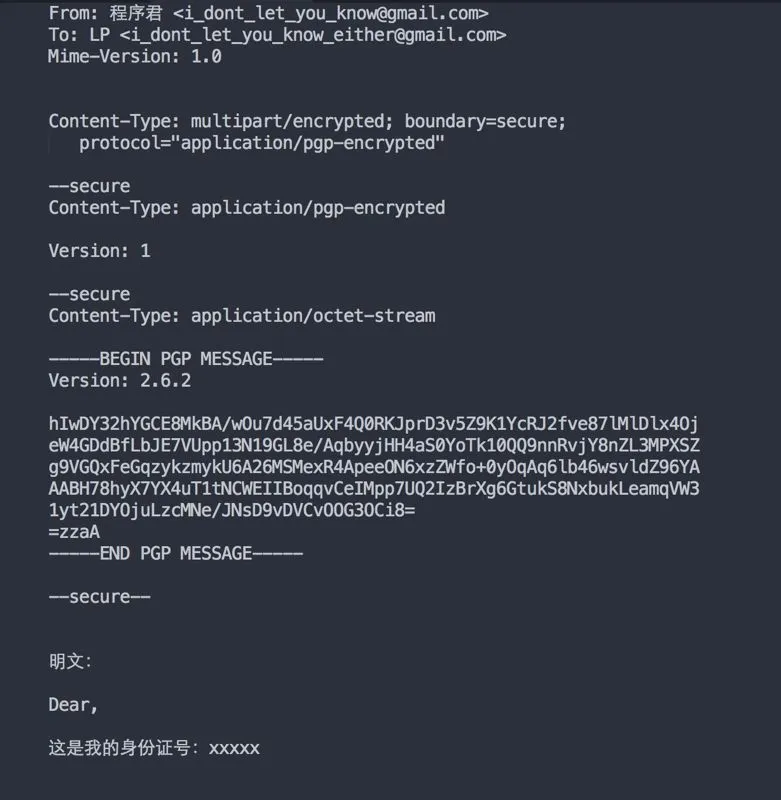
This is a PGP-encrypted email, embedded into a normal email via S/MIME (if you do not know what that is, please Google it; it is hard to explain in one sentence). It is encrypted with the recipient’s public key, and only the recipient can decrypt it with their private key (once it is sent, in theory even the sender cannot see the contents). Thus, even if the NSA compromises Gmail and pries into your email, it can see only the ciphertext above and cannot derive my ID number from the plaintext below.
PGP and S/MIME have had RFC definitions for use in email for a long time (about ten-plus years), but they have never caught on. There are several reasons:
(1) With end-to-end encryption in place, webmail becomes unusable (you cannot access your email through mail.163.com, gmail.com, and the like), which is very inconvenient. If you really wanted to use it, users would need to upload their private keys to the email provider, which creates a paradox.
(2) Even if you do not use webmail and instead use a mail client, you still may not be able to use it. First, you and your friends need your own public and private keys; second, you need to know each other’s public keys; third, you need to confirm that each public key really belongs to its supposed owner.
(3) Even if (2) is satisfied, if you switch computers and the new computer does not have your previous private key, you cannot read emails others sent you.
Quite troublesome, isn’t it? Security holes arise in all kinds of trouble, for example “operational security.”
Every piece of software has vulnerabilities. If a company claims its system has “zero defects” at release, it is fooling itself. The normal state of software engineering is “ship with bugs, as long as they are not easily exploitable.” Defects present at release are vulnerabilities; if they are not exploited, no actual risk exists. Take the notorious WinNuke attack on Windows: it exploited a vulnerability that had existed in Windows for a long time—yet for many years before that, many versions of Windows had lived just fine.
The key point of risk management is this: we cannot patch every vulnerability, but we can make vulnerabilities unexploitable. So having vulnerabilities is not what we fear; what we fear is failing to fix them after they are discovered. Putting a firewall in front of a vulnerable system is one way to make vulnerabilities unexploitable; patching, part of “operational security,” is another. Do you think operating systems, various system software, and even the frameworks you use to develop software—such as Linux—issue regular security updates to amuse you? They are responses to exposed vulnerabilities. Some truly fix the vulnerability itself; some merely make the corresponding attack ineffective (the vulnerability cannot be exploited). If your system has not been patched accordingly, then as long as a hacker can sniff out the version of the software you use, they can find the corresponding way to play with you.
Of course, as the saying goes, “An ordinary man is not guilty; the jade he carries is.” If you have not made others think you are worth attacking, then you probably will not be attacked.
Many people dismiss “social-engineering security,” especially we programmers who think highly of ourselves; on Zhihu or WeChat they spat all over my face. If you really live in the dream that “technology is everything,” I cannot stop you; I am only speaking to those willing to listen.
“Things must first rot, and only then do worms breed”; fortresses are always broken from within. Social engineering aims precisely at this point. To prove how close social engineering is to you, this programmer wrote a script to perform the most basic social-engineering sniffing against programmers (I did not use the common methods described in previous articles, because for me they were a bit impractical).
We know programmers use GitHub, and many put their personal projects there. Internet applications almost always connect to databases. So if you use frameworks such as Django, Rails, or Express.js, they will contain usernames and database passwords. In theory authors should mask such sensitive information, but what happens in practice? Can we find a person’s commonly used usernames and passwords through code?
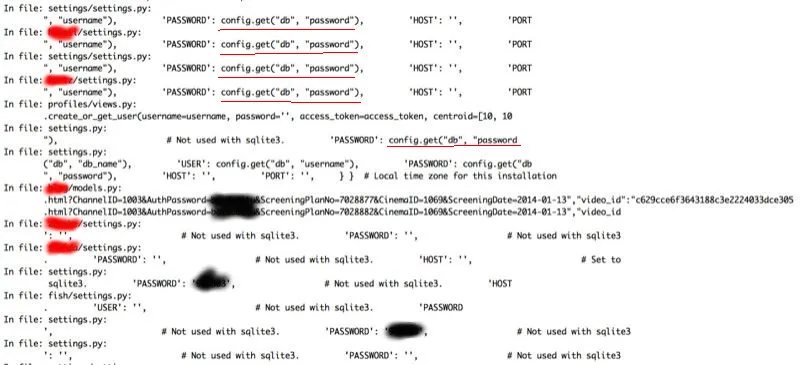
The image above shows my script’s output. Originally it displayed far more information than appears in the image. I could have opened the code suspected of leaking data and sniffed further, but there was too much content to mask one by one, and editing the image with GIMP was too much work, so I commented out much of the output.
The blacked-out content is the author’s password; the red content is information I did not want you to see that might reveal the author’s identity. The red-underlined text marks other files in this repo that I could further sniff for passwords.
This sniffing was aimed at a friend of mine.
I also sniffed some people I did not know and found that GitHub is simply a treasure trove for finding a user’s habitual usernames and passwords. One guy had several passwords that were simply a letter followed by an eight-digit birthday; one database root password was his full long English name (including surname) plus birthday—eighteen characters long in total. I have reason to believe he would use such a password in more important places, such as his email password—I could hardly resist guessing his Gmail address and trying whether this was his Gmail password (of course, I did not have the time to try).
Throughout the process I used no advanced hacking knowledge (in this direction I am basically a novice), but by exploring human weaknesses and with a bit of scripting ability (just a few dozen lines of code), I could obtain some key information.
If after reading this article you are still completely confused about what security measures to take, let this programmer summarize:
(1) Do not use information related to your identity as a password. (A good way to set a password is to memorize a common English sentence, then join the first letters, then salt it with a fixed rule—for example, capitalize the third letter, add a digit after the seventh, and so on.
(2) If sensitive information is transmitted over the network, make sure the other party’s URL is correct and that HTTPS is used throughout.
(3) For online banking, use a USB security token whenever possible; file-based certificates are unsafe under Windows (there is far too much unscrupulous software under Windows).
(4) Learn some psychology—know how others exert influence on you and how to break it.
(5) Put a hundred thousand “whys” in your head; question and verify more.